Basic Operation
38
DTX700 Owner’s Manual
Playing with Songs for Practice
Using the procedure described below, you can conveniently
mute (i.e., silence) a song’s drum part while leaving the other
parts unchanged. This function is very useful when you wish to
drum along with a song.
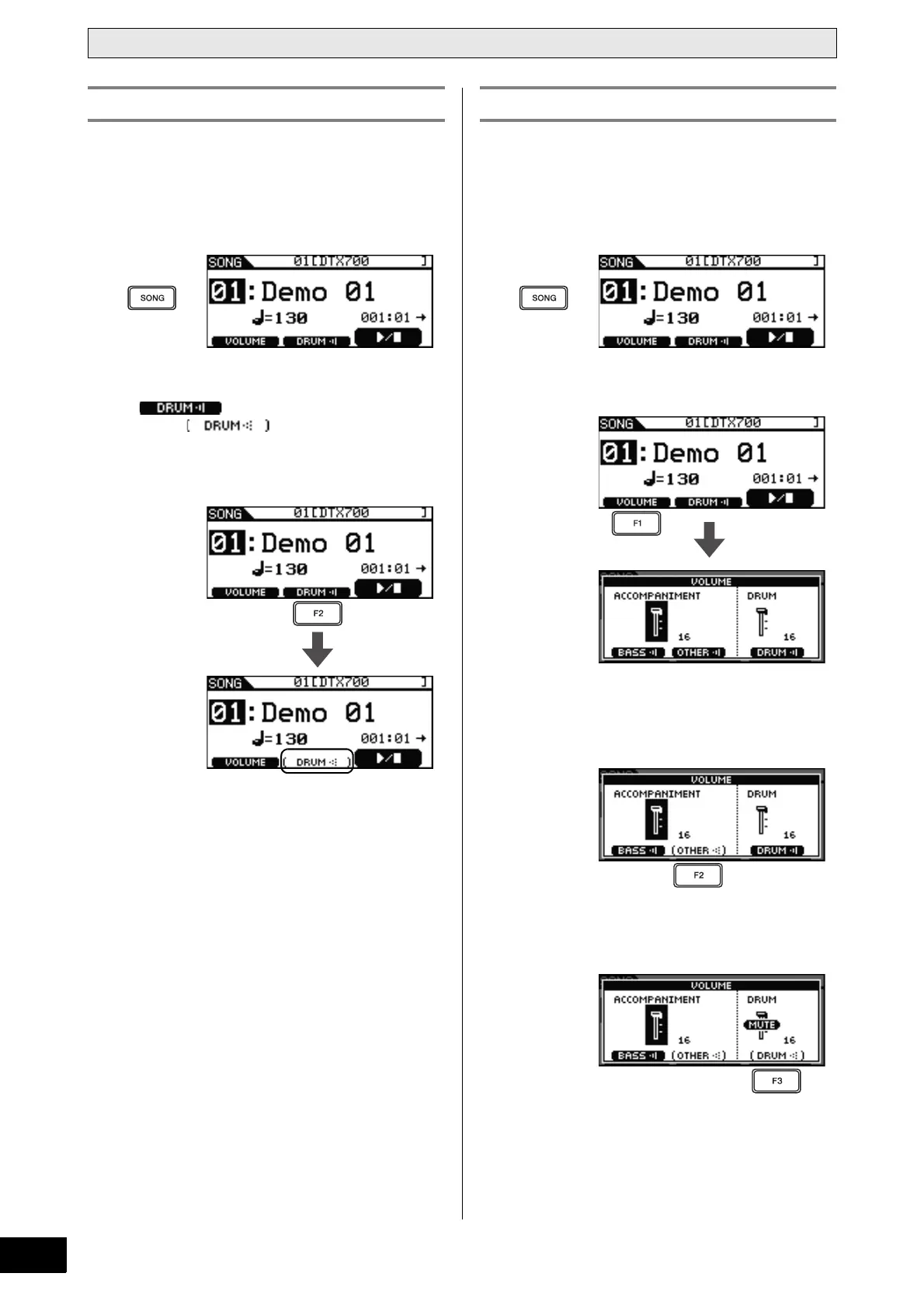
1 Press the [SONG] button.
2 Press the [F2] button.
The icon will be displayed on-screen as
inverted text , indicating that the drums are
now muted. You can unmute the drums and restore the icon
to its original condition by pressing the [F2] button once
again.
Using the procedure described below, you can conveniently solo
a song’s bass part (i.e., silence all other parts). This function is
very useful when you wish to practice with just the bass play-
ing.
1 Press the [SONG] button.
2 Press the [F1] button.
3 Press the [F2] button.
All accompaniment parts other than the bass will be muted
(i.e., silenced).
4 Press the [F3] button.
The drum part will also be muted.
Muting the Drum Part Soloing the Bass Part



 To Next Page