DTX700 Owner’s Manual
41
Basic Operation
Turning On the Click-Track
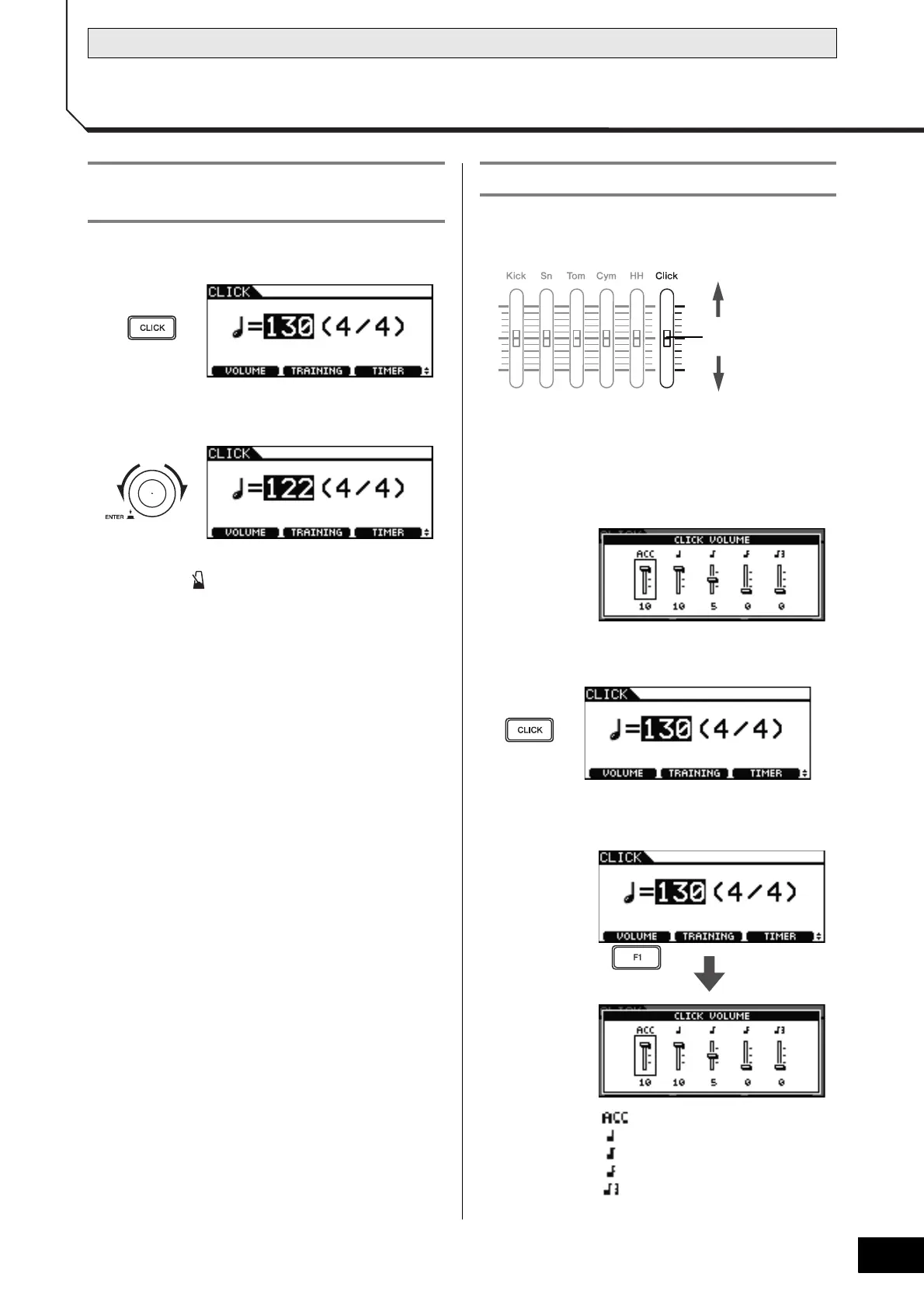
1 Press the [CLICK] button.
2 Turn the dial to set the tempo.
3 Press the [ ] button.
The click-track will start playing at the selected tempo.
NOTE
• If you select a song (page 36) after setting the tempo in
this way, the selected song’s tempo will be used for the
click-track.
• Use [MENU] m [Click] m [Voice] to change the click-
track sounds. For full details, refer to the Reference
Manual PDF document.
To adjust the overall click-track volume:
Move the Click slider up and down to adjust the volume.
To fine tune individual click-track vol-
umes:
Use the following procedure to adjust the volumes of each
element of the click-track.
1 Press the [CLICK] button.
2 Press the [F1] button.
: Accent (start of measure)
:Quarter notes
: Eighth notes
: Sixteenth notes
: Eighth-note triplets
Setting the Tempo and Starting the
Click-Track
Setting the Click-Track Volume



 To Next Page