6 - 7
COOL
THERMOSTAT
EAS00462
CHECKING THE THERMOSTAT
1. Check:
• thermostat
Does not open at 69 ~ 73 °C (156.2 ~
163.4 °F)
→
Replace.
▼▼▼▼ ▼ ▼▼▼▼ ▼ ▼▼▼▼ ▼ ▼▼▼▼ ▼ ▼▼▼▼ ▼ ▼▼▼▼ ▼▼▼
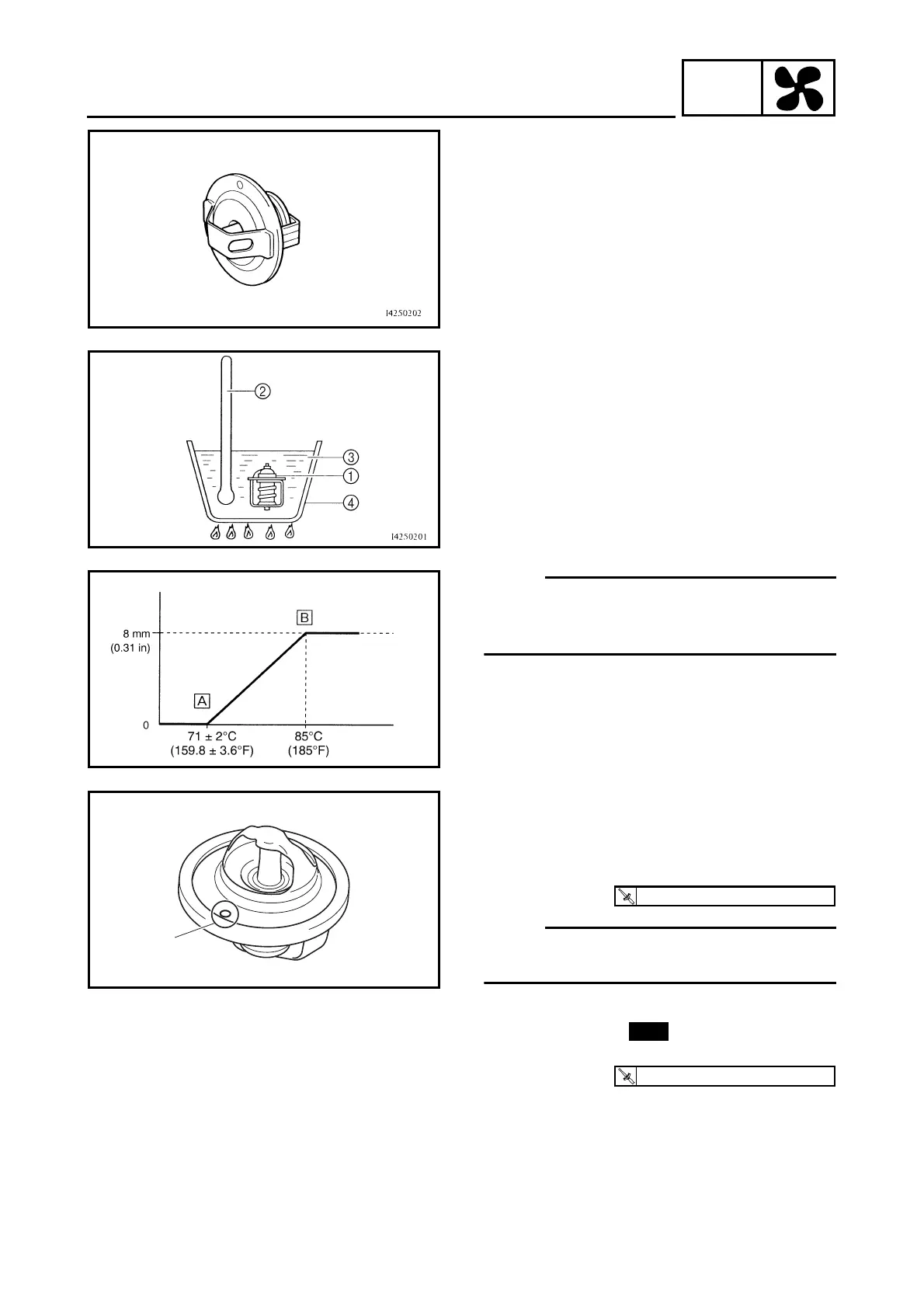
a. Suspend the thermostat in a container filled
with water.
b. Slowly heat the water.
c. Place a thermometer in the water.
d. While stirring the water, observe the ther-
mostat and thermometer’s indicated tem-
perature.
▲▲▲▲ ▲ ▲▲▲▲ ▲ ▲▲▲▲ ▲ ▲▲▲▲ ▲ ▲▲▲▲ ▲ ▲▲▲▲ ▲▲▲
1
Thermostat
2
Thermometer
3
Water
4
Container
È
Fully closed
É
Fully opens
NOTE:
If the accuracy of the thermostat is in doubt,
replace it. A faulty thermostat could cause seri-
ous overheating or overcooling.
2. Check:
• thermostat cover
• thermostat housing (cylinder head)
Cracks/damage
→
Replace.
EAS00467
INSTALLING THE THERMOSTAT
1. Install:
• thermostat
• thermostat cover
NOTE:
NOTE:
Install the thermostat with its breather hole
a
facing forward.
2. Install:
• copper washer
• coolant temperature sensor
a
T
R
.
.
10 Nm (1.0 m · kg, 7.2 ft · lb)
New
T
R
.
.
18 Nm (1.8 m · kg, 13 ft · lb)



 To Next Page