20
4. OPERATION PROCEDURE
Mode Key Overview
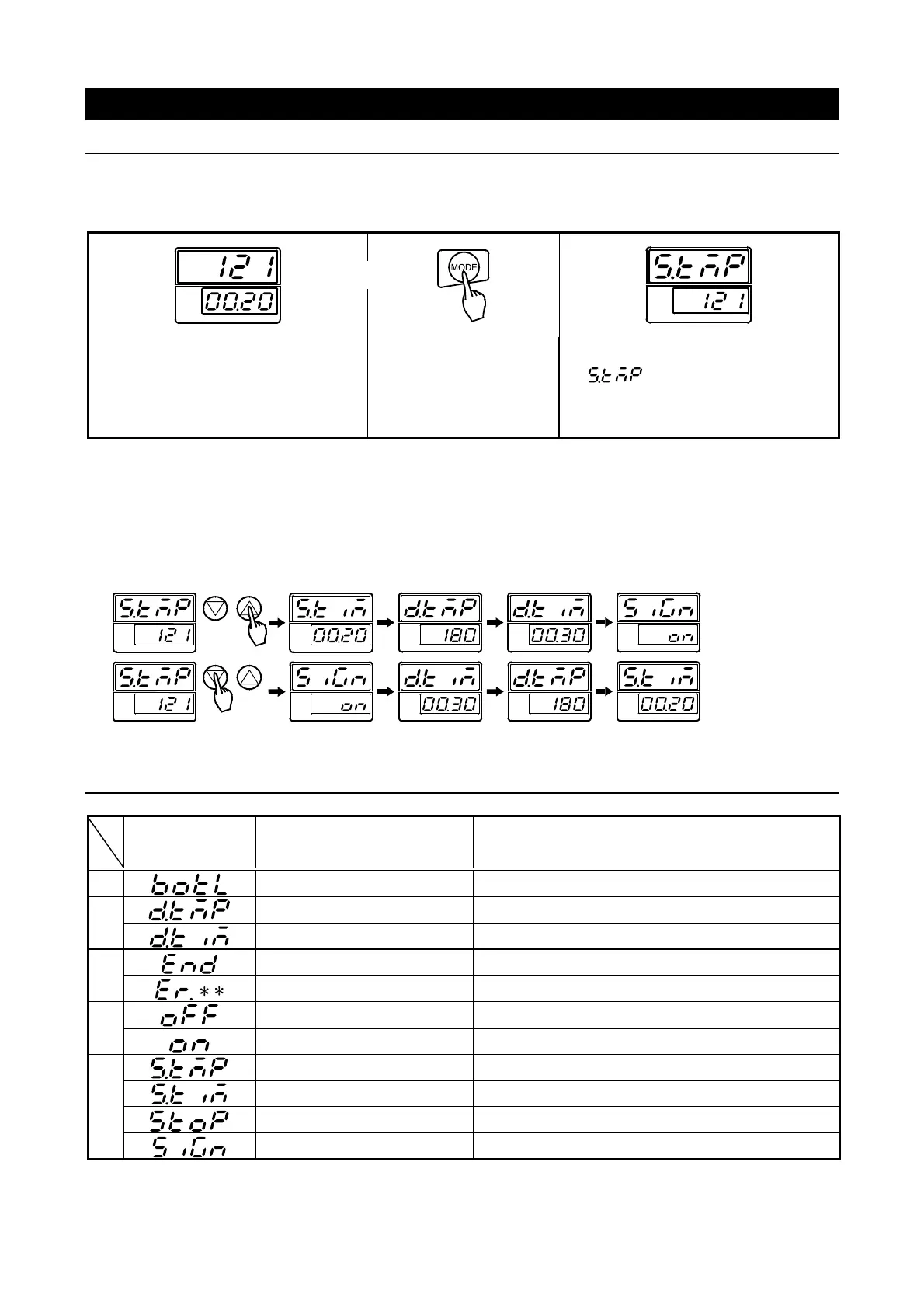
Using the MODE key.
The MODE key is used to change settings/modes and to monitor settings during operation. Sterilization
temperature, sterilization time, drying temperature and drying time, as well as signal on/off and keypad
tone on/off functions are set/selected with the MODE key
Turn on main power switch.
Sterilizer enters stand-by mode, and
shows current settings.
Press “MODE”.
→Main display begins flashing
“ ”.
(Sterilization temp.setting screen)
Other parameters
・ Turn on main power switch.
・ Press “MODE”.
・ Use ▽△ to toggle thru setting options.
Display Symbol Glossary
Symbol Meaning Description
B
BOTTLE Indicates drain bottle not properly set or installed.
D
DRY TEMPERATURE Drying temperature setting indicator.
DRY TIME Drying time setting indicator.
E
END End of operation indicator.
ERROR Operational error or malfunction indicator
O
OFF Signal function off indicator.
ON Signal function on indicator.
S
STERILIZE TEMPERATURE
Sterilization temperature setting indicator.
STERILIZE TIME Sterilization time setting indicator.
STOP Operation stop/pause indicator.
SIGNAL Alert tone setting indicator



 To Next Page