27
4. OPERATION PROCEDURE
Sterilize & Dry
Cooling / End
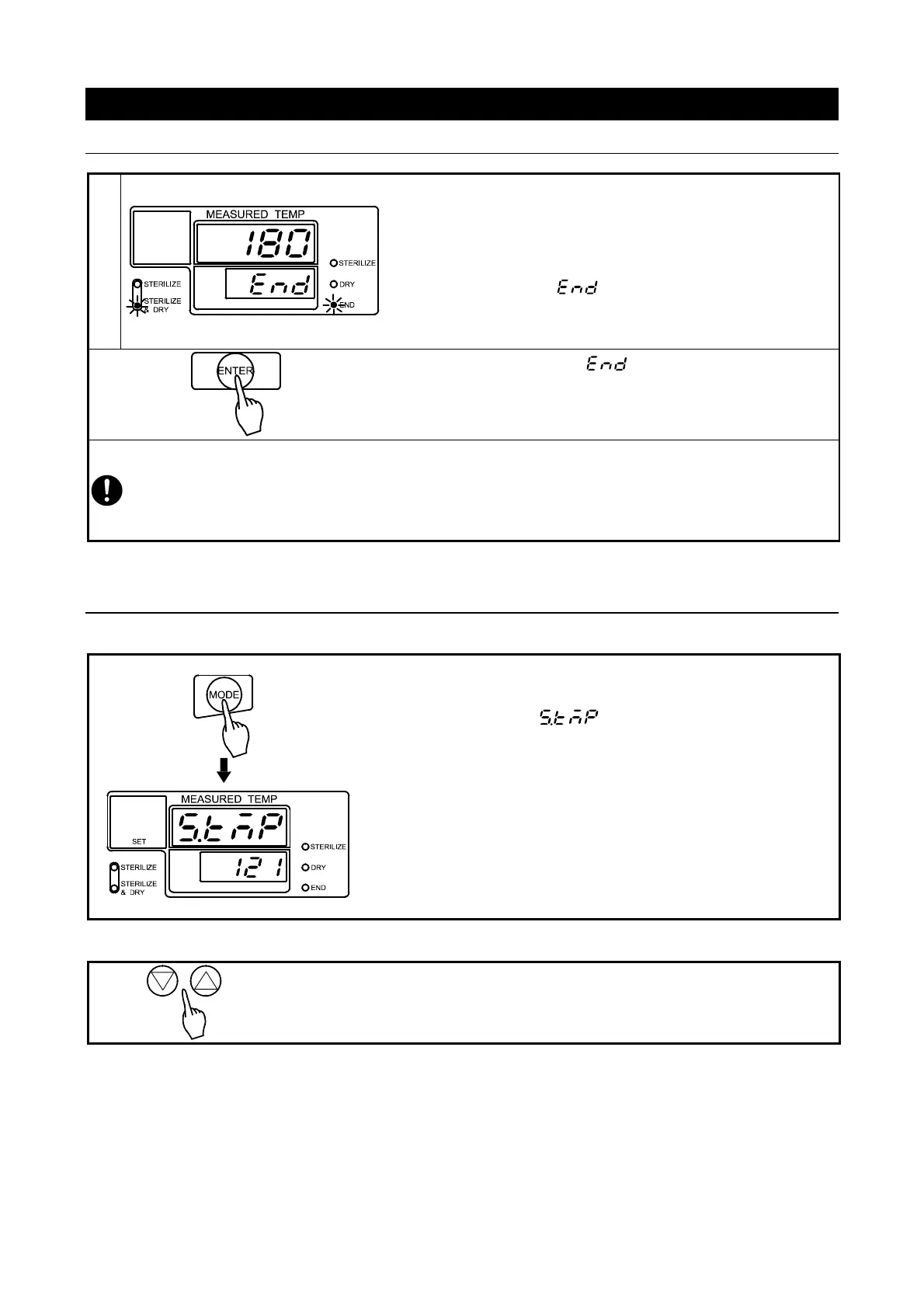
When drying process ends, heater turns off and chamber
begins cooling.
→Main display shows chamber temperature.
→Sub display flashes .
→End lamp lights.
→Sterilize & Dry menu lamp lights.
◇ Press “ENTER” to clear and return to standby
screen.
Another cycle may now be run.
Drain some water from the drain bottle after “STERILIZE & DRY” process. Failure to do so may
cause hot water to overflow during next operation run.
Water in drain bottle is hot immediately following operation. Wait for water to cool before
draining.
Other Functions
Monitoring settings during operation.
◇ Press “MODE”.
→Main display flashes (temp setting).
→Sub display shows temperature setting.
→SET lamp lights.
To check other settings, use ▽△ to show the desired indicator
(flashing) in main display and view the settings in sub display.
Press “MODE” to return to operation screen.
Note: settings are read-only in monitoring mode. They cannot be
changed.
Monitoring chamber temperature in standby
Press ▽ or △.
Main display shows temperature inside the chamber. R
stand-by.



 To Next Page