22
4. OPERATION PROCEDURE
Time & Temperature Settings
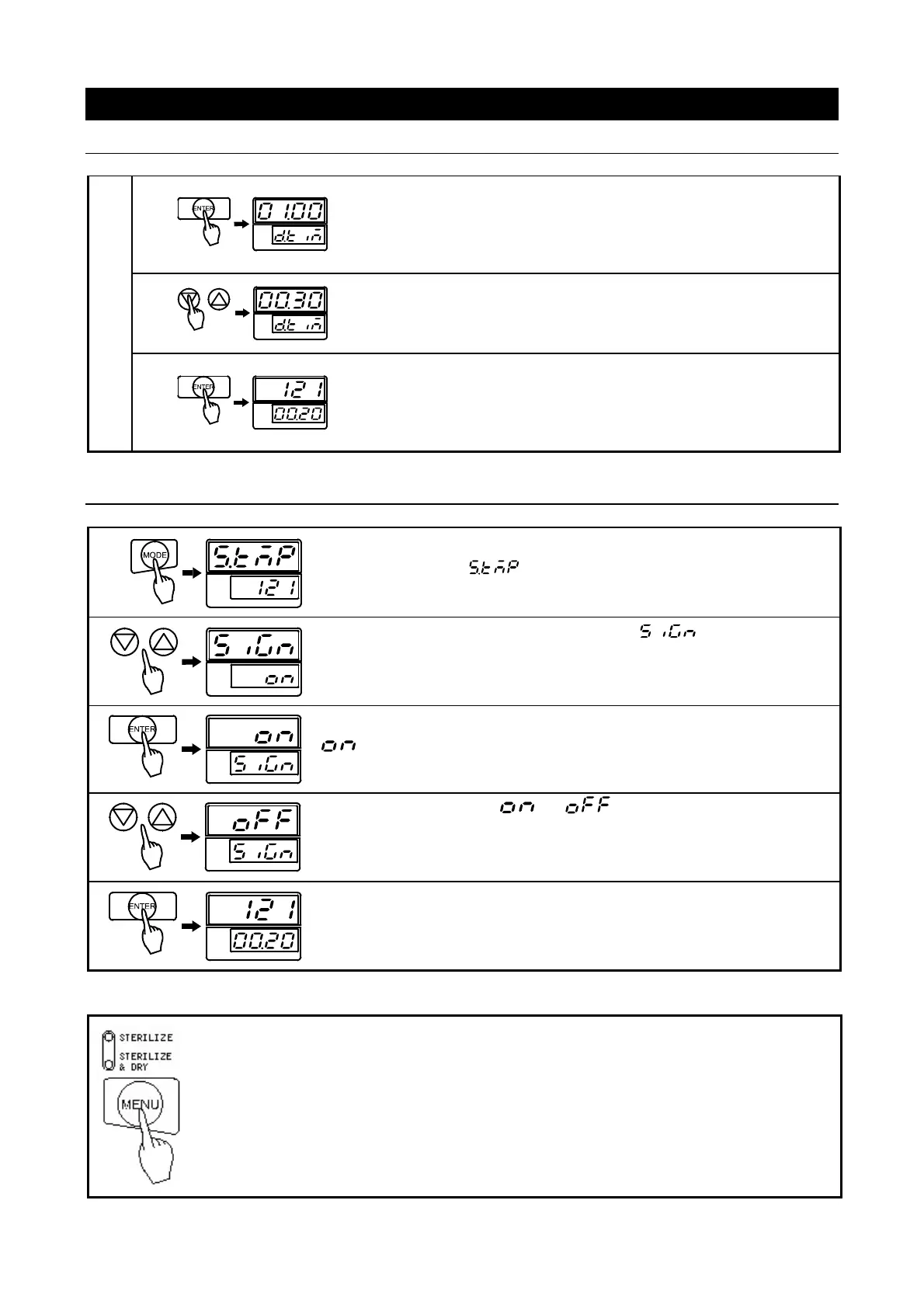
Drying Time
Press “ENTER” again.
Drying time can now be set.
Enter desired time using ▽△.
Press “ENTER”. Drying time setting is finalized. Displays automatically
return to standby and flash newly set sterilization temperature and
time.
Setting Alert Tone
Press “MODE”.
Main display flashes . Sub display flashes sterilization
temperature.
Use ▽△ keys to scroll through settings until is displayed (as
illustrated on the left).
Press “ENTER”.
is displayed in the main display and setting can be changed.
Using ▽△, select either or .
Press “ENTER”.
Alert tone setting is finalized, displays return to initial stand by screen.
Select between the two operation processes
・ Turn on main power switch.
・ Press “MENU” to select STERILIZE only process. Press “MENU” again to select
STERILIZE & DRY process.
●Process setting change can be made only in stand-by mode. Once operation begins
process setting cannot be changed.



 To Next Page