28
4. OPERATION PROCEDURE
Other Functions
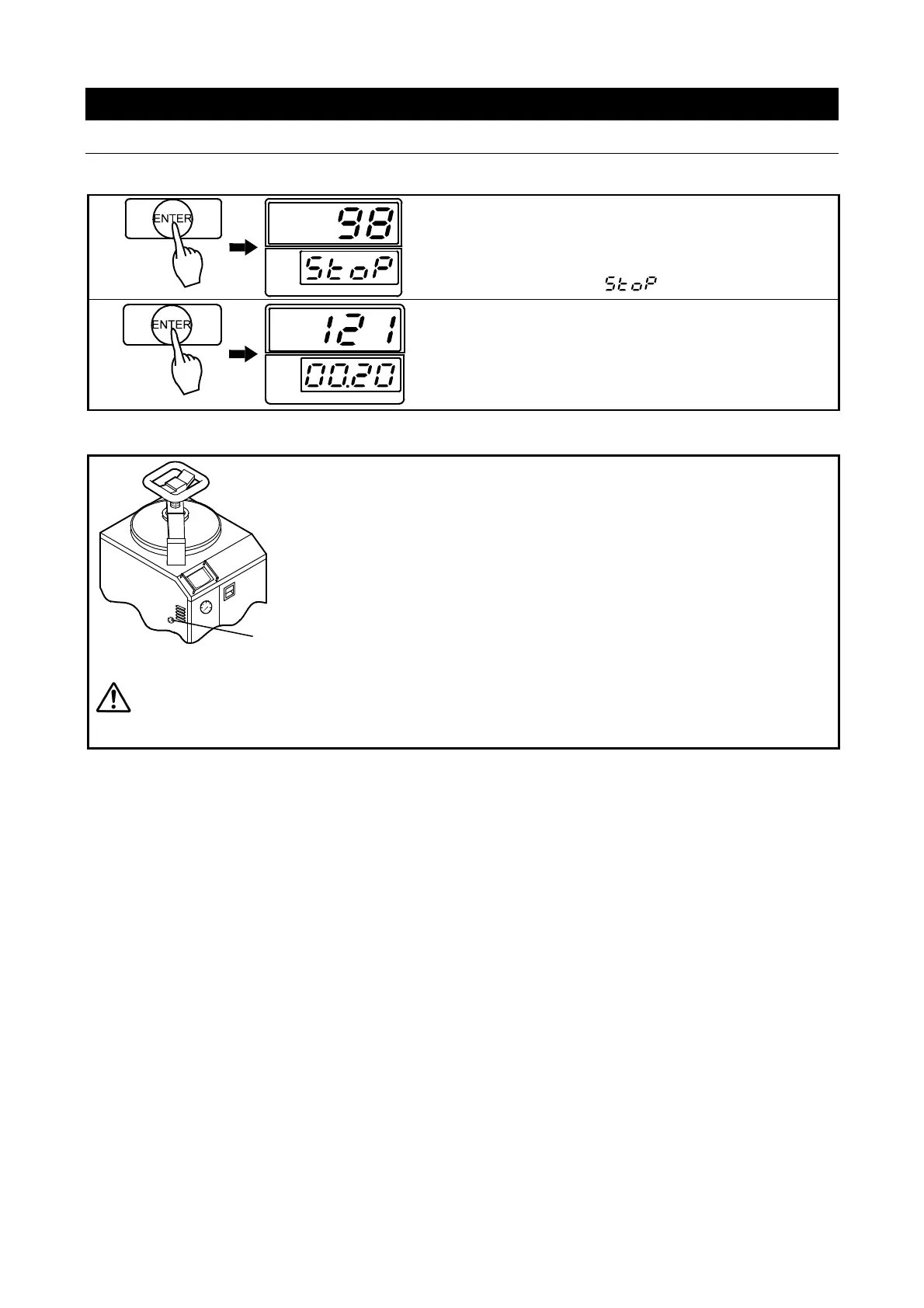
Pausing operation.
◇Press “ENTER”.
Operation stops. Steam is purged if pressurized.
→Main display shows current chamber temp.
→Sub display flashes .
◇Press “ENTER” twice to resume operation.
→Main display flashes temperature setting.
→Sub display flashes time setting.
Using the pressure relief button.
◇ Push the pressure relief button to depressurize the
chamber when necessary.
Pushing the pressure relief button opens the solenoid
exhaust valve and steam inside the chamber is routed to
the drain bottle, decreasing chamber pressure and
temperature.
The pressure relief button may only be used when the solenoid exhaust valve is closed. Be
sure that process load is not prone to sudden boilups. Do not to touch exhaust areas on
sterilizer. Burns or other injury may result. Sudden boilups or steam spray, due to the abrupt
pressure decrease may damage container or cause bodily injury.
Pressure relief button



 To Next Page