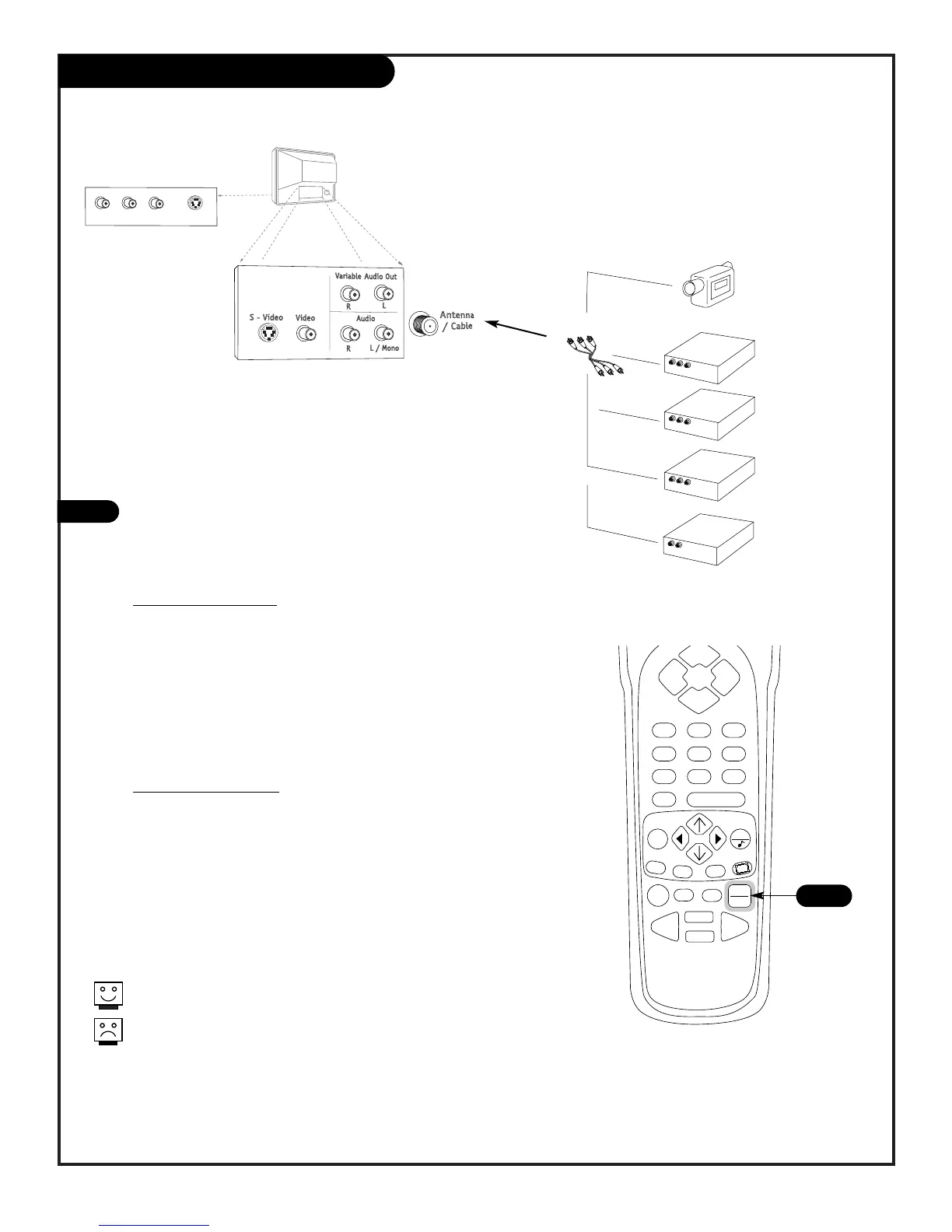
Selecting Viewing Sources
206-3802
PAGE 17
Pick the viewing source (picture and sound) you want to
see and hear on your Entertainment Machine
1
Press TV/VCR SOURCE repeatedly to choose from the available
viewing sources that are connected to the TV.
Available Sources:
Back Connections Panel
ANTENNA/CABLE: ANTENNA/CABLE on TV back Jackpack,
Over-the-Air Antenna or Cable service signal source.
Video 1: Video on TV back Jackpack,
Audio/Video Inputs.
S-Video 1: S-Video on TV back Jackpack,
Audio/Video Inputs.
Front Connections Panel
Video 2: Video on TV Front Jackpack,
Audio/Video Inputs.
S-Video 2: S-Video on TV Front Jackpack,
Audio/Video Inputs.
1
Front and Back
Connection Panels.
Where picture and
sound “sources” are
connected.
Camcorder
VCR
S-Video VCR
DVD Player
Other
Typical Equipment Sources
The sources you intend to view should be turned on.
You can connect equipment to the Video or S-Video jacks, but not at
the same time. Use the Audio input jacks with either the S-Video or
Video input.



 To Next Page