Mini glossary
S-VHS Provides higher quality picture and sound than an ordinary VCR when connected to the S-Video in jacks.
DVD PLAYER Digital Video Disks use the S-Video in jacks to provide the highest quality reproduction available from this
technology.
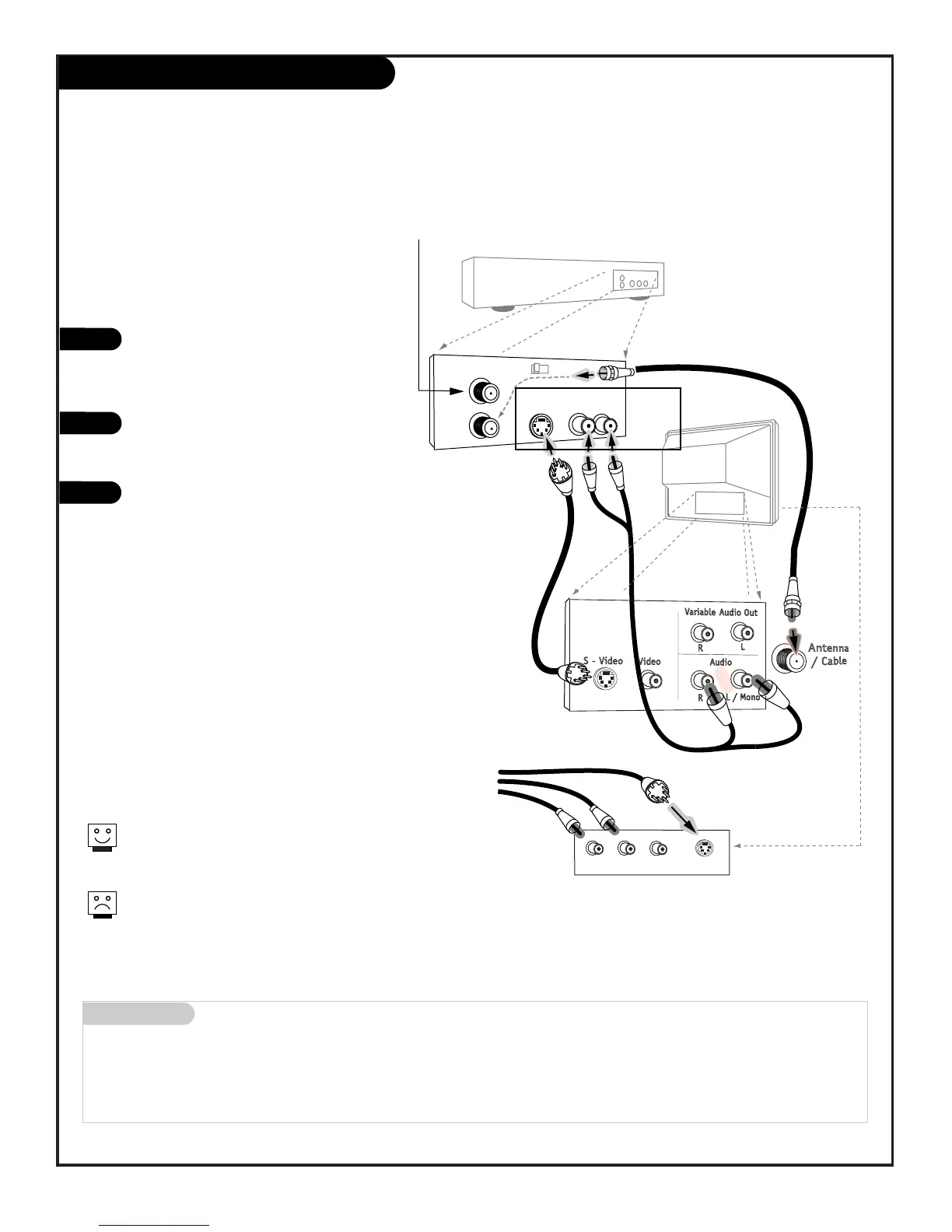
Connecting a S-VHS VCR or DVD player to
your Entertainment Machine
Super VHS VCR / DVD Player
Locate the Ant In jack on the back of your
S-VHS VCR. Connect the cable line coming
from your wall directly to
this jack.
Now locate the Out to TV jack. Connect a
cable from the Out to TV jack to the ANT IN
jack on the back of your TV.
Find the audio and S-Video jacks on the
back of your S-VHS VCR, and connect them
following the instructions provided with
your equipment.
1
2
3
Super VHS VCR
DVD
Player
Jacks
PAGE 11
206-3802
To use with PIP: go to the Source Menu (page 24) and
choose the jack you’ve connected your S-VHS equipment to
as the Main or PIP source.
The TVs rear connections panel has both Video and S-Input
jacks. You can connect equipment to either of these input
jacks but not at the same time. Use the R - L Audio input
jacks with either an S-Input or Video input.
DVD (Digital Video Disk) Player
Simply connect the S-Video/Audio out on the DVD
to the S-Video Input, R-L Audio on the TV.



 To Next Page