Mini glossary
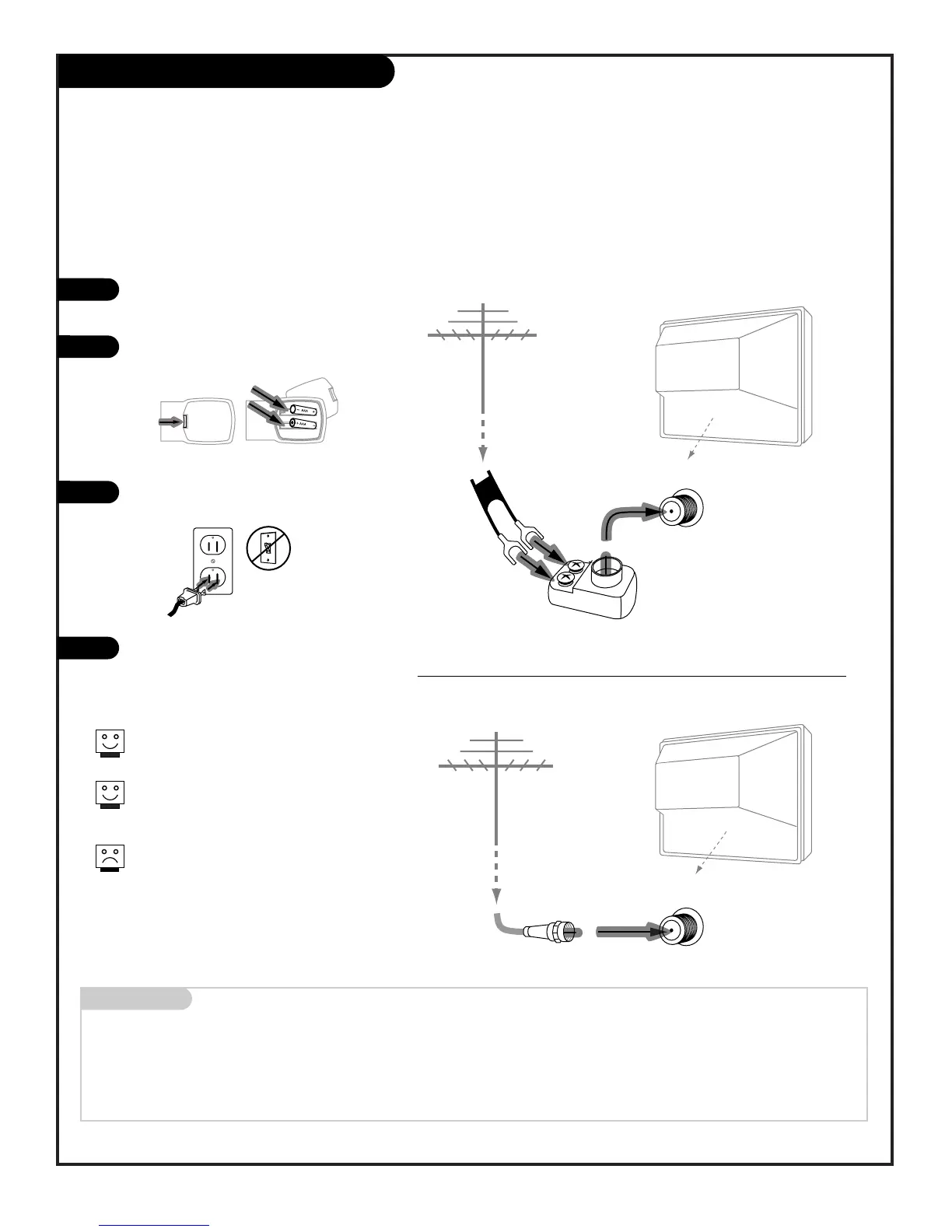
75 OHM RF CABLE The wire that comes from an off air antenna or cable service provider. Each end looks like a hex shaped nut with
a wire sticking through the middle, and it screws onto the threaded jack on the back of your TV.
300-75 OHM ADAPTER A small device that connects a two-wire 300 ohm antenna to a 75 ohm RF jack. They are usually about an
inch long with two screws on one end and a round opening with a wire sticking out on the other end.
Hook Up an Over the Air Antenna
206-3802
PAGE 7
Connect an off air antenna to your Entertainment Machine
Hook up your Entertainment Machine,
see diagrams at right.
Remove the back of the remote and put
in two AAA batteries.
Plug in your TV. Do not plug it into a
switched outlet.
Go to page 13 to EZ Program your
Entertainment Machine.
If you have a 75 ohm RF cable, then
you don’t need any adapters!
Remember, when screwing RF cables
onto jacks, clockwise tightens, and
counterclockwise loosens.
A 300 to 75 ohm adapter is not
included with your Zenith
Entertainment Machine.



 To Next Page