EasyManua.ls Logo

Zimmer PhySys - Combined Therapy Display

Zimmer PhySys
64 pages
Print Icon
To Next Page IconTo Next Page
To Previous Page IconTo Previous Page
Loading...
Operation instructions
9.5 Electrotherapy in combination with a
vacuum unit (VacoP)
9
Page 28
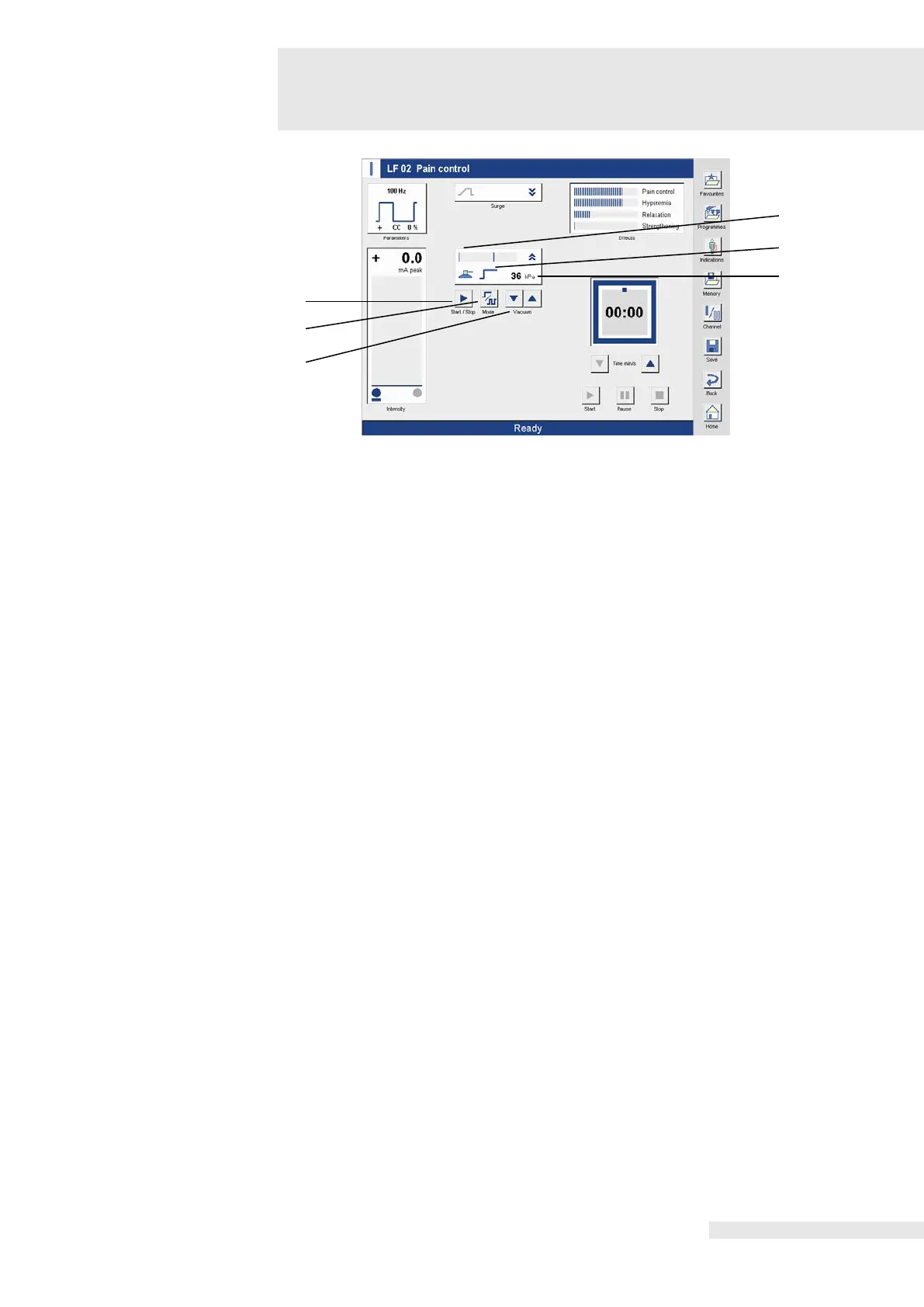
Description of the
display elements and
buttons
Note:
After the “Vacuum” button is activated, the parameter window opens.
(1) Start / Stop
Activating the button activates the base vacuum to draw in the electrodes. Activating the button
deactivates the vacuum.
(2) Mode
Activating the button opens the “Vacuum” entry field to adjust the parameters.
(3) Vacuum
The vacuum adjustment is made using the two arrow buttons.
(4) Display (kPa)
Numeric display of the set vacuum.
(5) Operating mode
Displays the set operating mode.
(6) Bar display
Displays the intensity adjusted.
Note:
Pulsed operation is only possible with the large vacuum electrodes.
5
1
2
3
6
4

Related product manuals