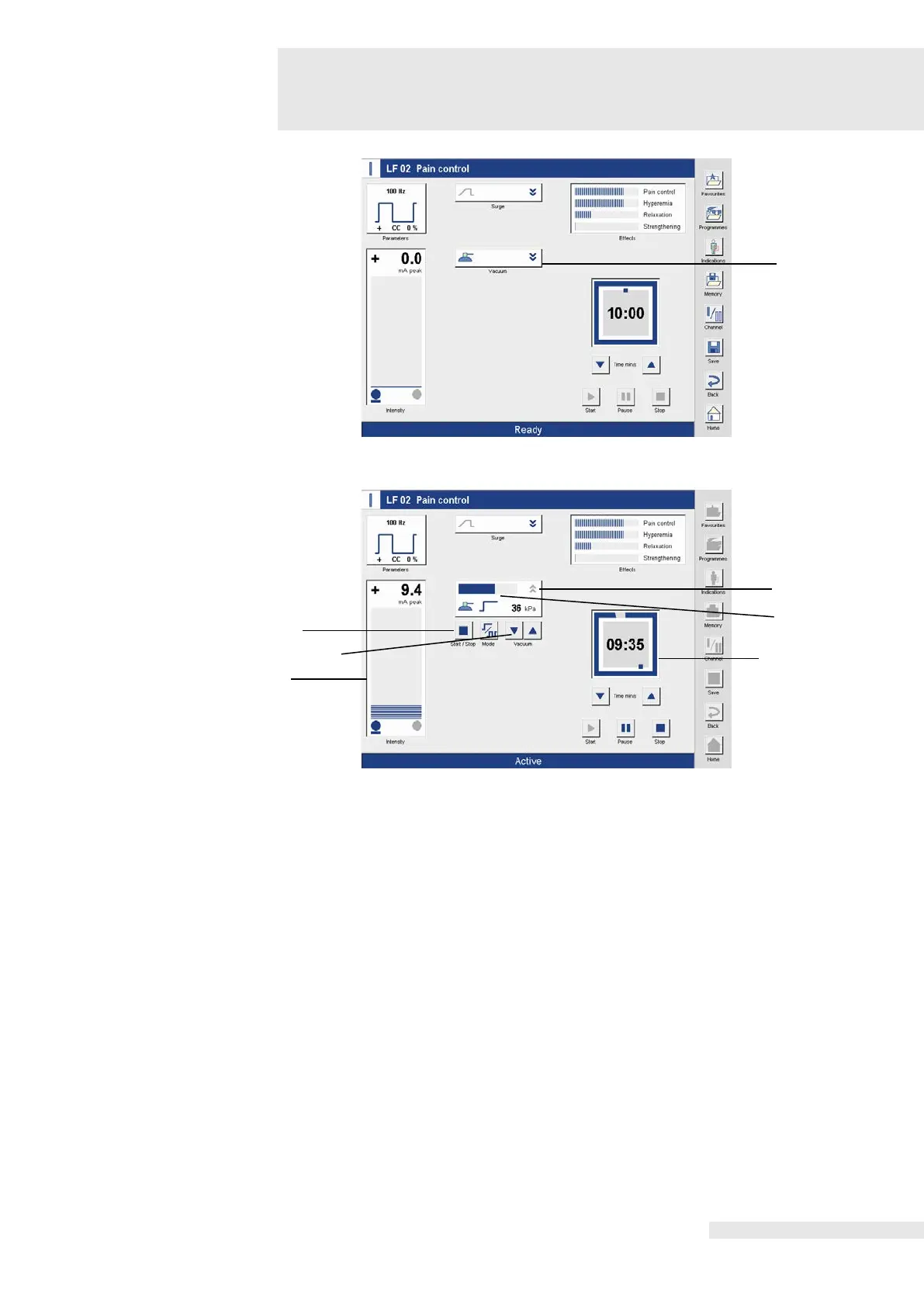
9.5 Electrotherapy in combination with a
vacuum unit (VacoP)
Activating the field (1) opens the Vacuum menu (2).
The vacuum is adjusted using the two arrow buttons (3).
After adjusting the vacuum, the current vacuum level is displayed in the bar graph (4).
Electrotherapy
By adjusting the intensity using the left intensity regulator (5), the display in the lower status
line changes from “Ready” to “Active” and therapy proceeds. The present current flow is shown
in the bar graph and the therapy time (6) decreases every second.
Electrotherapy
After the therapy time has elapsed, an acoustic signal indicates the end of the therapy, the
clock is at 00:00, the intensity automatically goes to zero and the bar graph display goes out.
The display in the lower status line changes from “Active” to “Ended”.
After the therapy has elapsed, the vacuum unit must be manually deactivated by pressing
“Start / Stop”.
Deactivating the vacuum
unit
The vacuum unit is deactivated using the “Start / Stop” button (7).
Activating the therapy
time
Using the “Start” button, the therapy time is reactivated after the end of therapy.















 To Next Page