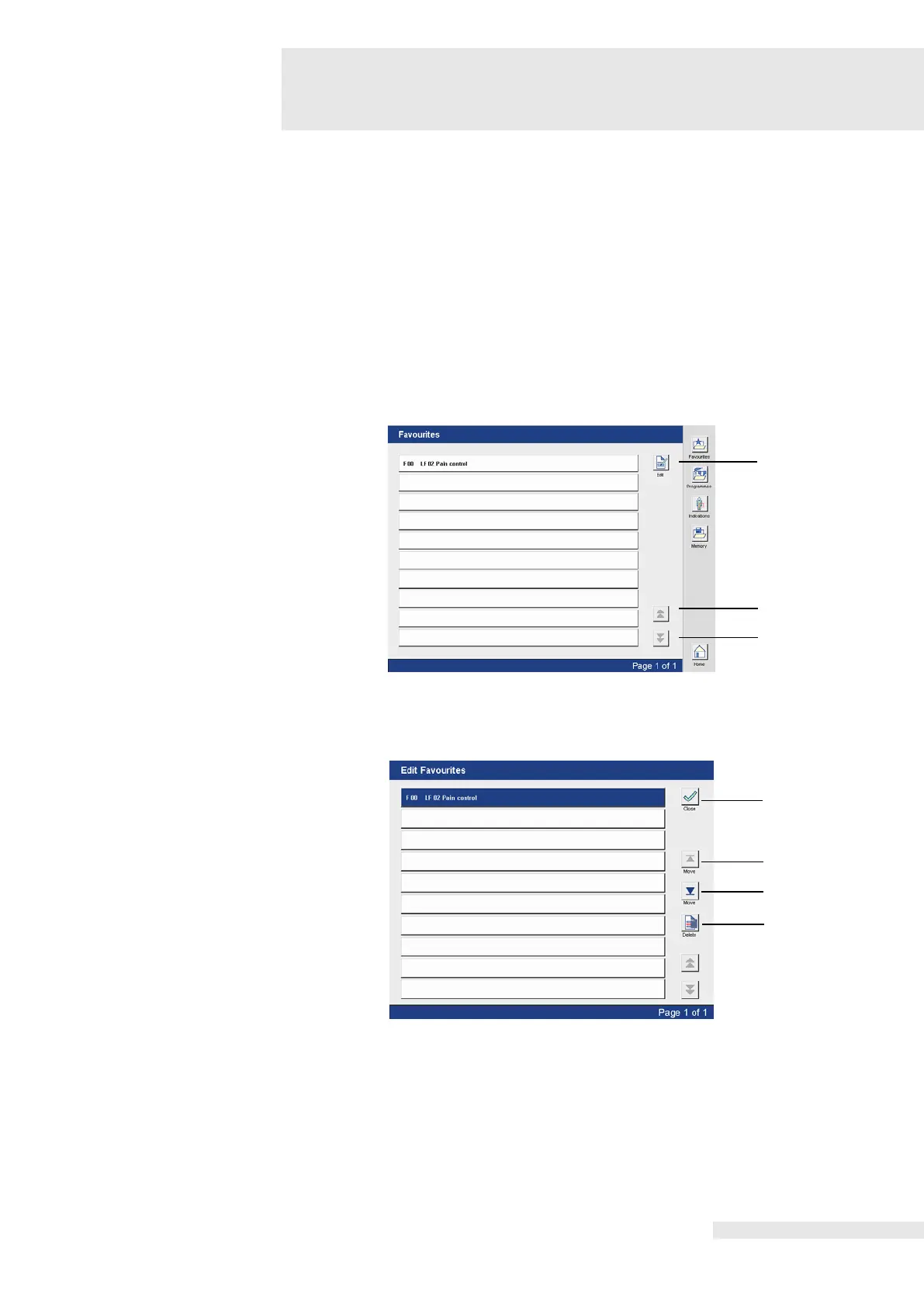
9.9 Favourites / Memory list
Retrieve programs, edit list
The individually saved programs are listed in the Favourites and Memory list.
Here these can be:
1. retrieved for therapy or
2. edited (moved in the sequence and deleted).
The steps to retrieve and edit the Favourites / Memory list are identical, so only the retrieving
and editing the favourite list is described.
Activating the “Favourites” button opens the favourites list.
The desired program is selected directly in the corresponding line.
By activating the buttons (1) and (2), the individual pages in Favourites can be viewed. Button
(1) scrolls forward, button (2) scrolls backward.
Activating the button (3) opens the “Edit Favourites” screen.
The program to be edited is selected directly in the line.
Activating the button (1) leads back to the Favourites list.
Activating the button (2) moves the program up.
Activating the button (3) moves the program down.
Activating the button (4) deletes the program.
Activating the button (4) triggers a confirmation prompt:
“Do you really want to delete the program?”
Activating the button “Yes” deletes the program.
Activating the button “No” interrupts the deletion process.















 To Next Page