9.8 Saving programs
To save programs, the SD card must be correctly inserted in the SD card slot. Otherwise it will
not be possible to save programs.
The programs can also be saved unchanged.
The procedure for saving is the same for all forms of therapy. The procedure for saving an
electrotherapy program is described below.
The program parameters can be changed and saved in the therapy screen.
In addition to saving programs, the I/T curve data can be saved in the I/T curve screen
(paralysis diagnostics). These data can be exported and read into Excel and individually
name program
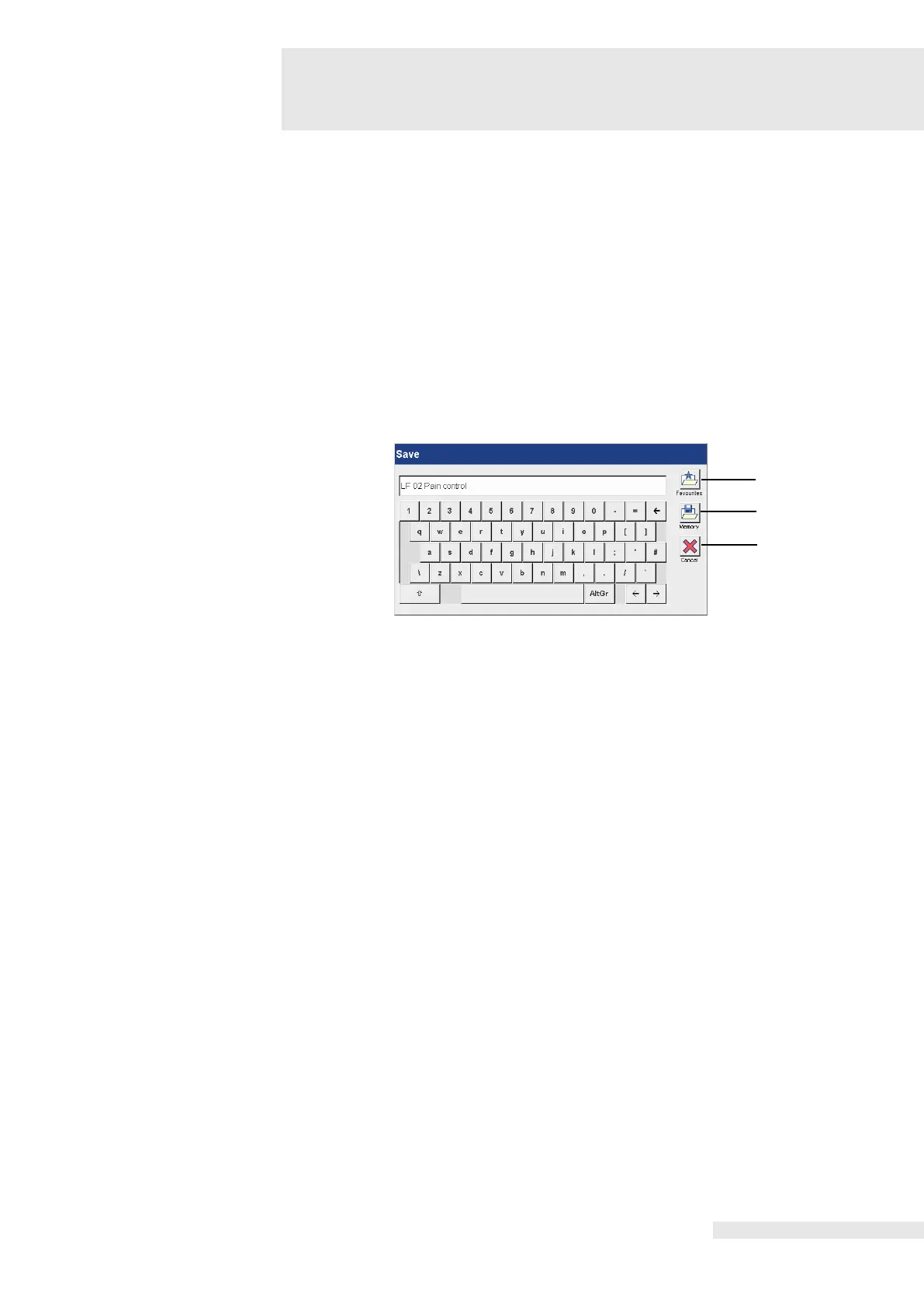
Activating the “Save” button opens the keyboard to enter the program name.
Two options are available for naming programs:
1. Acceptance of the program name stored in the entry field.
2. Entry of an individual program name. In the case of an individual program name, entry is
performed using the keyboard.
Before entering an individual program name, the program name stored in the entry field must
be deleted.
The programs can be saved in the Favourites list or Memory list. There are 120 storage
locations available in each case.
list / Memory list
Activating the button (1) opens the Favourites list and automatically saves the program in the
Favourites list.
Activating the button (2) opens the Memory list and saves the program in the Memory list.
Activating the “OK” button closes the “Save” screen and adds the program to the
corresponding list.
The program is always saved in the first open space in the list.
Activating the “Cancel” button (3) interrupts the save procedure.















 To Next Page