ZIPWAKE DYNAMIC TRIM CONTROL SYSTEM - FOR INTEGRATION 13
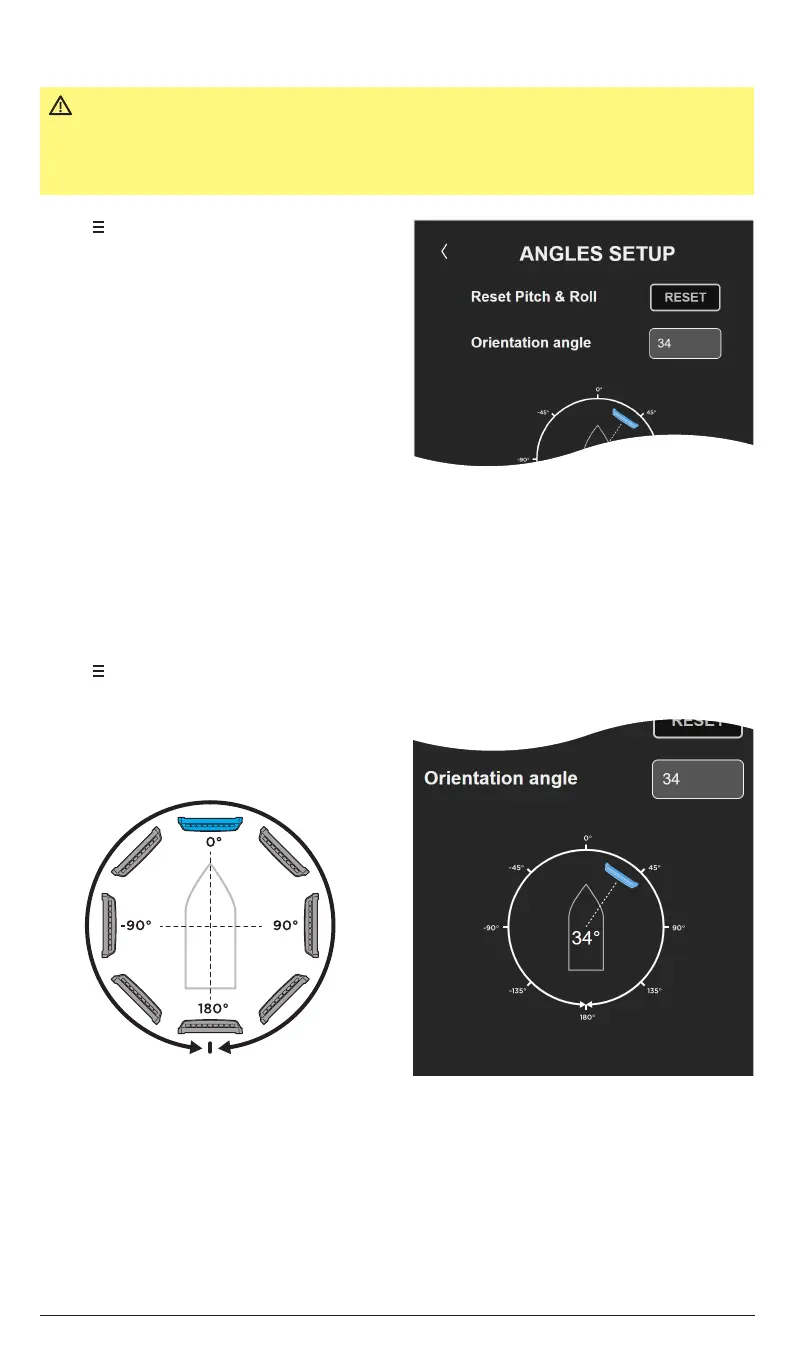
6.2 RESET THE PITCH AND ROLL ANGLES
1. Tap to open the System Menu.
2. Tap Angles Setup.
3. Tap RESET to set the pitch/roll angle to
zero. Tap YES in the pop-up window to
confirm.
IMPORTANT
During Initial Start, the pitch and roll angle indicators are reset.
When launched, level the boat in calm waters at a standstill and
perform a reset manually for the system’s automatic control
functions to work properly.
6.3 SET/VERIFY INTEGRATOR MODULE ORIENTATION ANGLE
1. Make sure the integrator module orientation angle (mounting angle relative the boat’s
forward direction) is set within ±5° according to the figures below.
1. Tap to open the System Menu.
2. Tap Angles Setup.
3. Set/verify Orientation angle.
NOTE!
If the orientation angle is dicult to measure or estimate, use a compass or a mobile
device compass app to determine the intergrator module’s angle relative the boats
forward direction within ±5°.
NOTE!
Both the pitch and roll angles should now read close to 0.0°.


 To Next Page