ZIPWAKE DYNAMIC TRIM CONTROL SYSTEM - FOR INTEGRATION8
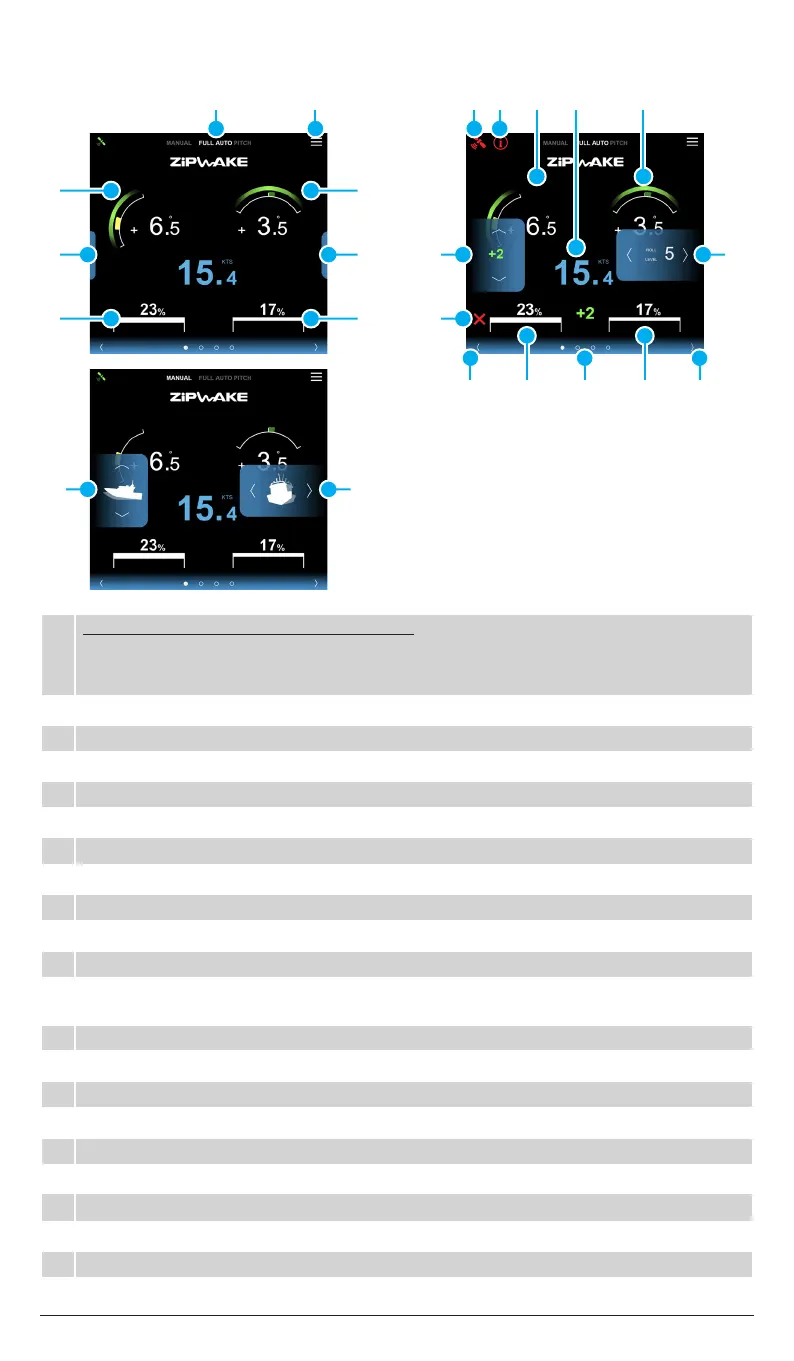
4.3 MAIN DISPLAY OVERVIEW
1 SYSTEM STATUS/MENU (PRESS TO ACTIVATE)
FULL AUTO:
Auto Pitch Control and Auto Roll Control are activated.
AUTO PITCH: Auto Pitch Control is activated. Auto Roll Control turned o.
MANUAL: Indicates manual pitch and roll control using the Pitch and Roll menu.
2 SYSTEM MENU: Tap to open menu
3 Boat Pitch Indicator: Visualizes the current pitch angle of the boat.
4 Boat Roll Indicator: Visualizes the current roll angle of the boat.
5 Pitch control menu - Hidden: Tap to open.
6 Roll control menu - Hidden: Tap to open.
7 Port Interceptor Feedback: Visualizes current extension of the port interceptor(s).
8 Starboard Interceptor Feedback: Visualizes current extension of the starboard interceptor(s).
9 GPS Status: Green – GPS fix OK Yellow – No GPS fix Red – No GPS connection
10 Error Information: Indicates a system error - check the System Information menu.
11 Pitch Angle: Pitch angle indicator in degrees.
12 Boat Speed: Current speed over ground.
If there is no GPS signal - speed numbers are not shown.
13 Roll Angle: Roll angle indicator in degrees.
14 Pitch control menu: Pitch control and pitch oset.
15 Roll control menu: Roll control and roll level.
16 Interceptor Error: Indicates an interceptor error - check the System Information menu.
17 Left arrow: Tap to change view.
18 Port Interceptor Position: Indicates extension of port interceptor(s) in percent.
19 Page indicator: Current view highlighted - Swipe to change view.
20 Starboard Interceptor Position: Indicates extension of starboard interceptor(s) in percent.
21 Right arrow: Tap to change view.
22 Manual control buttons: Tap to control pitch and roll.
1917 18 20 21
1 2 11 12 13
5
7
3
6 15
22
8
4
14
22
16
9 10


 To Next Page