ZIPWAKE DYNAMIC TRIM CONTROL SYSTEM - FOR INTEGRATION14
7 MANUAL ATTITUDE CONTROL
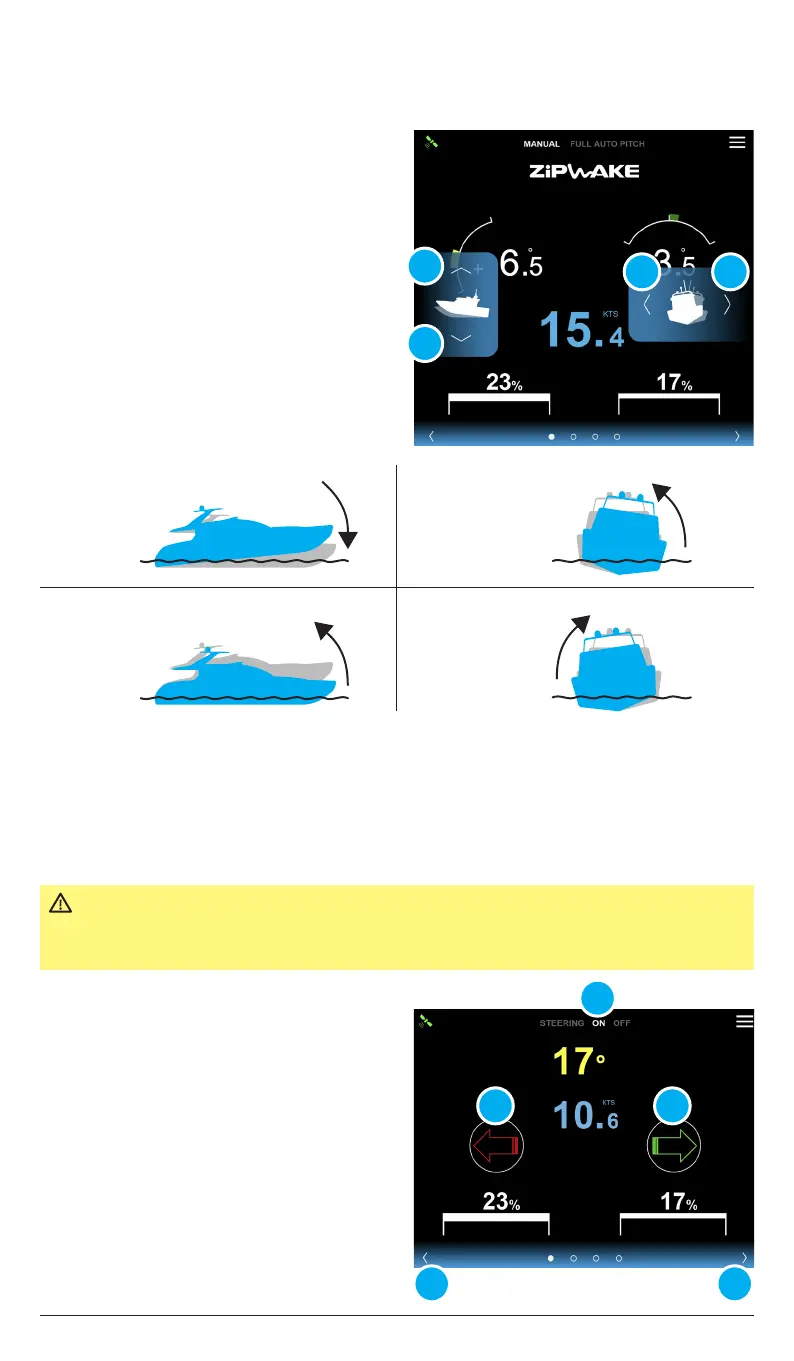
With the system in Manual mode, the boat’s
running attitude can be manually controlled
using the control buttons in the Zipwake
application. The up/down buttons control
the trim or pitch angle, while the left/right
buttons control the list or roll angle.
1. Tap the arrows (A) or swipe to the
steering mode view.
2. Tap ON (B) to activate steering mode.
3. Tap the arrows (C) to steer.
A
A A
B
B
DC
C C
7.1 MANUAL PITCH AND ROLL
7.2 STEERING MODE
With Steering mode activated the boat’s heading or yaw angle can be manually
controlled from the Zipwake application.
IMPORTANT Steering mode should only be used to make sensible course
corrections when running in relatively calm waters. Steering mode
remains o/turns o if Auto Roll Control (chapter 8) is activated.
Bow down
Tap/hold the bow down
icon (A)
Bow up
Tap/hold the bow up
icon (B)
Correcting starboard list
Tap/hold the roll
icon (C)
Correcting port list
Tap/hold the roll
icon (D)
NOTE!
If steering is deactivated for all interceptor
pairs (chapter 9.3.2) the steering mode
page will not be visable.


 To Next Page