Touch Lock
Software Update
ZIPWAKE DYNAMIC TRIM CONTROL SYSTEM - FOR INTEGRATION24
12.3 SOFTWARE UPDATE - OPTIONAL CONTROL PANEL
12.4 RESTART THE SYSTEM
1. Download a software upgrade file from zipwake.com.
2. Copy the software upgrade file to the root of the
USB memory stick.
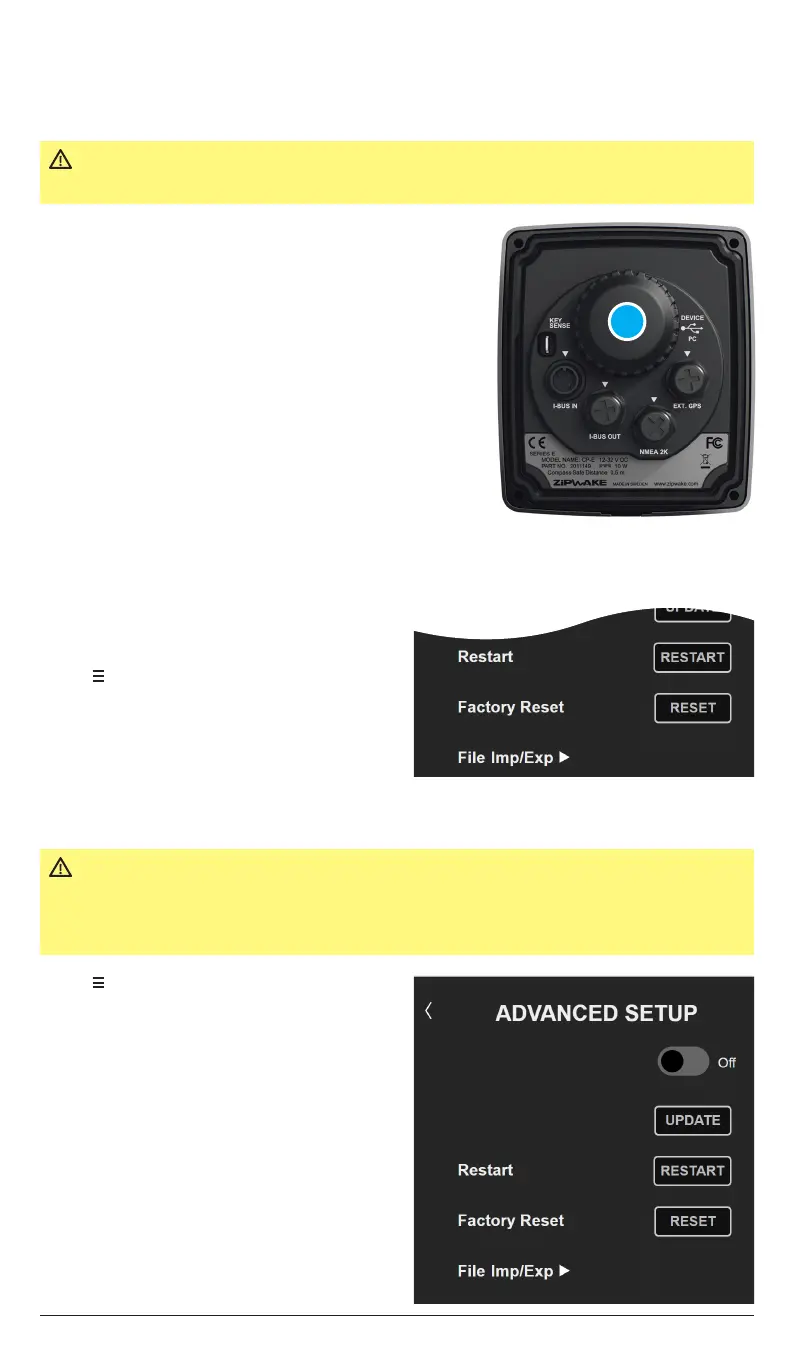
3. Remove the USB (A) connector cover on the back
of the control panel and connect the USB memory
stick to the DEVICE connector.
4. Restart the system and follow the instructions on
the display.
5. Remember to remove the USB memory stick and
put the connector cover back in place when done.
The Dynamic Trim Control System software can also be updated using a Zipwake control
panel (optional). Visit zipwake.com to check for new software releases.
NOTE!
Your System Configuration (user settings) and Auto Pitch Control Curve will not be
erased when you upgrade to another software version. You can also downgrade to a
previous software release.
IMPORTANT The software upgrade file must be saved to the root of a USB
memory stick with FAT32 formatting when upgrading the system.
12.5 FACTORY RESET
1. Tap to open the System Menu.
2. Tap Advanced Setup.
3. Tap RESET to conduct the Factory Reset.
4. Tap OK in the pop-up window to confirm.
5. The system will now reset all the settings
and turn o.
6. Start the system and perform a new setup
via the initial start (chapter 5).
1. Tap to open the System Menu.
2. Tap Advanced Setup.
3. Tap RESTART to restart the system
To reset the settings and the Auto Pitch Control Curve to default, perform a Factory Reset.
IMPORTANT A Factory Reset resets all values and settings in the system.
You can backup (chapter 12.6) and reinstall either the settings or
the Auto Pitch Control Curve after a Factory Reset has been
performed.
Touch Lock
Software Update
A


 To Next Page