ZIPWAKE DYNAMIC TRIM CONTROL SYSTEM - FOR INTEGRATION18
8.6 AUTO ROLL SPEED RANGE
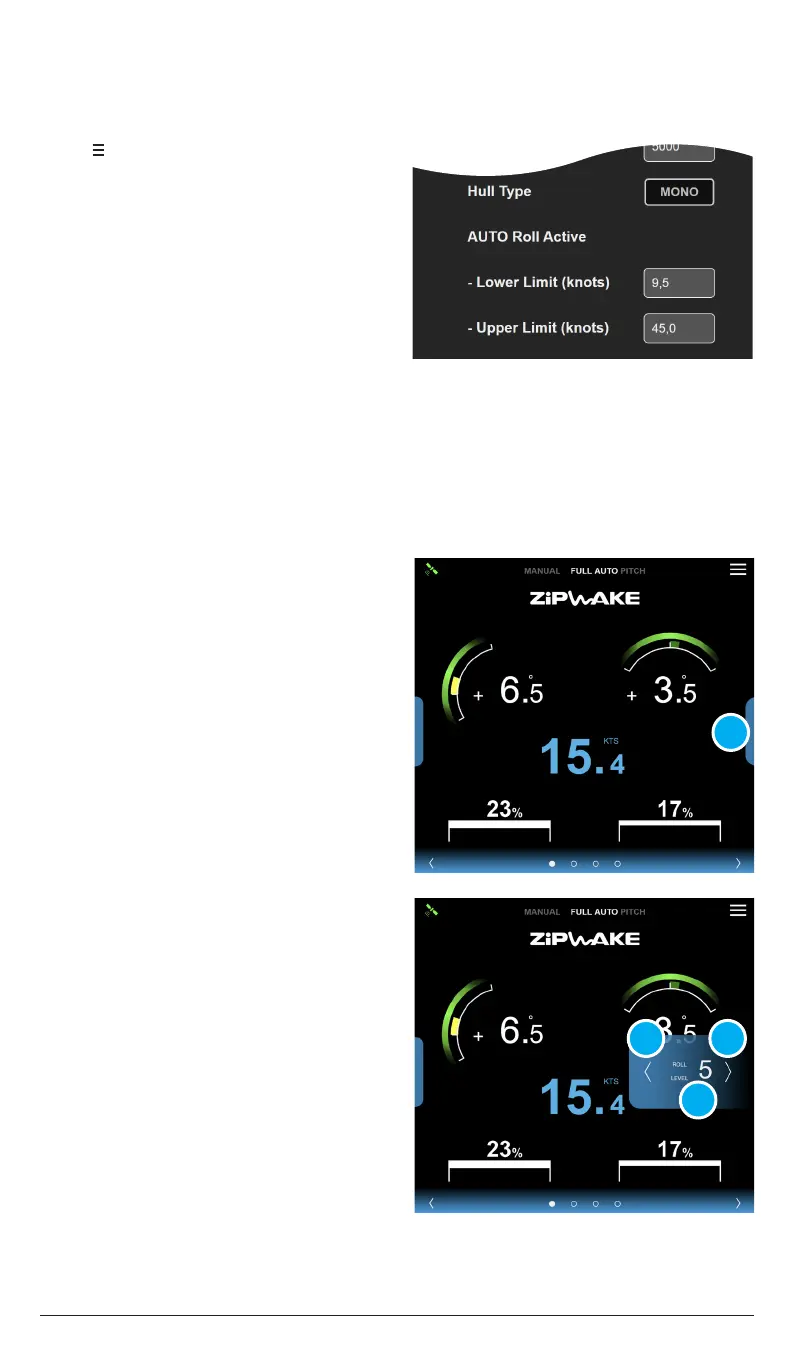
1. Tap to open the System Menu.
2. Tap AUTO Setup.
3. Adjust the Lower/Upper Limit.
The Auto Roll Control is active within a speed range that is calculated based on the
entered boat data. The lower and upper limits can be adjusted from their default values.
NOTE!
Once speed exceeds the upper limit, AUTO roll remains inactive until speed drops below
the upper limit by 6 knots while holding a steady heading.
8.7 AUTO ROLL LEVEL
1. Tap the vertical bar (A) to open the roll
level controls.
With Auto Roll Control activated, its sensitivity can be adjusted from level 1-10.
Increase or decrease the Roll Level depending on sea and load conditions.
NOTE!
Current roll level (D) is indicated by the value between the arrows. Roll level 5 equals
normal (default) sensitivity. Try dierent levels until you are satisfied. The selected roll
level is saved until you select a new level.
2. Tap the left arrow (B) to decrease
roll level.
3. Tap the right arrow (C) to increase
roll level.
A
B
D
C


 To Next Page