ZIPWAKE DYNAMIC TRIM CONTROL SYSTEM - FOR INTEGRATION20
9.3 INTERCEPTOR CONFIGURATION
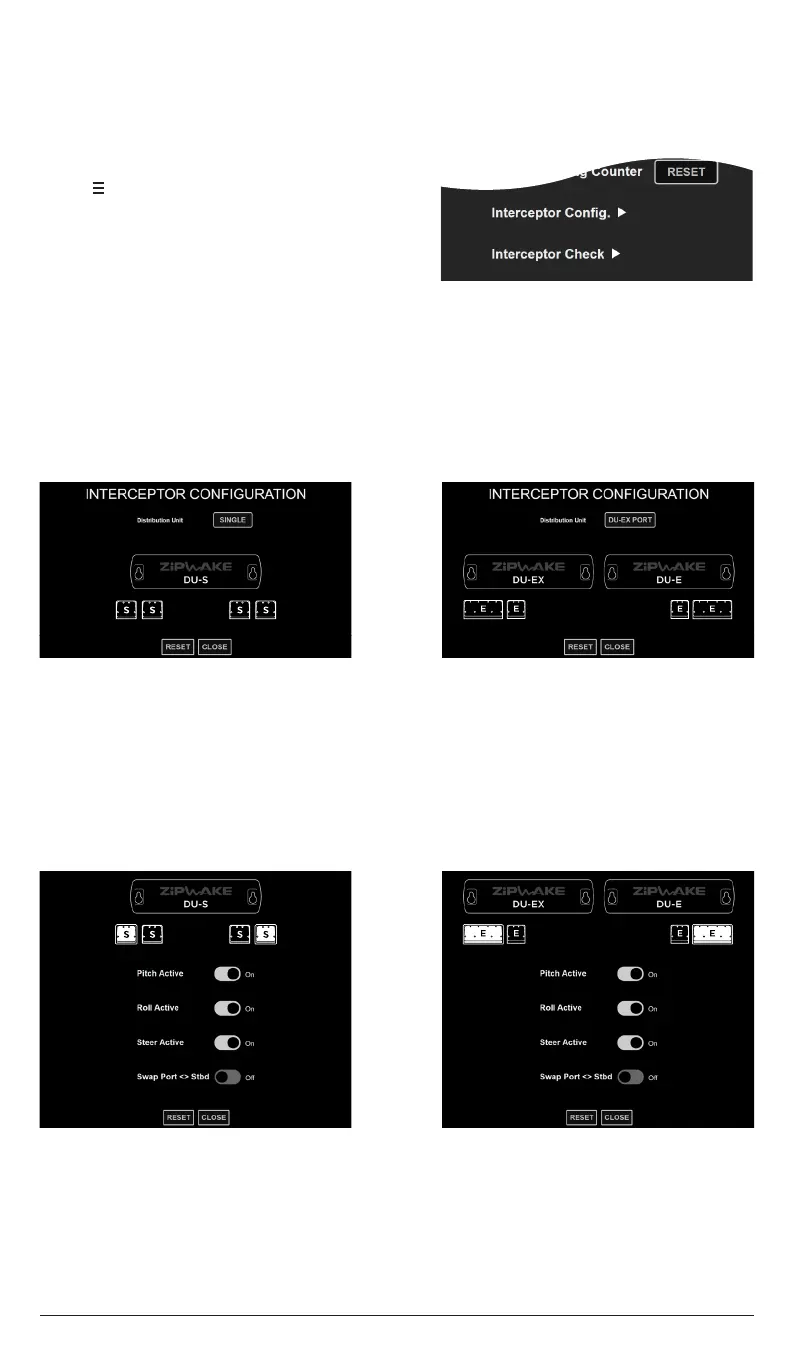
ENTER THE INTERCEPTOR CONFIGURATION MAIN PAGE
1. Tap to open the System Menu.
2. Tap Interceptor Setup
3. Tap Interceptor Configuration.
Details about the current system installation including distribution unit(s) and interceptor
configuration are managed and visualized from the Interceptor Configuration menu page.
The system allows custom allocation of control forces by setting pitch, roll and yaw
control as active or inactive for each pair of port and starboard interceptors. A pair’s
function may also be switched e.g. to mitigate roll-induced steering forces from another
interceptor pair or pairs.
9.3.1 DISTRIBUTION UNIT(S)
1. Verify/Select the DU installation that represents the actual system installation.
2. Select SINGLE if the system installation only includes a Distribution Unit for
Series S or E (DU-S or DU-E).
3. If the system installation includes a Distribution Expansion Unit (DU-EX) select
the option that specifies the mounting side that represents the actual installation
(DU-EX PORT SIDE or DU-EX STBD SIDE).
1. Tap the Interceptor illustrations to select an interceptor pair.
2. Set the desired interceptor function for each pair.
9.3.2 CUSTOM ALLOCATION OF CONTROL FORCES
NOTE!
In systems with multiple interceptor pairs, the first pair will always be active in pitch and
roll. A center-mounted interceptor only controls pitch.
Refer to the Installation Guide
for information about connecting a center-mounted
interceptor to the distribution unit.
Tap RESET to reset the configuration saved to the system and let the system re-evaluate
the connected interceptor configuration.


 To Next Page