A
B
DE
C
ZIPWAKE DYNAMIC TRIM CONTROL SYSTEM - FOR INTEGRATION 15
8 FULL AUTO / AUTO PITCH CONTROL
8.1 AUTOMATIC PITCH
8.3 ACTIVATE FULL AUTO / AUTO PITCH
With Full Auto or Auto Pitch Control acti-
vated, the system will automatically adjust
the running trim of your boat, minimizing
wave resistance for best performance
and comfort at all speeds. The Auto Pitch
Control Curve tells the system how much
the interceptors will be extended at each
speed, thereby adjusting the boat’s pitch
angle as a function of speed.
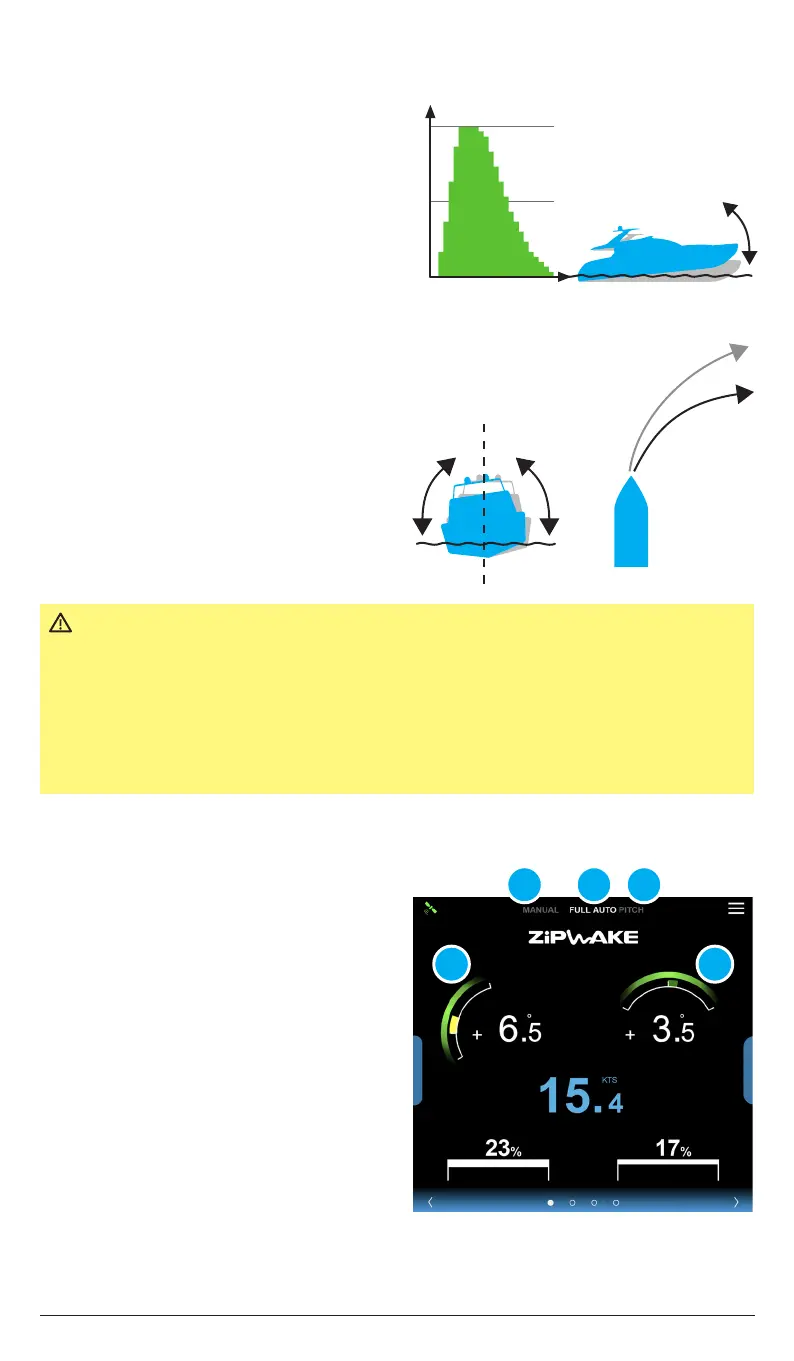
1. To activate Auto Pitch & Roll Control,
tap FULL AUTO (A); it will turn white
and and green arcs will appear at the
pitch (B) and roll (C) gauges.
2. To activate Auto Pitch Control only, tap
AUTO PITCH (D); it will turn white and
the green arc at the roll (C) gauge will
disappear.
3. Tap FULL AUTO (A) to activate Auto
Roll Control again.
4. Tap MANUAL (E) to return to Manual
mode.
IMPORTANT
The system’s automatic control functions remain o/turn o when no
GPS speed signal is available or in the event of other system failure(s).
A flashing error message is then shown at the bottom of the main
display.
Auto Roll Control is only active if boat speed is within the Auto Roll
speed range (chapter 8.6). The system’s automatic control functions
remain o / turned o when no GPS speed signal is available.
Speed
Interceptor Extension
8.2 AUTOMATIC ROLL
With Auto Roll Control activated (FULL
AUTO), the system will automatically
eliminate uncomfortable and dangerous
boat roll. The system constantly works to
keep the boat level or to make balanced
(banked) turns. For boats that tend to heel
too much inward in turns, the system will
help the boat make sharper turns.
Auto Roll
activated
Auto Roll
turned o


 To Next Page