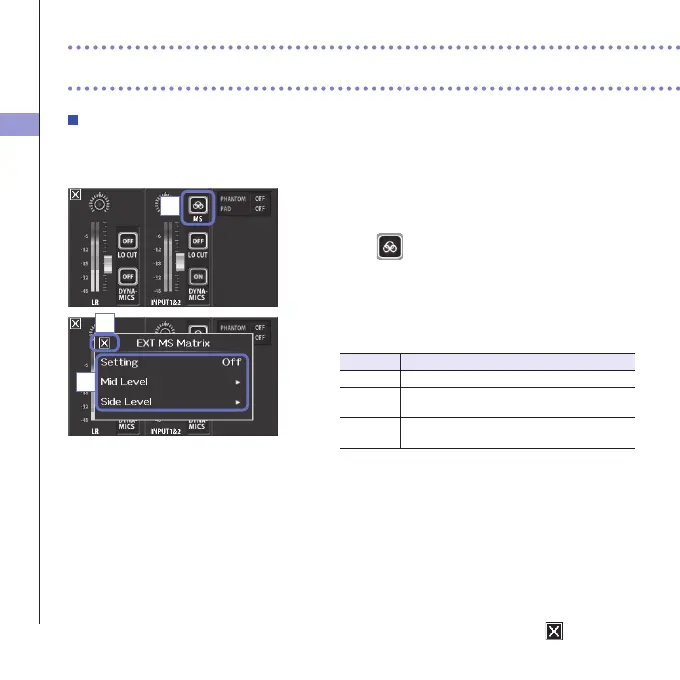
Mixer Screen settings
37
Mixer Screen settings (continued)
EXT MS MATRIX
Signalsfrom anMSformatstereo micinputthrough Inputs1/2can be convertedtoan ordinary
stereo(L/R)signal.YoumustactivatethestereolinkforInputs1/2beforerecording.
1. Press the track buttons for Inputs 1/2 at the same
time to activate the stereo link.
2. Touch on the Mixer Screen.
3. Change the "EXT MS Matrix" setting in the submenu
that opens.
ThisopenstheMS-MATRIXsettingsscreen.
Setting:
Setting Explanation
Off DisabletheMS-MATRIX.
In1=Mid,
In2=Side
Input 1 will beassigned tothe midmic and
Input2willbeassignedtothesidemic.
In1=Side,
In2=Mid
Input1willbeassignedtotheside mic and
Input2willbeassignedtothemidmic.
MidLevel:
Adjust the level of the unidirectional mic used to
capturethecenterofthesound(Mid).
Thiscanbesettomuteorfrom−48.0to+12.0dB.
SideLevel:
Adjustthelevelofthebidirectionalmicusedtocapture
soundsfromleftandright(Side).
Thiscanbesettomuteorfrom−48.0to+12.0dB.
4. After completing the setting, touch to close the
submenu.
2
4
3



 To Next Page