1.
2.
a.
b.
c.
3.
a.
b.
4.
2.2 Brief Installation Guide
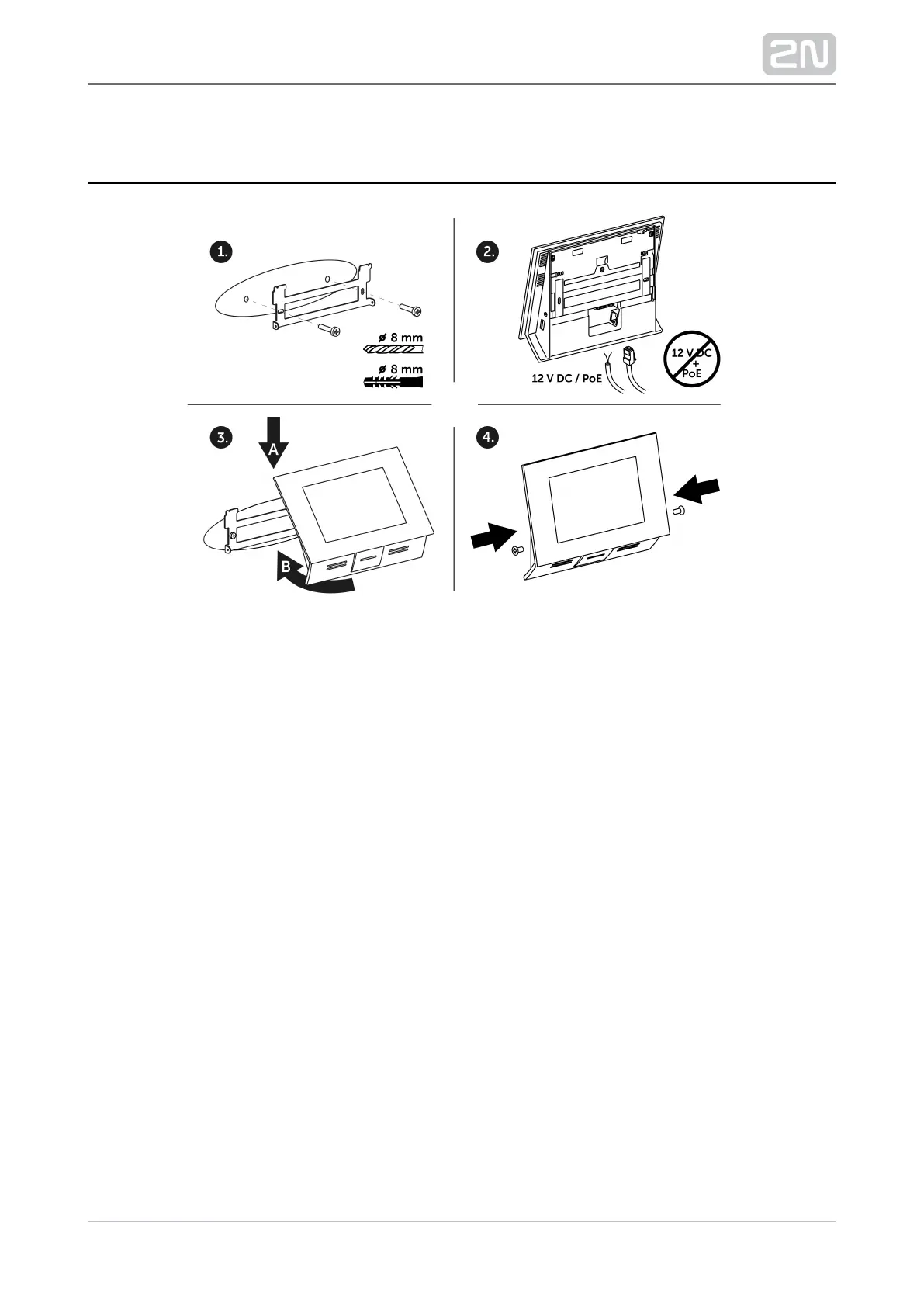
Install the device holder onto a vertical wall. The recommended installation
height is 120 cm above the floor. The product package includes screws and plugs
for mounting into classic bricks. Use appropriate installation fittings for a
different type of wall material!
Feed the device via an Ethernet PoE adapter (or PoE supporting Ethernet switch
/router) or a 12 V DC 2 A power adapter.
With PoE supply, just snap RJ-45 into the appropriate connector.
With 12 V DC 2 A supply, screw the power adapter plus and minus cables
into the appropriate terminal board on the device.
Simultaneous PoE + 12 V DC 2 A supply is not recommended!
Put the device on the holder as follows:
Place the device carefully from top to bottom with its bottom part slightly
away (up to 5 cm) from the wall.
When the device fits to the main holder supports, push the device bottom
part onto the wall.
Tighten the safety screws on both the device sides.



 To Next Page