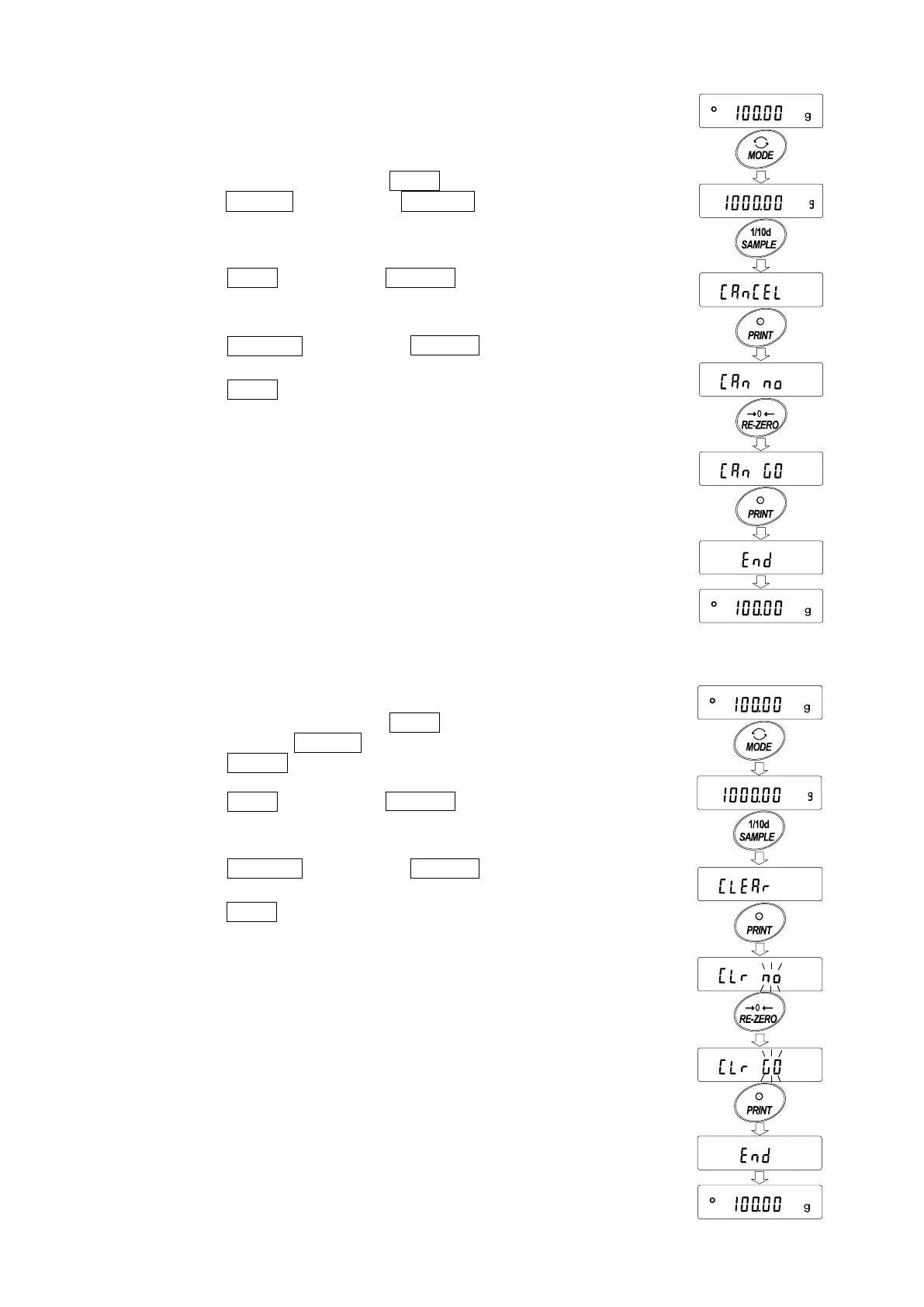
Deleting the latest data
When the wrong data is entered, it can be deleted and excluded from statistical
calculation. Only the latest data can be deleted.
1 In the weighing mode, press the MODE key, and then
press the SAMPLE key to display 1CanCel .
2 Press the PRINT key to display Can no .
3 Press the RE-ZERO key to display Can go .
4 Press the PRINT key to delete the latest data and
exclude it from statistical calculation.
The number of data decreases by 1 when the balance
returns to the weighing mode.
Clearing the statistical data
All the statistical data will be deleted and the number of data will be 0 (zero).
1 In the weighing mode, press the MODE key,
and then press the SAMPLE key several times
to display Clear .
2 Press the PRINT key to display Clr no .
3 Press the RE-ZERO key to display Clr go .
4 Press the PRINT key to delete the statistical data.
The number of data becomes 0 (zero) when the
balance returns to the weighing mode.
N010
N000
SUM
P
res
s
seve
ral t
ime
s



 To Next Page