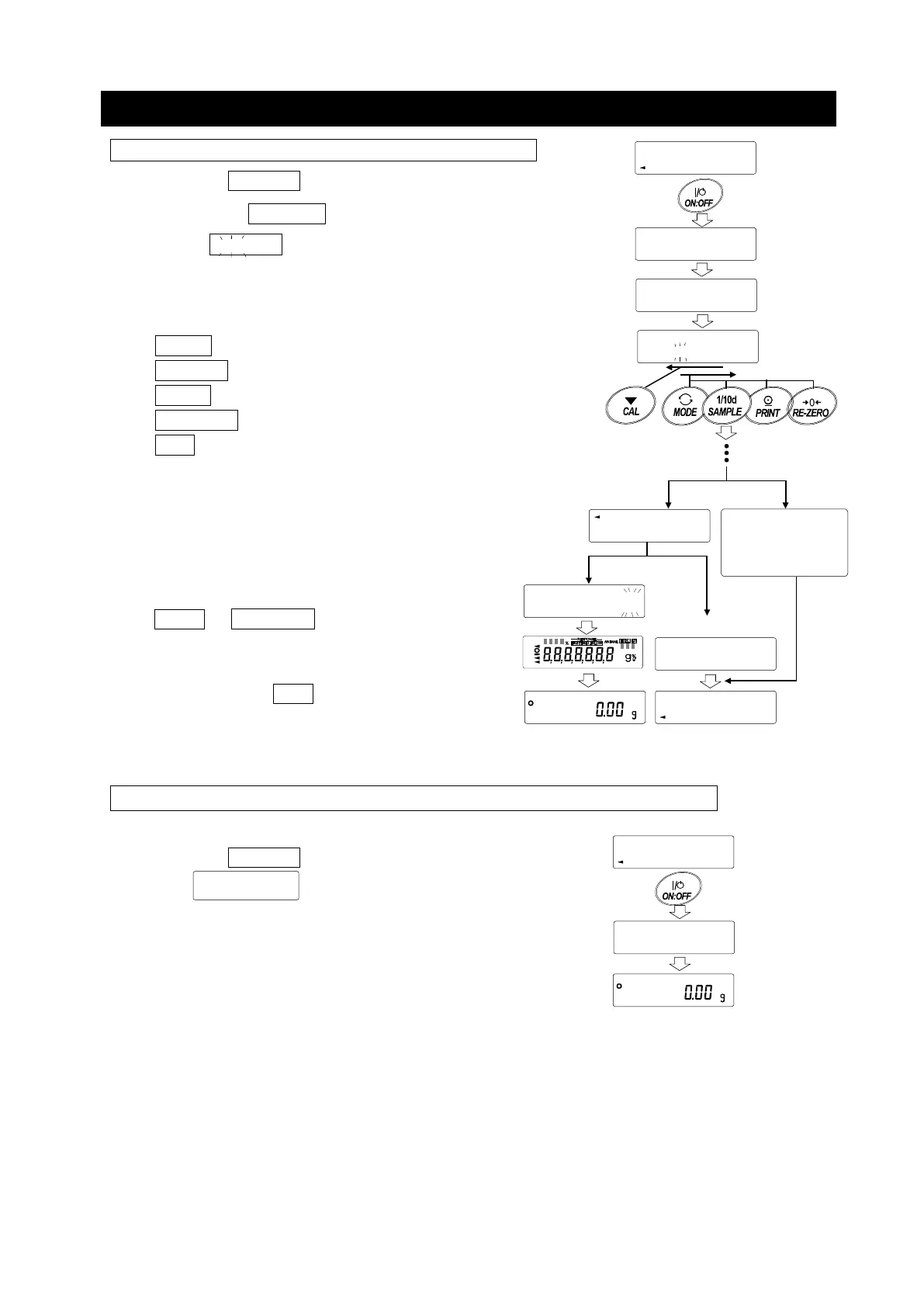
How To Input The Password At The Start Of Weighing
(Request password input at the start of weighing)
1. Press the ON:OFF key while the display off.
2. After display
PA55
, it becomes password input
display ---- .
3. Input 4 digits password using the following keys.
The balance will turn automatically after no operation for
ten minutes.
MODE key ............. Character
SAMPLE key .......... Character
PRINT key ............. Character
RE-ZERO key ........ Character
CAL key ................. Back key
4. If the password is correct, the login level will be
displayed, the weighing will be displayed after all
lamps are illuminated. After entering the
administrator's password, log in as an
administrator.
(At factory settings, the password is set to
by RE-ZERO key input 4 times at the
administrator level.)
If the password is incorrect, the buzzer
sounds 3 times, FAiL
will display and the
display will turn off.
(To change the setting, login is required with the administrator's password)
When logged in as a guest (GUESt)
1. Press the ON:OFF key while the display off.
2. After displayed, return to the weighing display.
ST
LoG
In , GUE
Weighing display
ST
LoG
In , GUE
Password
LoG
U5Er
PA55
Input 4 times
No key operation
for 10 minutes
In ,U5Er
fAIL
Weighing display
Password is incorrect
Display off
----
Login level display



 To Next Page