Registering Password (Changing)
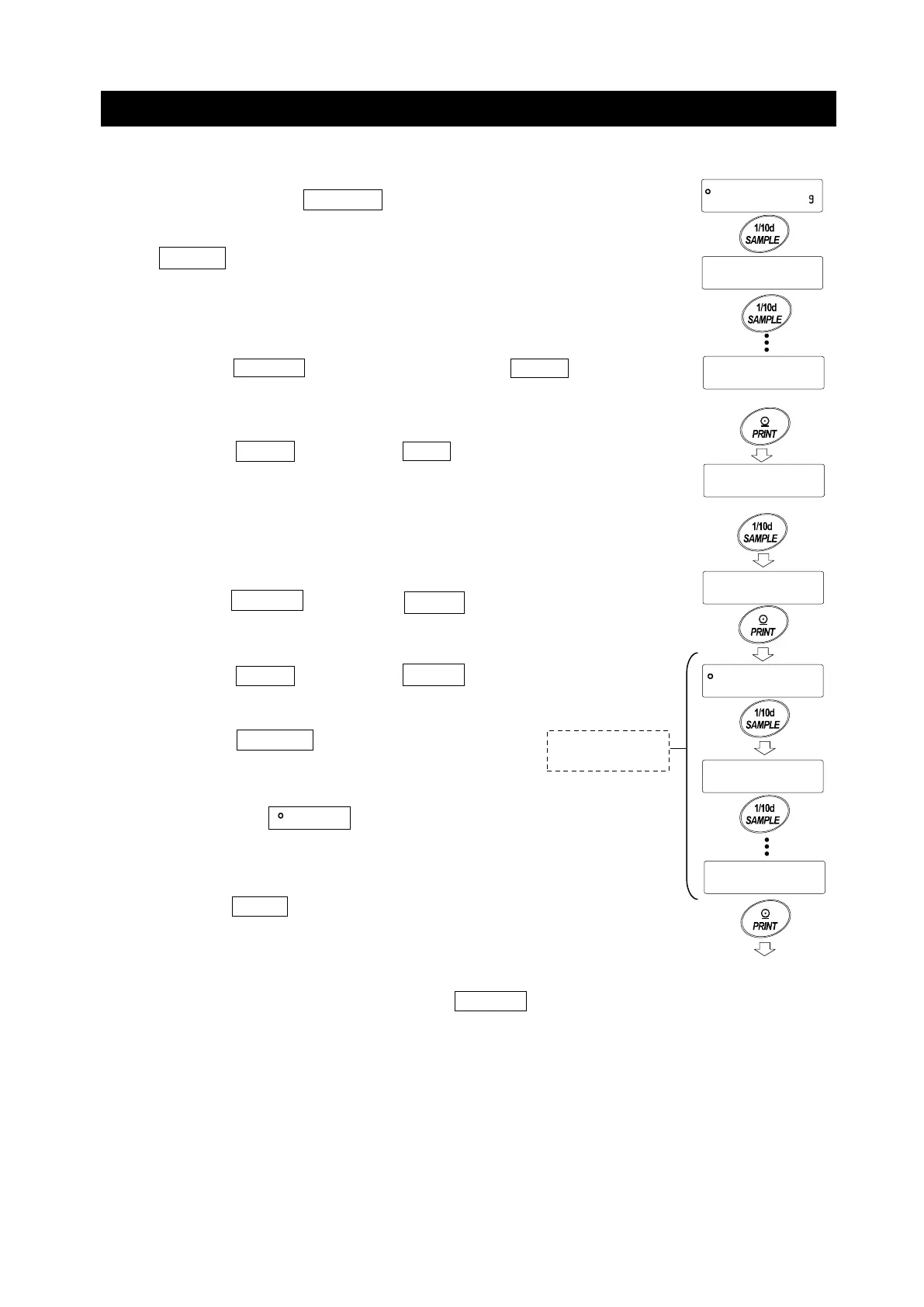
The password can be changed at "Password (Loc no.)" of the Function Table.
1. Press and hold the SAMPLE key for 2 seconds in the
weighing mode.
bA5Fnc
is displayed.
2. Press the
SAMPLE key several times to diaplay
Locfnc
.
3. Press the PRINT key to display pA55 .
4. Press the SAMPLE key to display
Loc no.
.
5. Press the PRINT key to display
IN .
6. Press the SAMPLE key to change the login level
.
/
to
.
If the password is already registered at the login level,
the stability mark is lit. (changeable)
7. Press the PRINT key to change the password.
Refer to "Changing Password".
Note
□ Log out by turning off the display using the ON:OFF key.
□ If set to
pA55 2
, the
password is required when logging in
as an administrator.
Password registration of
to
is unnecessary.
bA5Fnc
times
Locfnc
PA55 1
ALL
Loc no.
0.00
Ad
U5Er
U5Er
Login level
several
Refer to "Changing
Password"
for 2 seconds



 To Next Page