MULTIMEDIA
186
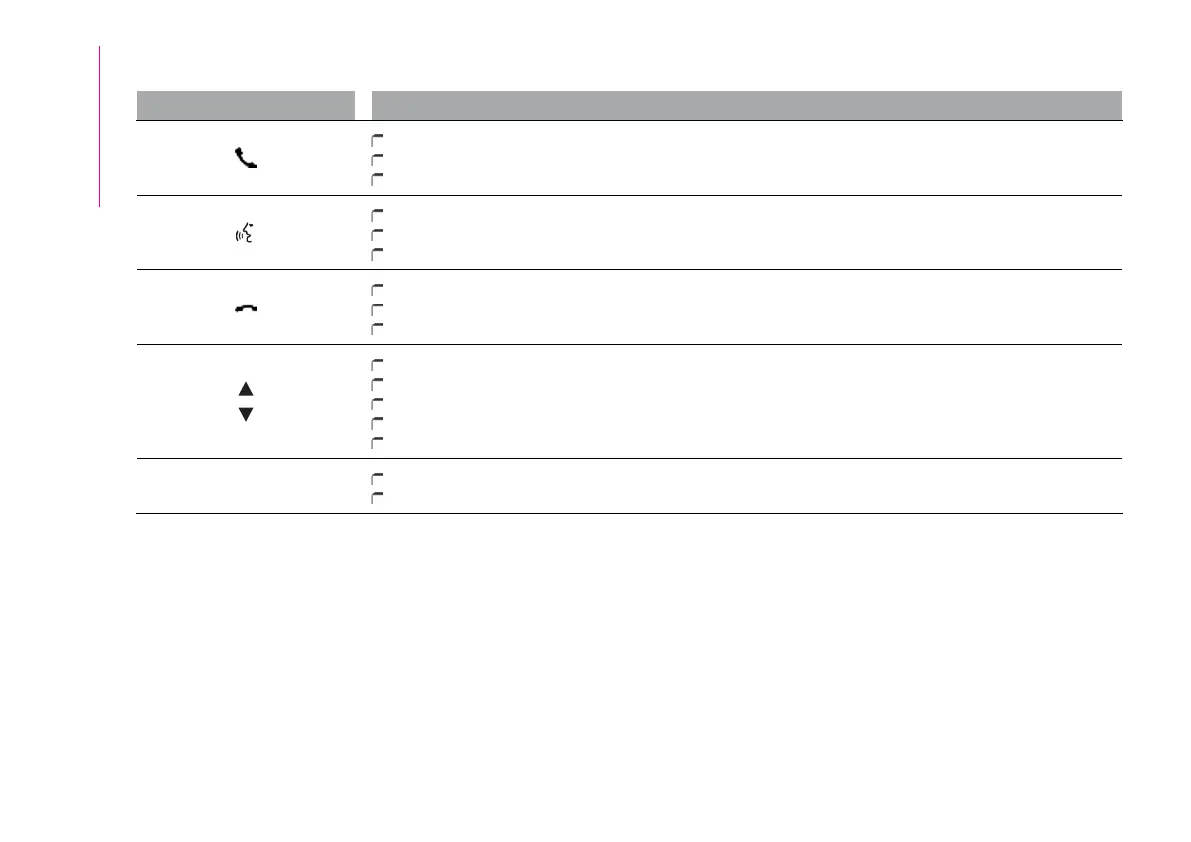
Controlsonsteeringwheelsummarytable
ButtonsInteraction
Acceptance ofincoming call
Answering thesecond incomingcall andputting theactive callon hold
Display ofthe last10 callsonthe instrument panel
Activation ofvoice recognition
Interruption ofthe voicemessage inorder togive anew voicecommand
Interruption ofvoice recognition
Rejection ofincoming call
Ending ofcall inprogress
Exit thedisplay onthe instrumentpanel ofthe lastcalls (onlywith callbrowsing active)
Short press(Radio mode):selection ofnext/previousstation
Long press(Radio mode):scan higher/lowerfrequenciesuntil released
Short press(USB, Bluetooth®mode): selection ofprevious/next track
Long press(USB, Bluetooth®mode): fastforward/rewinduntilreleased
Short press(phone mode):selection ofnext/previouscall (onlywith callbrowsing active)
+/-
Short press:volume increase/decrease insingle steps
Long press:volume continuousincrease/decrease untilreleased


 To Next Page