57|56
13.6 Datasets
For each arming scheme (e.g. "Monday", "Daily", etc.) you can choose any number of 16 "datasets". Youcan
therefore con gure 16 di erent actions. For example, you could con gure your system so that it disarms
in the morning, arms at midday, disarms a er lunch and then arms again in the evening. This requires
4individual datasets.
Important: be very careful and methodical when creating datasets. Ideally you should come up with
an exact scheme beforehand and outline it in a simple table, for example. This would provide a better
overview.
13.7 Exceptions
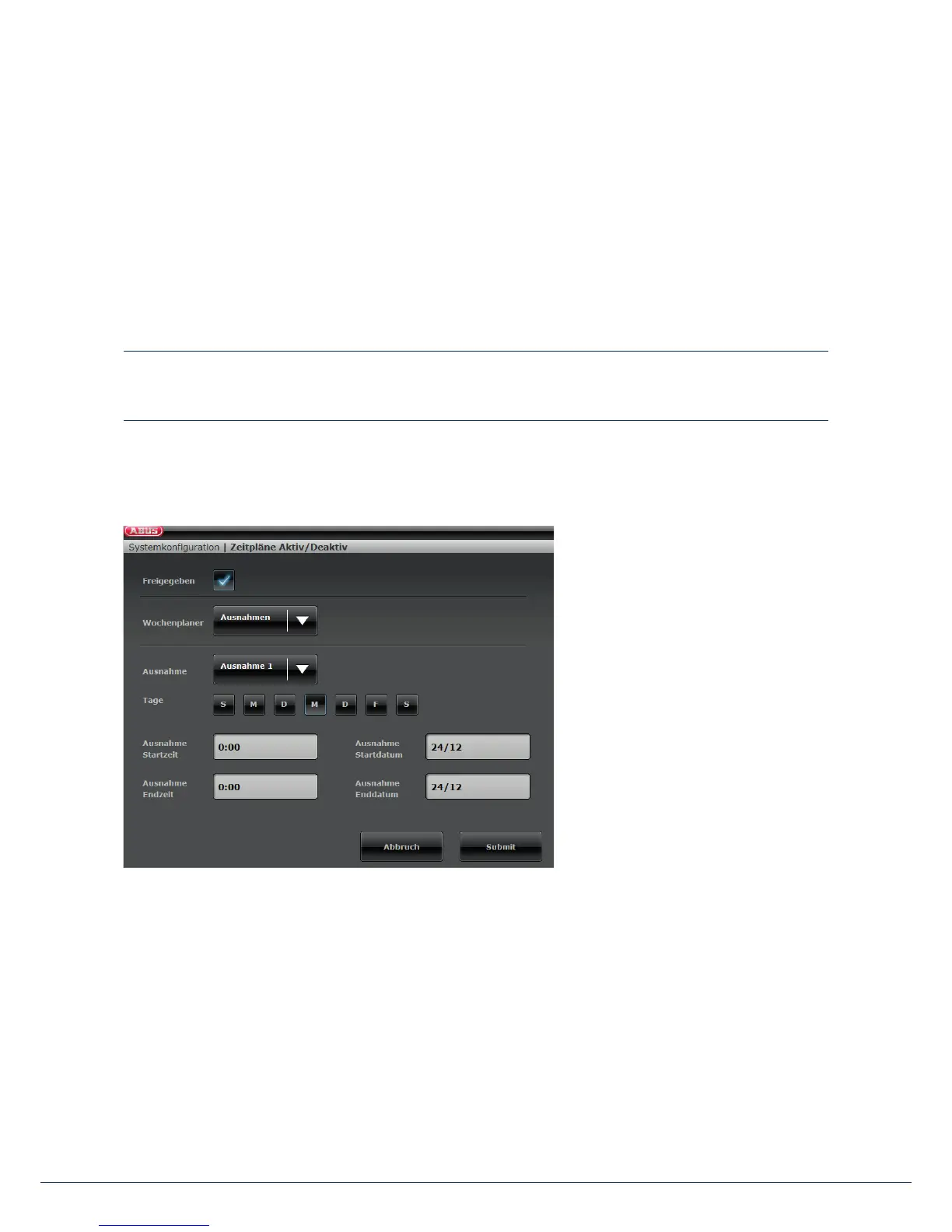
There are a total of 20 "exceptions"
available. These are used to set up
holidays and special events, such as
Christmas or Easter. Here is an example
of how to set up an exception. You
want to set the time schedule to "Daily"
but add an exception for 24December
so that the alarm panel remains armed
and does not disarm at 7 a.m. Proceed
as follows:
1. First click on "Week planner" and then on "Exceptions". This opens a new window where you can de ne
the individual exceptions.
2. Click on "Exception 1" and enter the data for the exception. There are 20 exceptions available. You can add
these exceptions in the previous window under "Exceptions" and then link them to the dataset.
3. Add all of the desired exceptions to the calendar and link them to the time schedules as shown in the
previous section.
13. Operation via web browser



 To Next Page