OVERVIEW OF SYSTEM COMPONENTS - 2
VerifyNow System User Manual Page 14 14340.J
2.1.1 Assay Device Port and Cover
The assay device port holds a VerifyNow assay device during the test. When seated
in the port, the assay device is aligned with optical detection components to measure
the agglutination of the sample using light transmittance through wells in the assay
device. When closed, the assay device port cover blocks ambient light in the room
from interfering with the test.
The assay device port is also equipped with a spot code scanner that scans
information on the assay device to determine which assay is being performed and
the assay device lot number.
2.1.2 Display Screen
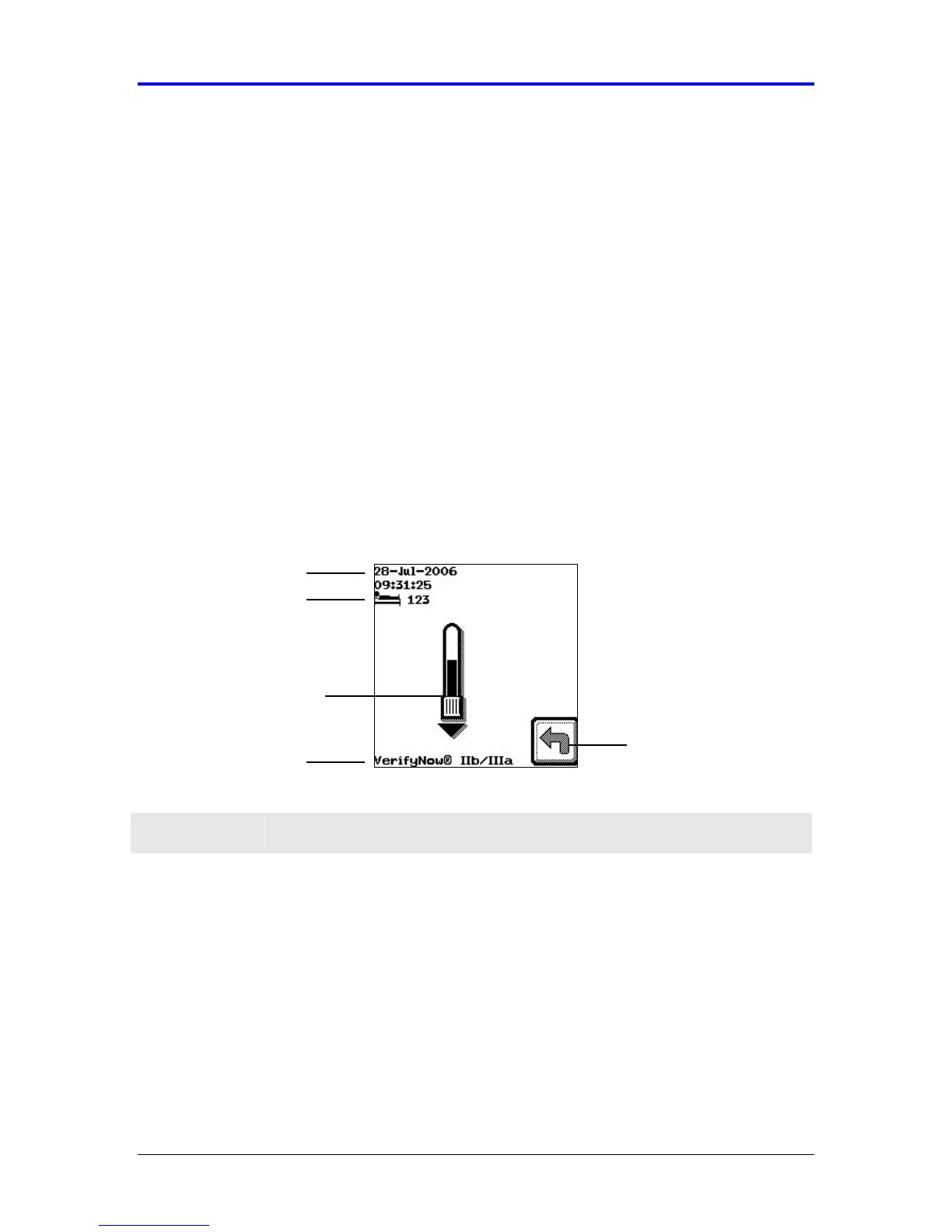
All messages and instructions for the operator display on the screen. The display
screen provides information about each step in the test, the assay type, mode, as
well as the current date and time. Figure 2-2 highlights the common features of the
software screens.
Figure 2-2 Display Screen
Feature Description
Icons Icons are used to navigate through the steps in a test. Icons
display along the right side of the display screen and correspond
to an adjacent icon key. Selecting an icon key displays another
screen or directs the instrument to perform an action. Refer to the
Appendix for a description of each icon.
Prompt Most automated activities involve several steps and associated
screens. Instructions on what to do at the next step are provided
in the center of the display screen. In Figure 2-2, the image
prompts the operator to insert the sample collection tube.
Icon
Assay Type
Date and Time
Mode
Prompt



 To Next Page