CLEANING AND MAINTENANCE - 9
VerifyNow System User Manual Page 87 14340.J
CAUTION: Do not steam-sterilize or autoclave the instrument. Do not
immerse the instrument in any solution. Do not clean the instrument with
acetone or any other plastic solvent or abrasive cleaner.
CAUTION: Prolonged exposure to alcohol or other strong cleansers can
result in damage or discoloration to the instrument’s case materials.
Always use a soft cloth when cleaning the display screen and bar code
window. Abrasive cleaners, pads, or cloths will permanently damage the
surface of the plastic windows.
CAUTION: Be careful not to spill any liquids on the instrument, printer
(accessory), or power supply while cleaning the exterior surfaces.
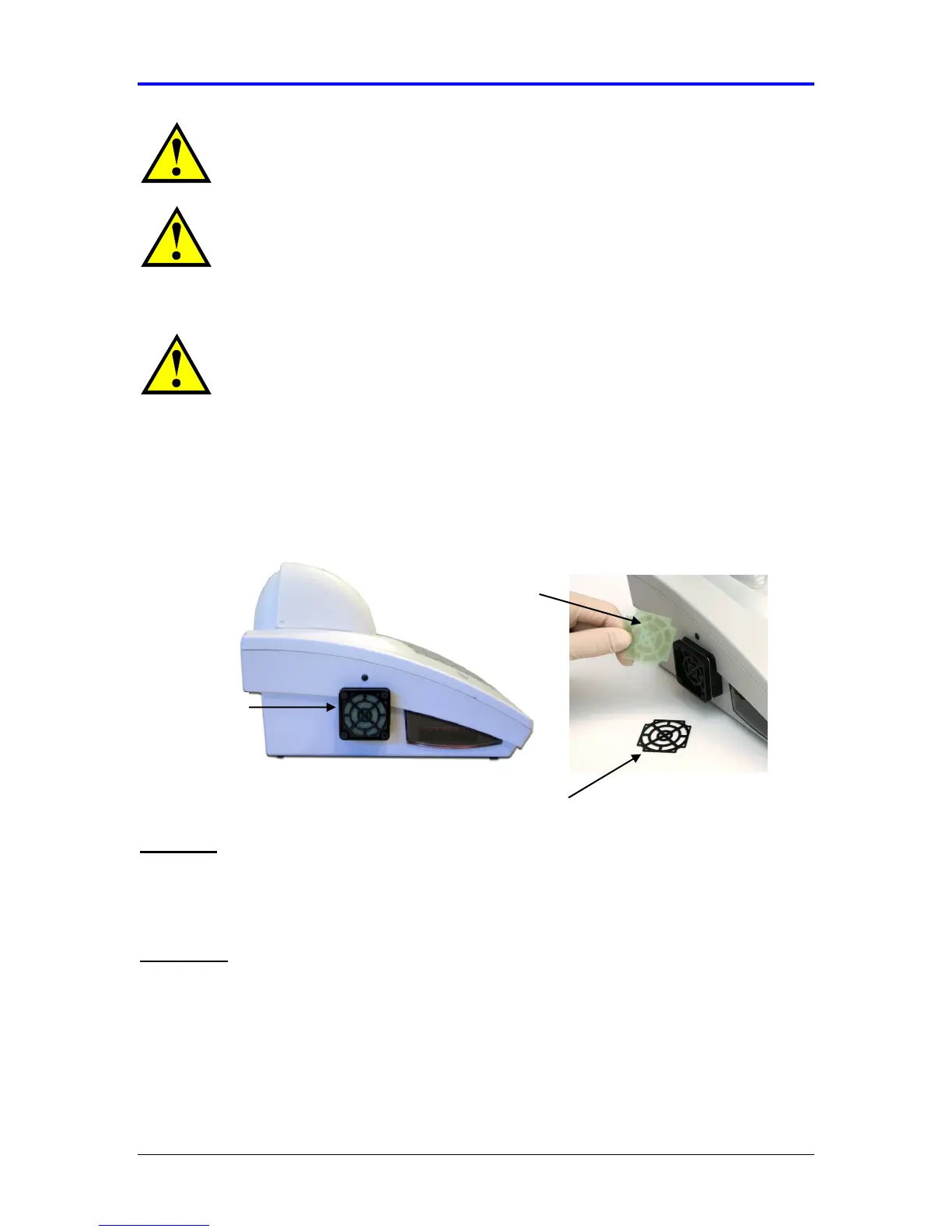
9.3 Replace the Fan Filter
The instrument is equipped with an exterior fan vent to cool the internal electronic
components. Depending on the room conditions, small amounts of dust and debris
may accumulate over time within the fan filter and obstruct airflow. Periodic cleaning
of the fan filter may be performed to avoid overheating of the instrument.
Materials
• Replacement fan filter (Accumetrics Catalog No. 37056)
• Replacement fan filter retainer (Accumetrics Catalog No. 37050)
Procedure
Use the following procedure to remove and clean the fan filter:
1.
Power off the instrument (“O” designates off).
Fan Filter
Fan
Fan Retainer



 To Next Page