PATIENT TESTING - 6
VerifyNow System User Manual Page 56 14340.J
NOTE: A sample taken prior to abciximab or eptifibitide administration cannot be
used to establish a “baseline” or uninhibited result if a GP IIb/IIIa inhibitor has been
administered within the past 10 days.
1.
Press the Percent key.
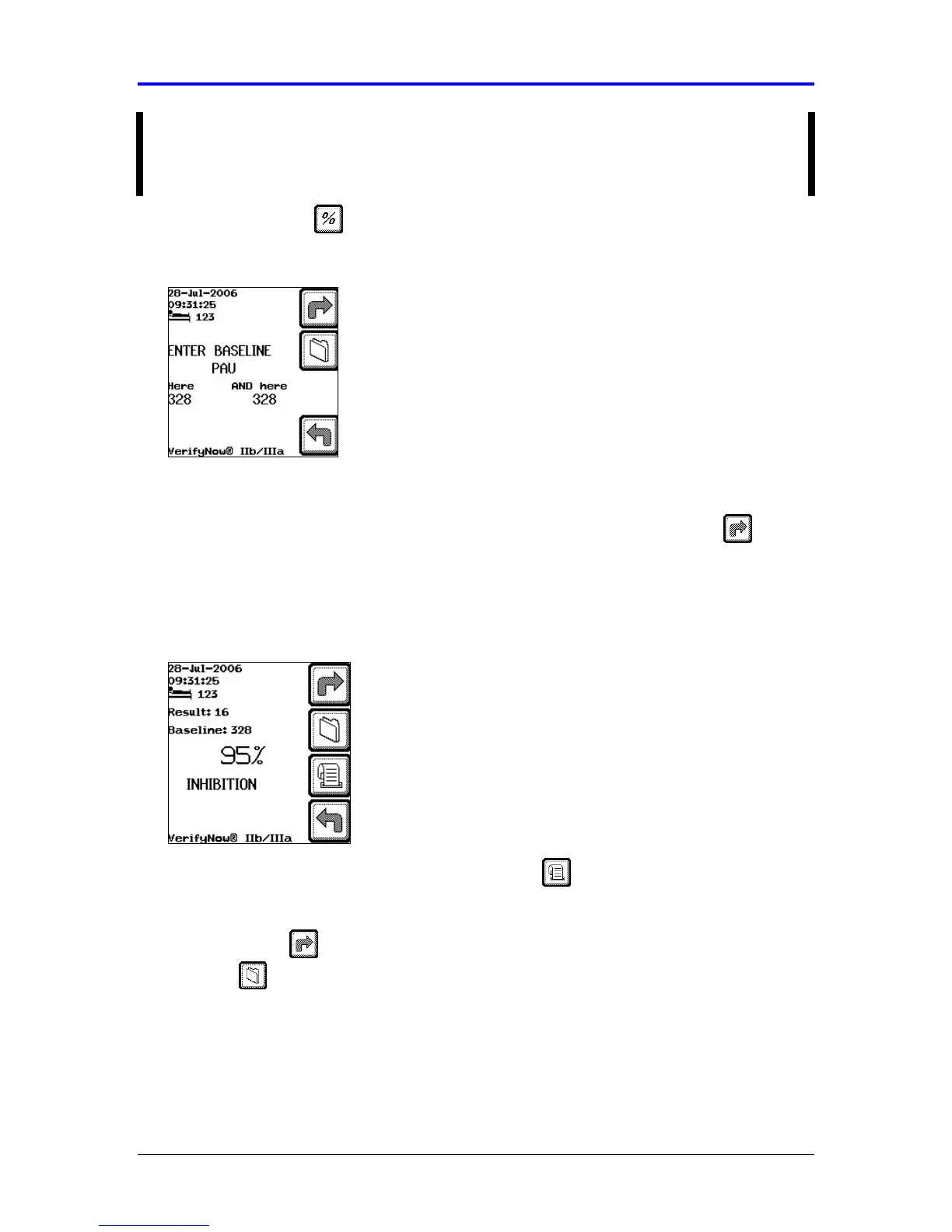
Figure 6-18 Enter PAU
2.
Obtain the patient’s baseline (pre-drug) PAU result. Enter the baseline PAU result
in the space indicated “Here”, press the Tab key, and re-enter the baseline PAU
result in the space indicated “AND here” (Figure 6-18). Press the Next key to
display the percent inhibition. In the example (Figure 6-19), if the baseline result
was 328 PAU and the post-drug result was 16 PAU, this would calculate to 95%
inhibition.
Figure 6-19 Percent Inhibition
3.
The result may be printed by pressing the Print key, if your instrument has an
attached printer.
4.
Press the Next key to return to the Results screen (Figure 6-17). Press the
Retrieve key to retrieve past assay results. Refer to Chapter 7, Retrieving
Test Results for more information on retrieving results.



 To Next Page