Machine Maintenance 3-27
Removing the WLAN Module 0
1. Perform the “Removing the Palmrest Module/Upper Case” procedure described on
page 3-18.
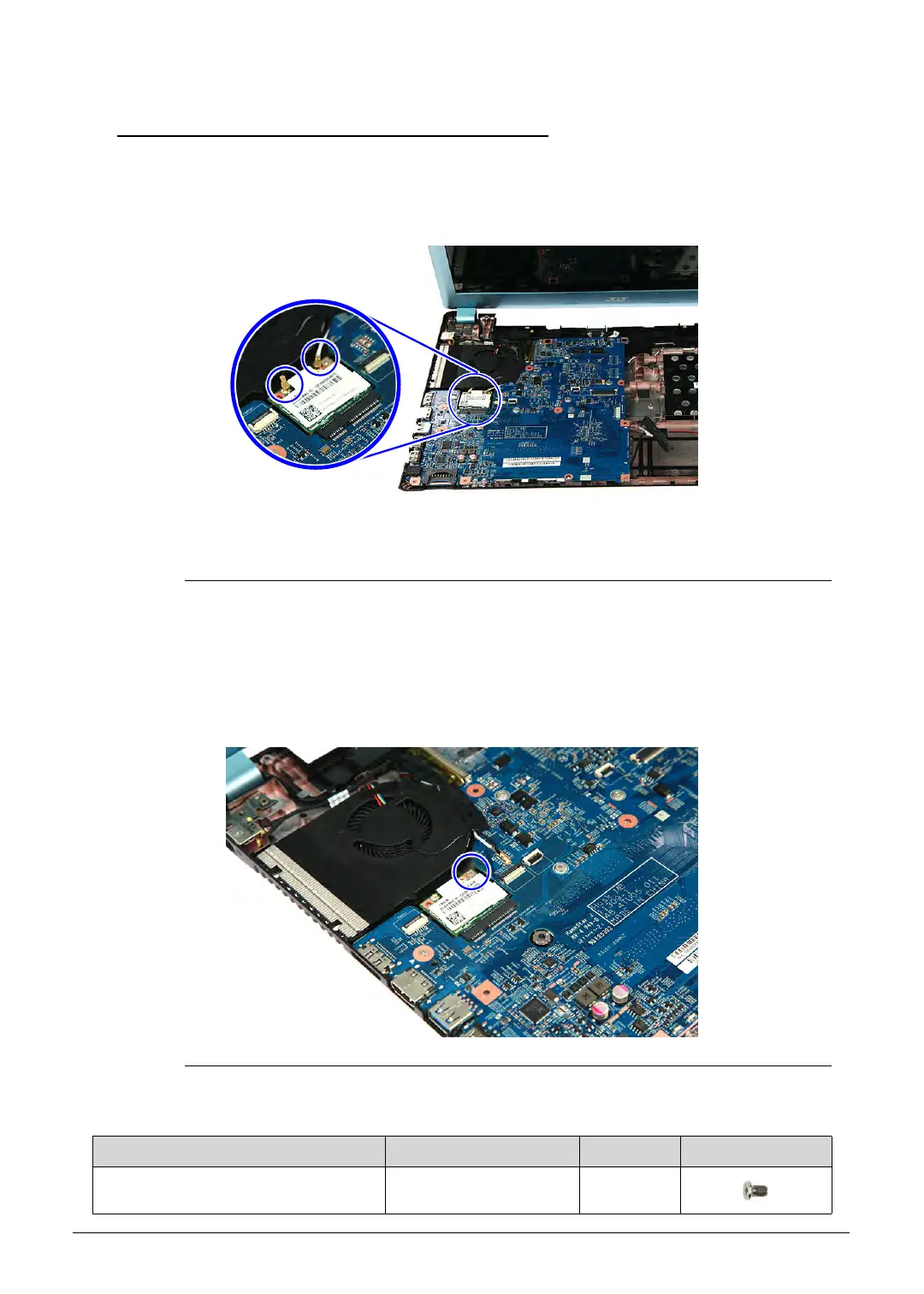
2. Unplug the two (2) antenna cables from the WLAN module.
Figure 3-31. WLAN Module Antennas
For reference during machine reassembly, note which cable color
corresponds to the main (black) and auxiliary (white) connectors.
3. Remove the screw securing the WLAN module to the mainboard.
Figure 3-32. WLAN Module Screw
Table 3-32. Screw
Step Screw Quantity Screw Type
WLAN Module Disassembly M2 × L3 1
http://mycomp.su/ - Maintenance and Service Guide,Service Manual,Motherboard Schematics for Laptop/notebook
РЕМОНТ НОУТБУКОВ. Запчасти и комплектующие для ноутбука. Схемы, сервис мануалы, инструкции по разборке ноутбука.
ВОССТАНОВЛЕНИЕ ДАННЫХ. г. Санкт-Петербург, Тел.(812)951-37-99, Тел.8-921-951-37-99,ICQ:573812745, service@it-lux.ru



 To Next Page