Machine Maintenance 3-23
Removing the Power Button Board 0
1. Perform the “Removing the Palmrest Module/Upper Case” procedure described on
page 3-18.
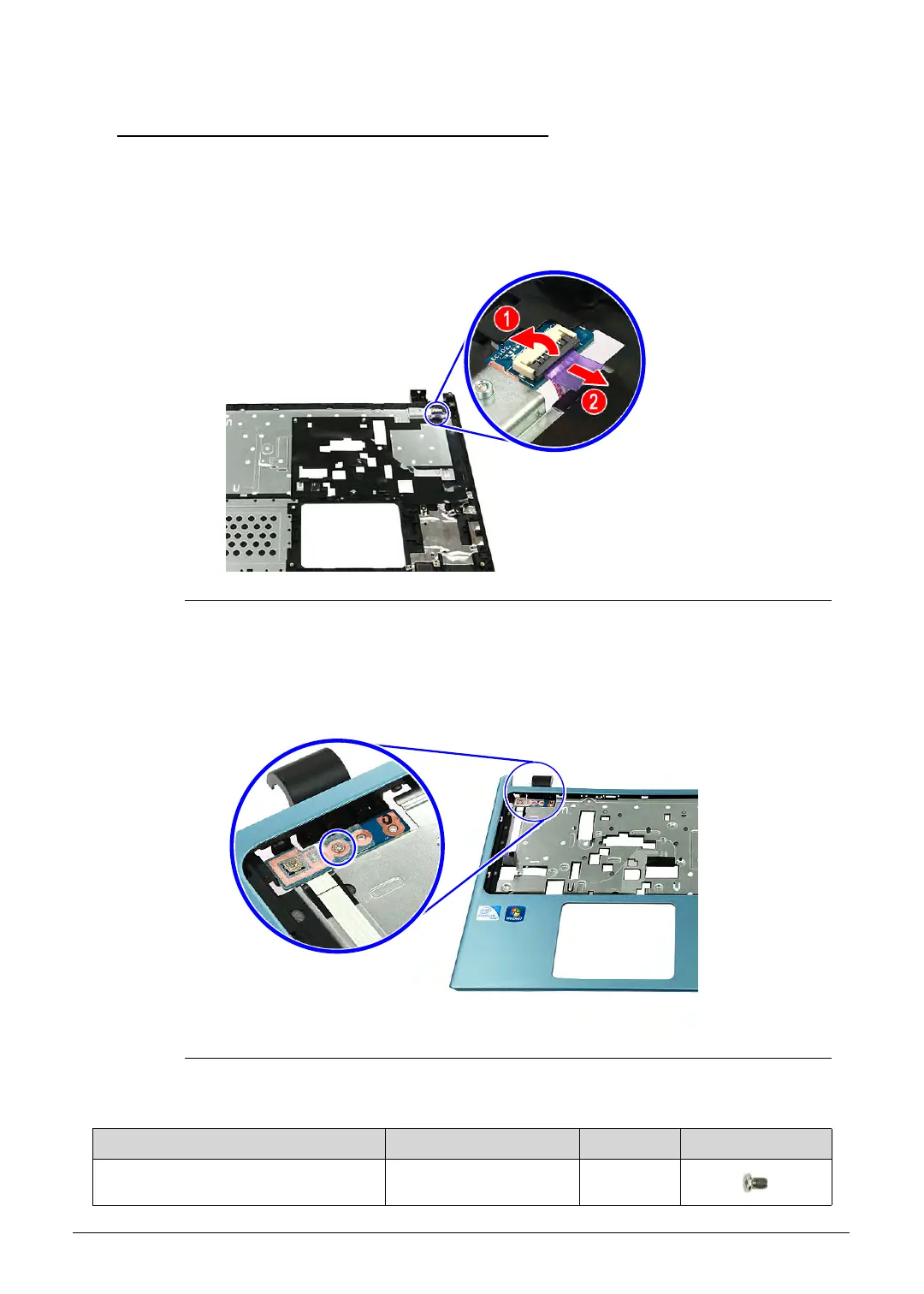
2. Release the connector latch from the power button board (1), then disconnect the power
button cable (2).
Figure 3-24. Power Button Cable
3. Turn the upper case over.
4. Remove the screw securing the power button board to the upper case.
Figure 3-25. Power Button Board Screw
Table 3-25. Screw
Step Screw Quantity Screw Type
Power Button Board Disassembly M2 × L3 1
http://mycomp.su/ - Maintenance and Service Guide,Service Manual,Motherboard Schematics for Laptop/notebook
РЕМОНТ НОУТБУКОВ. Запчасти и комплектующие для ноутбука. Схемы, сервис мануалы, инструкции по разборке ноутбука.
ВОССТАНОВЛЕНИЕ ДАННЫХ. г. Санкт-Петербург, Тел.(812)951-37-99, Тел.8-921-951-37-99,ICQ:573812745, service@it-lux.ru



 To Next Page