3-14 Machine Maintenance
Removing the ODD Module 0
1. Perform the “Removing the Keyboard” procedure described on page 3-12.
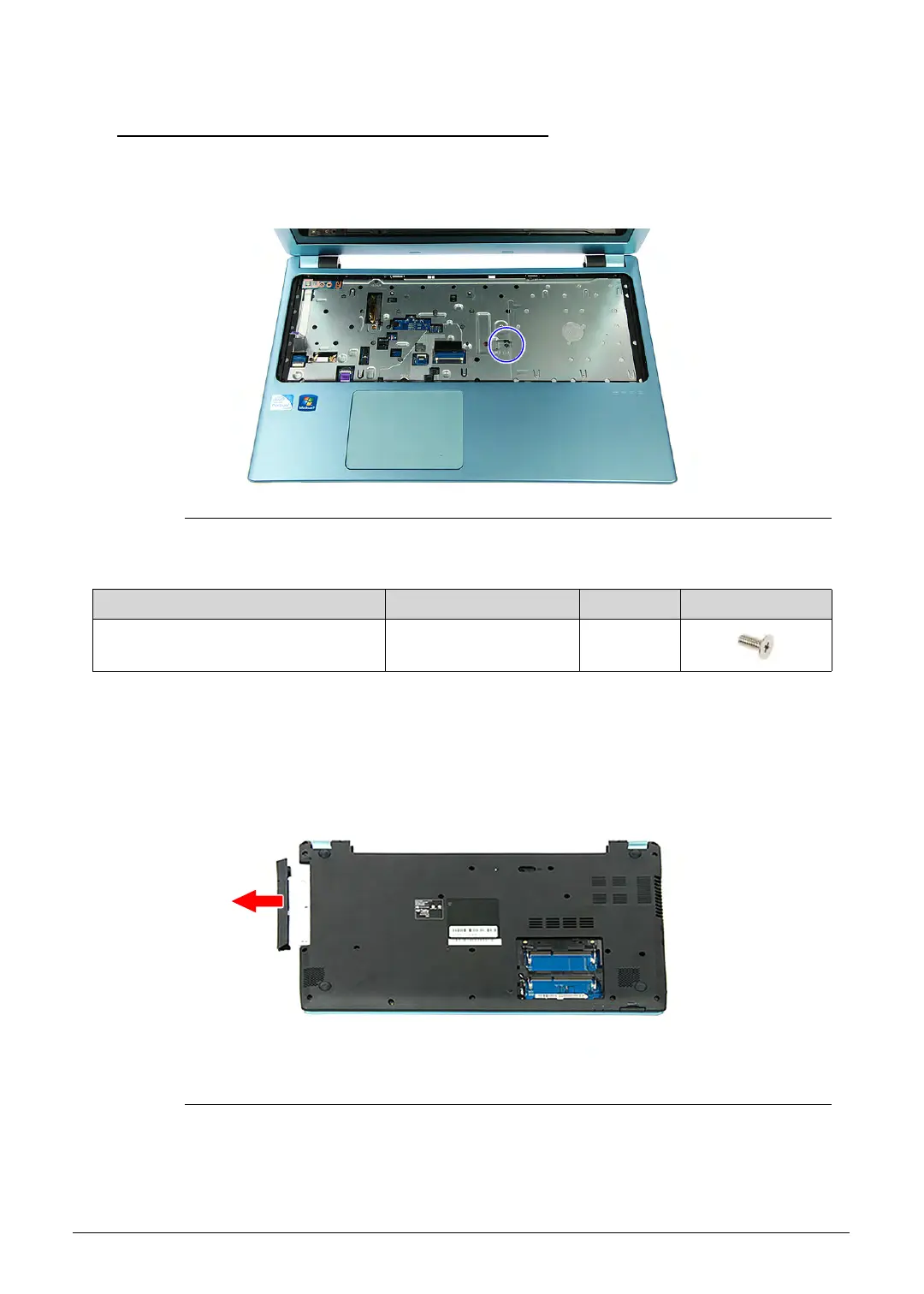
2. Remove the screw securing the ODD module to the upper case assembly.
Figure 3-10. ODD Module Screw
3. Turn the computer over to acces the base side of the lower case assembly.
4. Gently pull out the ODD module from the ODD drive bay.
Figure 3-11. ODD Module
Table 3-10. Screw
Step Screw Quantity Screw Type
ODD Module Disassembly M2.5 × L5 1
http://mycomp.su/ - Maintenance and Service Guide,Service Manual,Motherboard Schematics for Laptop/notebook
РЕМОНТ НОУТБУКОВ. Запчасти и комплектующие для ноутбука. Схемы, сервис мануалы, инструкции по разборке ноутбука.
ВОССТАНОВЛЕНИЕ ДАННЫХ. г. Санкт-Петербург, Тел.(812)951-37-99, Тел.8-921-951-37-99,ICQ:573812745, service@it-lux.ru



 To Next Page