1-12 Hardware Specifications and Configurations
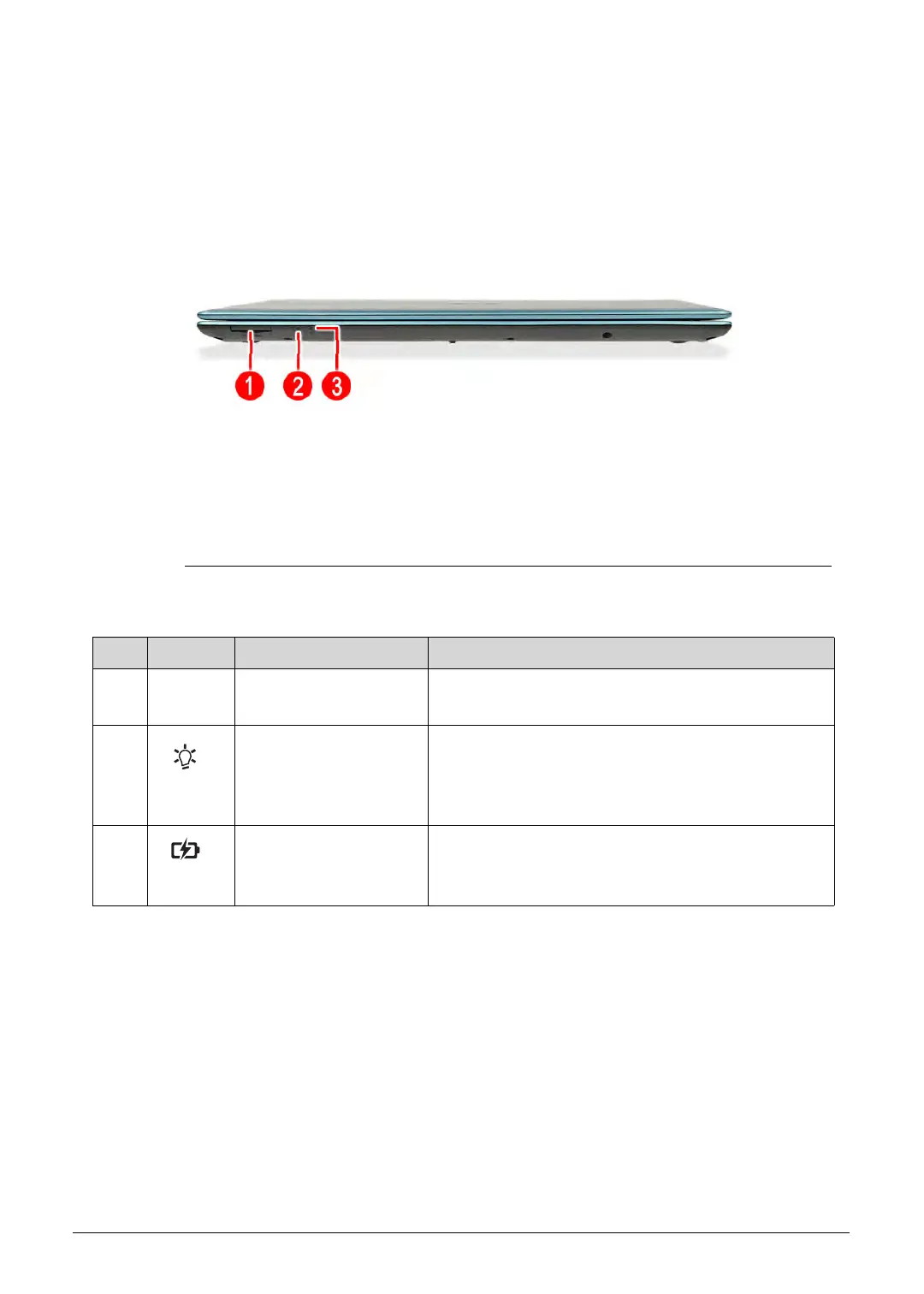
Close Front View 0
Figure 1-2. Close Front View
Table 1-2. Close Front View
No. Icon Item Description
1 Multi-in-1 card reader Supports MMC, MMCplus and SD cards.
Note: Only one card can operate at any given time.
2 Power indicator Indicates the computer’s power status.
Blue: The computer is turned on.
Blinking amber: The computer is in power-saving
mode.
3 Battery indicator Indicates the computer’s battery status.
Blue: The computer is in AC mode.
Blinking amber: The battery is charging.
http://mycomp.su/ - Maintenance and Service Guide,Service Manual,Motherboard Schematics for Laptop/notebook
РЕМОНТ НОУТБУКОВ. Запчасти и комплектующие для ноутбука. Схемы, сервис мануалы, инструкции по разборке ноутбука.
ВОССТАНОВЛЕНИЕ ДАННЫХ. г. Санкт-Петербург, Тел.(812)951-37-99, Тел.8-921-951-37-99,ICQ:573812745, service@it-lux.ru



 To Next Page