Machine Maintenance 3-77
Reinstalling the Keyboard 0
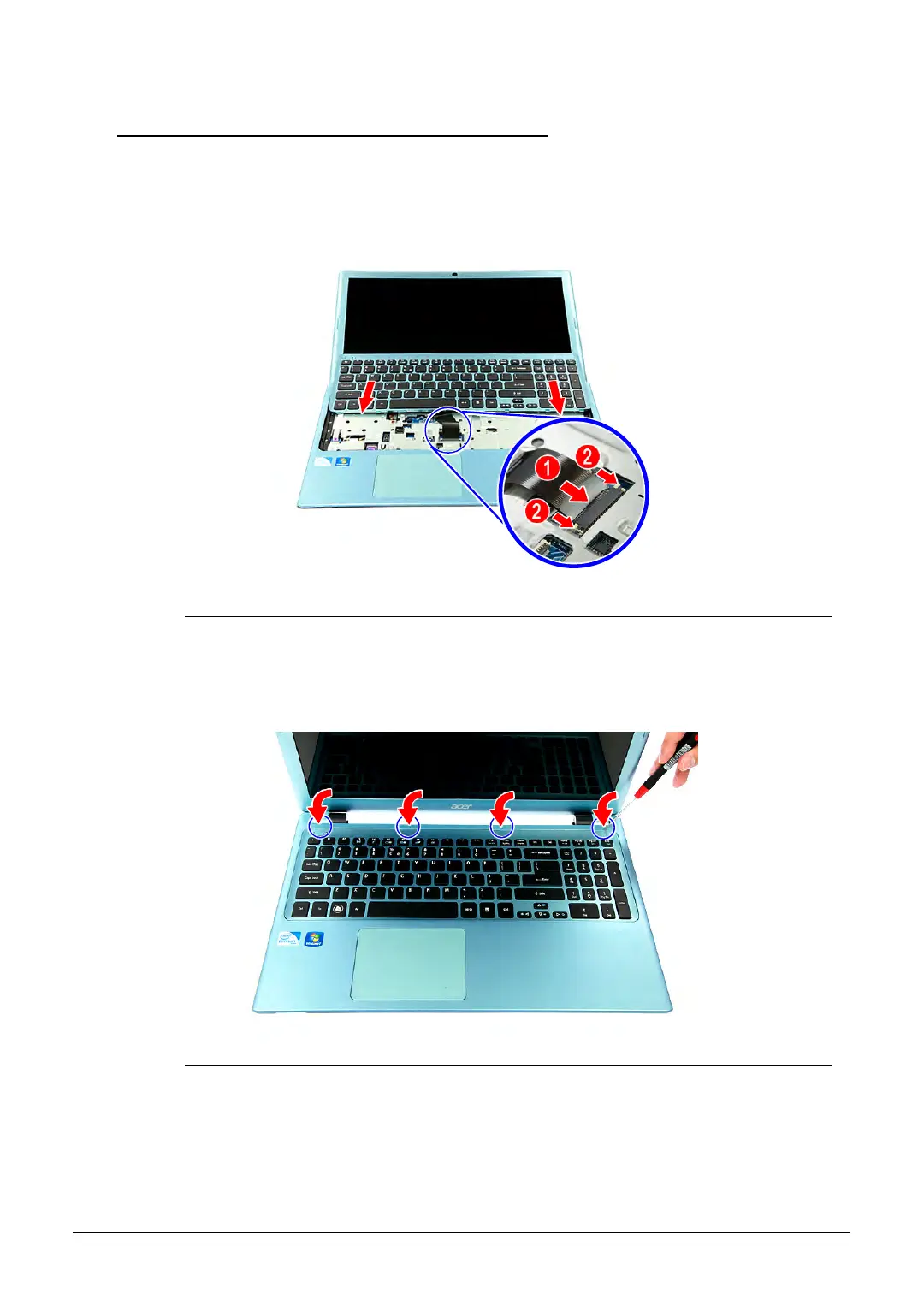
1. Turn the computer over and open the LCD panel.
2. Connect the cable to the mainboard (1), then press the connector latch (2) until it locks
into place. Place the keyboard into its socket.
Figure 3-114. Keyboard
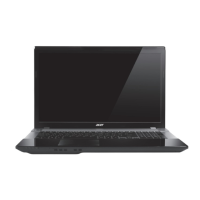
3. Use a non-marring plastic flat-blade screwdriver to push the latches on the top side of the
keyboard, then press the keyboard until it latch into place.
Figure 3-115. Keyboard Latches
http://mycomp.su/ - Maintenance and Service Guide,Service Manual,Motherboard Schematics for Laptop/notebook
РЕМОНТ НОУТБУКОВ. Запчасти и комплектующие для ноутбука. Схемы, сервис мануалы, инструкции по разборке ноутбука.
ВОССТАНОВЛЕНИЕ ДАННЫХ. г. Санкт-Петербург, Тел.(812)951-37-99, Тел.8-921-951-37-99,ICQ:573812745, service@it-lux.ru



 To Next Page