System Utilities 2-15
Remove HDD/BIOS Password Utilities 0
This section explains how to remove the HDD and BIOS passwords.
Removing the HDD Password 0
If the incorrect HDD password is entered three times in succession, an error is
generated. (Figure 2-11)
Figure 2-11. Password Error Status
To reset the HDD password:
1. Open the computer in a DOS environment.
2. Type the following command:
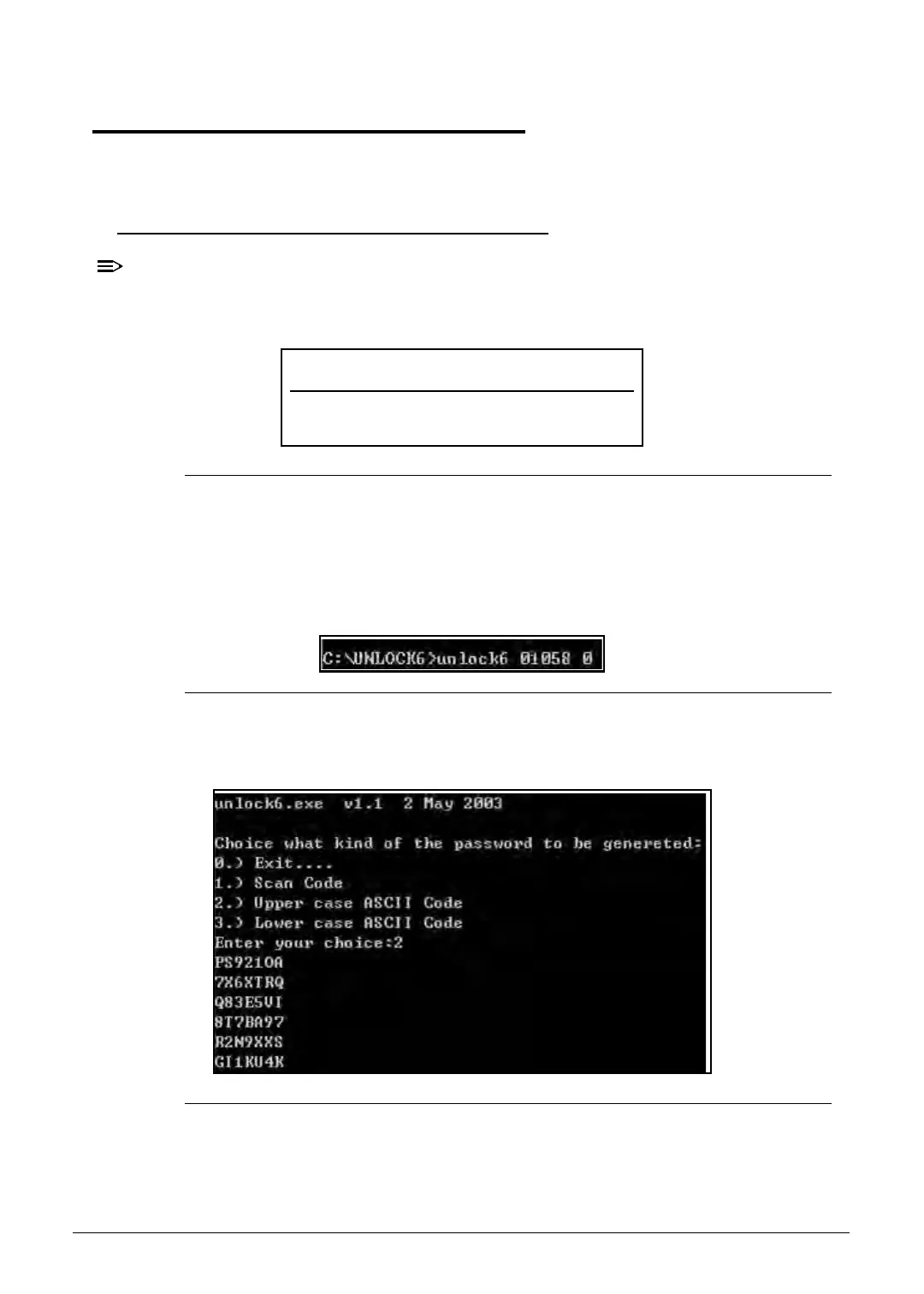
A\> unlock6 XXXXX 00
Figure 2-12. Unlock Key Code
3. Press Enter to display the command options.
Figure 2-13. Password Encoding
Password Error Status
HDD password error code
http://mycomp.su/ - Maintenance and Service Guide,Service Manual,Motherboard Schematics for Laptop/notebook
РЕМОНТ НОУТБУКОВ. Запчасти и комплектующие для ноутбука. Схемы, сервис мануалы, инструкции по разборке ноутбука.
ВОССТАНОВЛЕНИЕ ДАННЫХ. г. Санкт-Петербург, Тел.(812)951-37-99, Тел.8-921-951-37-99,ICQ:573812745, service@it-lux.ru



 To Next Page