3-62 Machine Maintenance
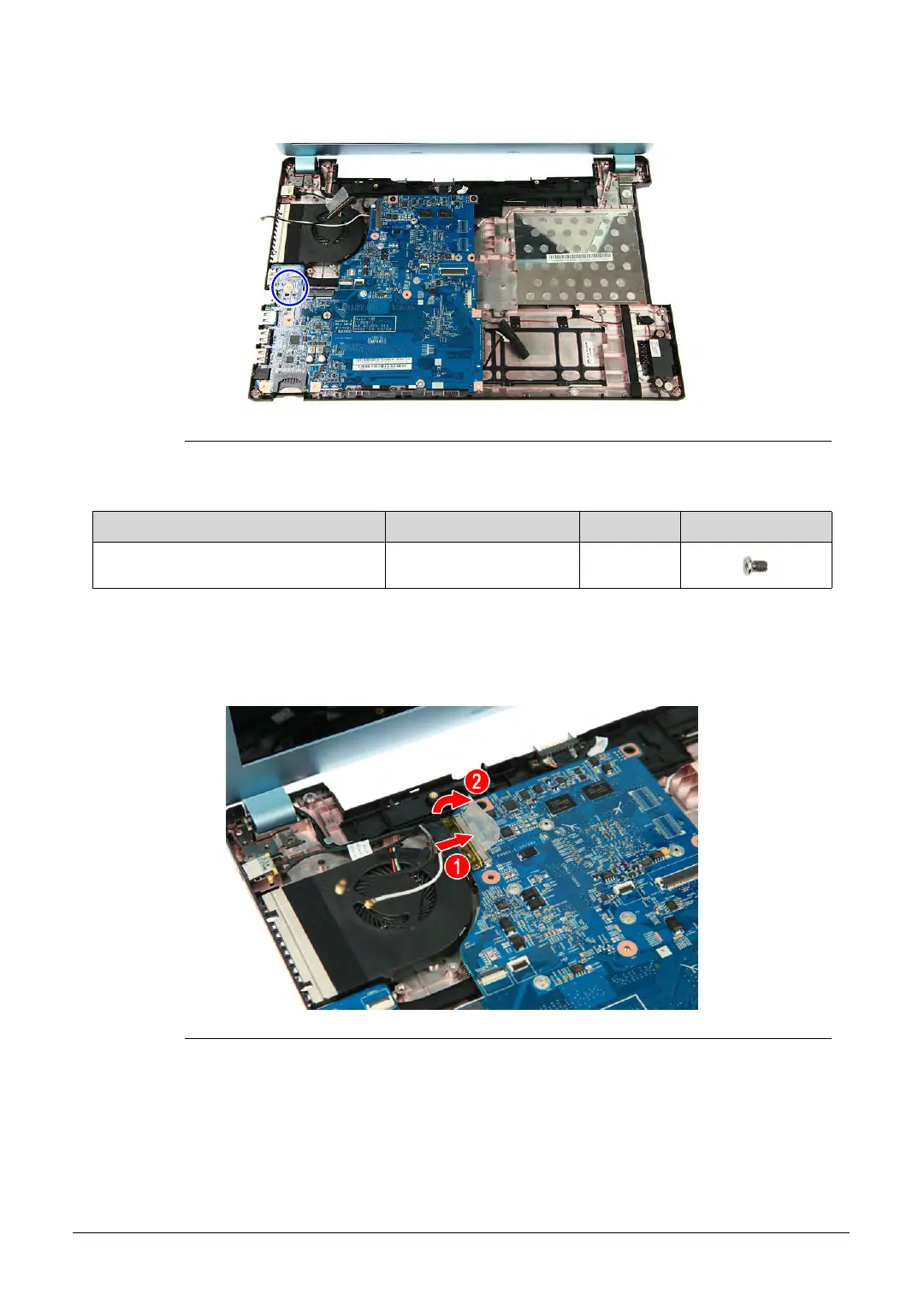
4. Secure the mainboard to the lower case assembly using one screw.
Figure 3-88. Mainboard Screw
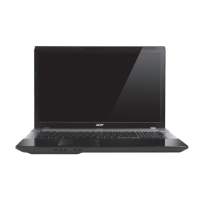
5. Connect the cable to the mainboard (1), then secure the LCD cable to the mainboard
using adhesive tape (2).
Figure 3-89. LCD Cable
6. Turn the computer over to acces the base side of the lower case assembly.
Table 3-88. Screw
Step Screw Quantity Screw Type
Mainboard Reassembly M2 × L3 1
http://mycomp.su/ - Maintenance and Service Guide,Service Manual,Motherboard Schematics for Laptop/notebook
РЕМОНТ НОУТБУКОВ. Запчасти и комплектующие для ноутбука. Схемы, сервис мануалы, инструкции по разборке ноутбука.
ВОССТАНОВЛЕНИЕ ДАННЫХ. г. Санкт-Петербург, Тел.(812)951-37-99, Тел.8-921-951-37-99,ICQ:573812745, service@it-lux.ru


 To Next Page