Machine Maintenance 3-73
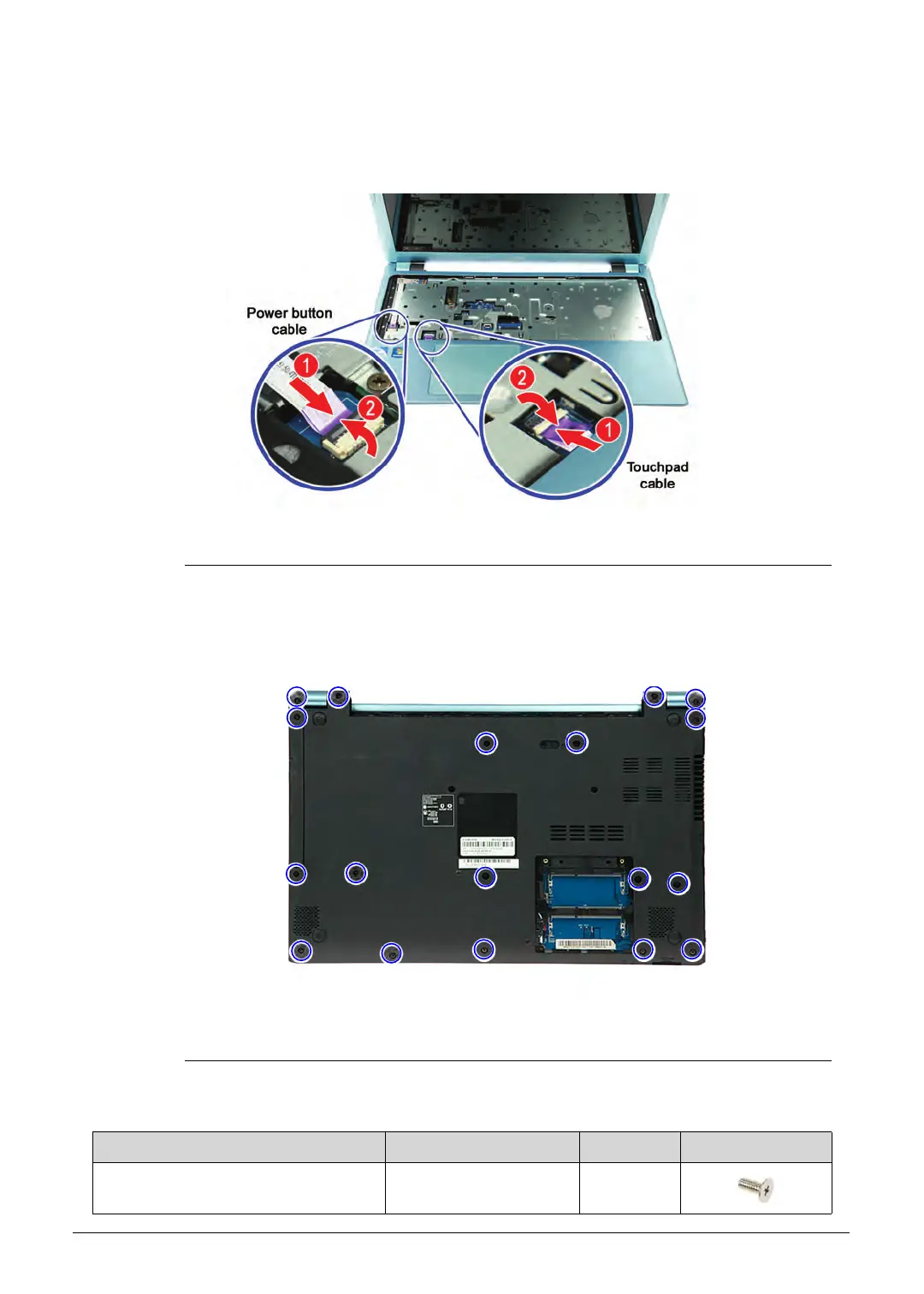
3. Connect the power button and touchpad cables to the mainboard (1), then press the
connector latches (2) until they lock into place.
Figure 3-107. Power Button and Touchpad Cables
4. Turn the computer over to acces the base side of the lower case assembly.
5. Secure the upper case to the lower case assembly using seventeen screws.
Figure 3-108. Upper Case Screws – Base Side
Table 3-108. Screws
Step Screw Quantity Screw Type
Upper Case Reassembly M2.5 × L5 17
http://mycomp.su/ - Maintenance and Service Guide,Service Manual,Motherboard Schematics for Laptop/notebook
РЕМОНТ НОУТБУКОВ. Запчасти и комплектующие для ноутбука. Схемы, сервис мануалы, инструкции по разборке ноутбука.
ВОССТАНОВЛЕНИЕ ДАННЫХ. г. Санкт-Петербург, Тел.(812)951-37-99, Тел.8-921-951-37-99,ICQ:573812745, service@it-lux.ru



 To Next Page