1-20 Hardware Specifications and Configurations
0
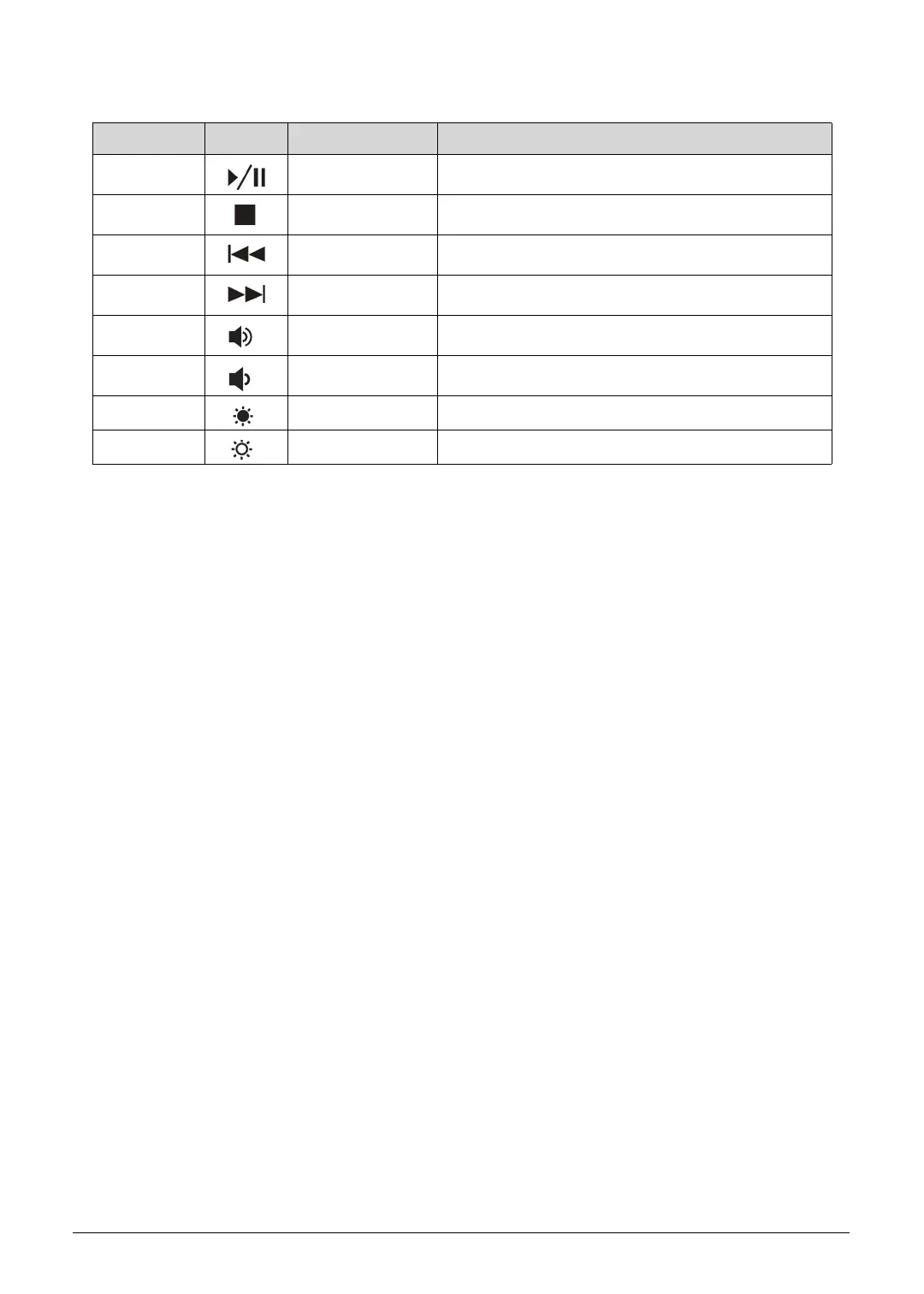
Fn+Home Play/Pause Play or pause a selected media file.
Fn+Pg Up Stop Stop playback of the selected media file.
Fn+Pg Dn Previous Return to the previous media file.
Fn+End Next Jump to the next media file.
Fn+ Volume Up Increases the sound volume.
Fn+ Volume Down Dereases the sound volume.
Fn+ Brightness Down Decreases the screen brightness.
Fn+ Brightness Up Increases the screen brightness.
Table 1-10. Hotkeys
Hotkey Icon Function Description
http://mycomp.su/ - Maintenance and Service Guide,Service Manual,Motherboard Schematics for Laptop/notebook
РЕМОНТ НОУТБУКОВ. Запчасти и комплектующие для ноутбука. Схемы, сервис мануалы, инструкции по разборке ноутбука.
ВОССТАНОВЛЕНИЕ ДАННЫХ. г. Санкт-Петербург, Тел.(812)951-37-99, Тел.8-921-951-37-99,ICQ:573812745, service@it-lux.ru



 To Next Page