101
uuIndicatorsuMulti-Information Display Warning and Information Messages
Continued
Multi-Information Display Warning and Information Messages
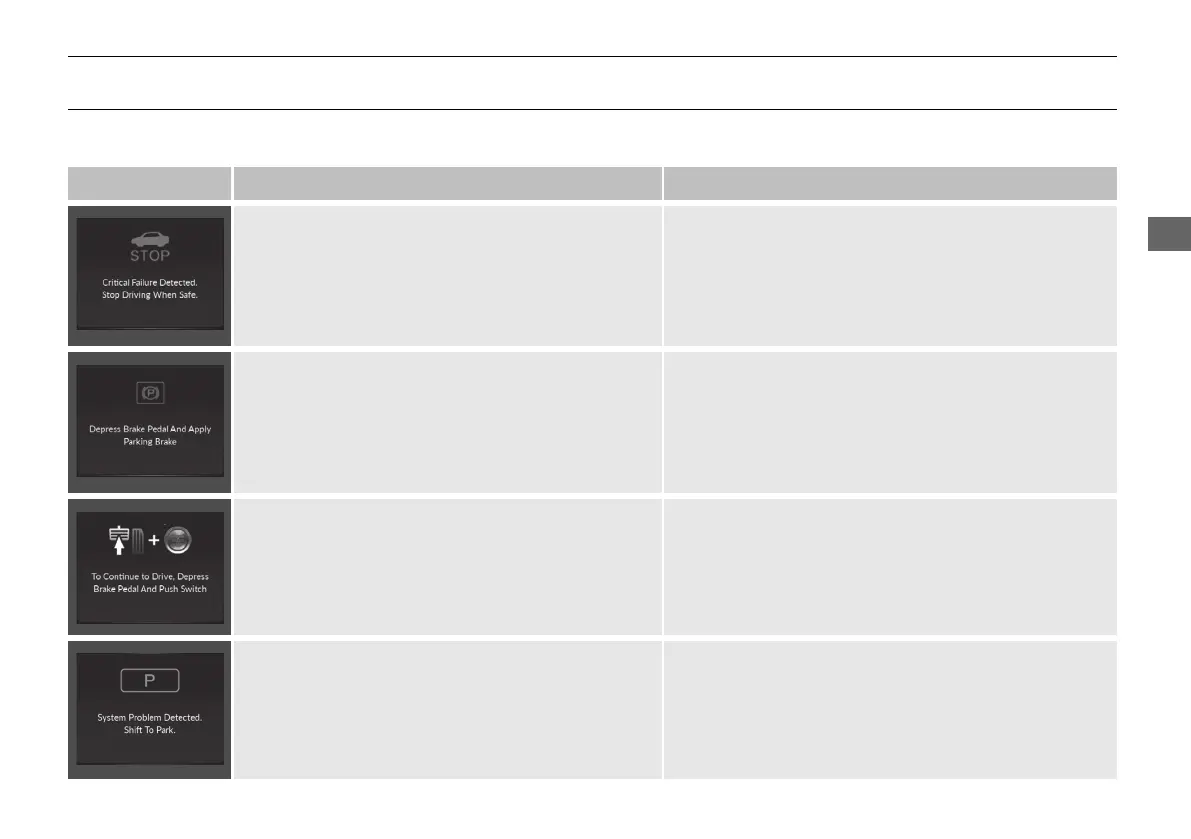
The following messages appear only on the multi-information display. Roll the right selector wheel to see the message again with the
system message indicator on. 2 Switching the Display P. 133
Message Condition Explanation
●
Appears when the vehicle is no longer able to run
due to a malfunction.
●
Immediately stop in a safe place.
●
Appears when there is a risk that the vehicle will
move unexpectedly after you have stopped due to a
malfunction with the vehicle.
●
While the vehicle is stopped, apply the parking brake.
●
Have your vehicle checked by a dealer.
●
Appears when you set the power mode to ON again
and the vehicle is able to run.
2 Starting the Engine P. 419
●
Appears when the engine stops without the
transmission in (P, and does not restart
automatically.
●
Appears if you open the hood while Auto Idle Stop
activates.
●
If you want to set the power mode to ON, put the
transmission into (P.
●
If you want to start the engine, follow the normal
procedure.
2 Starting the Engine P. 419
21 ACURA RDX-31TJB6210.book 101 ページ 2020年6月16日 火曜日 午後12時39分



 To Next Page