247
uuAudio System uAudio Remote Controls
Continued
Audio Remote Controls
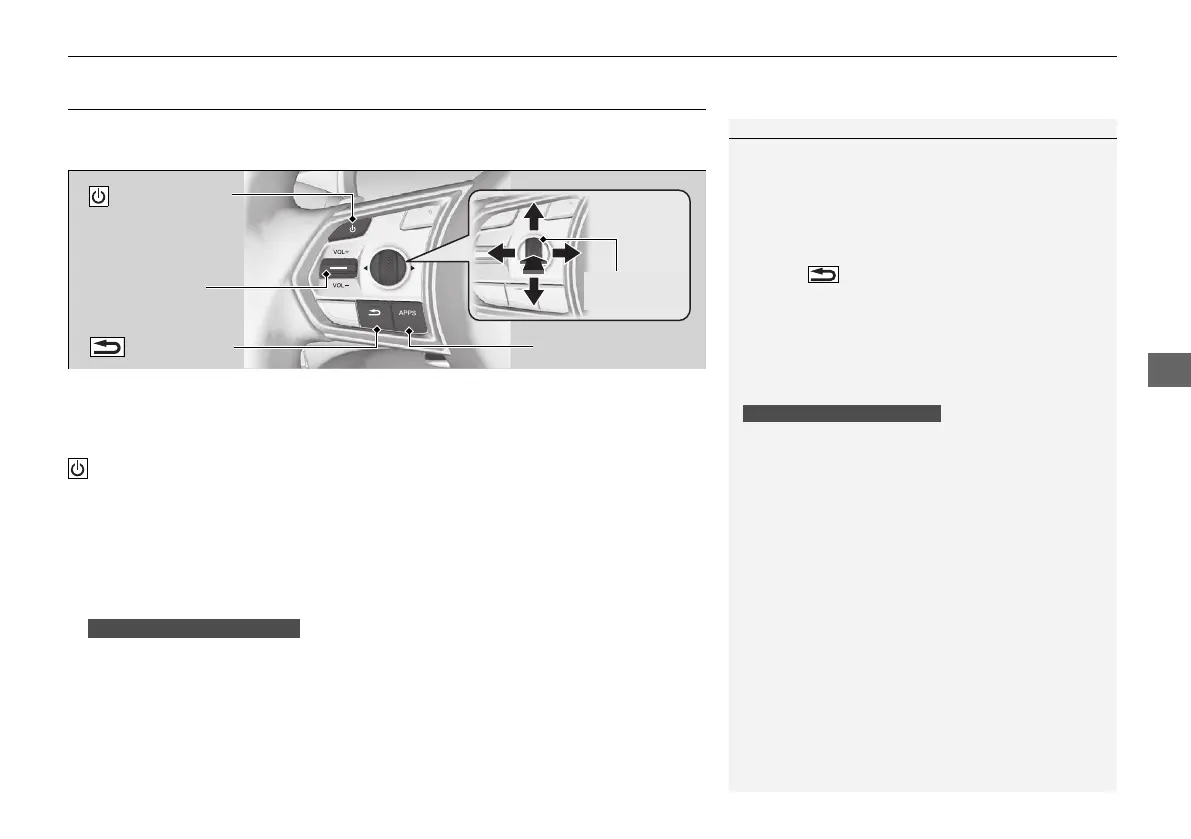
Allow you to operate the audio system while driving. The information is shown on
the multi-information display or head-up display
*
.
VOL(+/VOL(- (Volume) Switch
Press Up: To increase the volume.
Press Down: To decrease the volume.
(Power) Button
Press to turn the audio system on and off.
Left Selector Wheel
• When selecting the audio mode
Press the APPS button, then roll up or down to select an item on the multi-
information display or head-up display
*
, and then press the left selector wheel.
Move the left selector wheel to the right to display the Recents list, then scroll to
an item selected in the past and press the wheel.
1Audio Remote Controls
Some modes appear only when an appropriate
device or medium is used.
Depending on the Bluetooth® device you connect,
some functions may not be operated.
Press the (back) button for the multi-
information display or head-up display
*
to go back to
the previous screen or cancel a command.
Press the APPS button to go back to the menu screen
of the multi-information display or head-up display
*
.
Recents list is available when the following audio
mode is selected.
• FM Radio
• AM Radio
• SiriusXM
• USB Audio
Models with head-up display
(Power) Button
VOL(+/VOL(-
(Volume) Switch
(back) Button
Left Selector
Wheel
APPS Button
Models with head-up display
* Not available on all models
21 ACURA RDX-31TJB6210.book 247 ページ 2020年6月16日 火曜日 午後12時39分


 To Next Page