Continued
401
uuAcuraLink® u
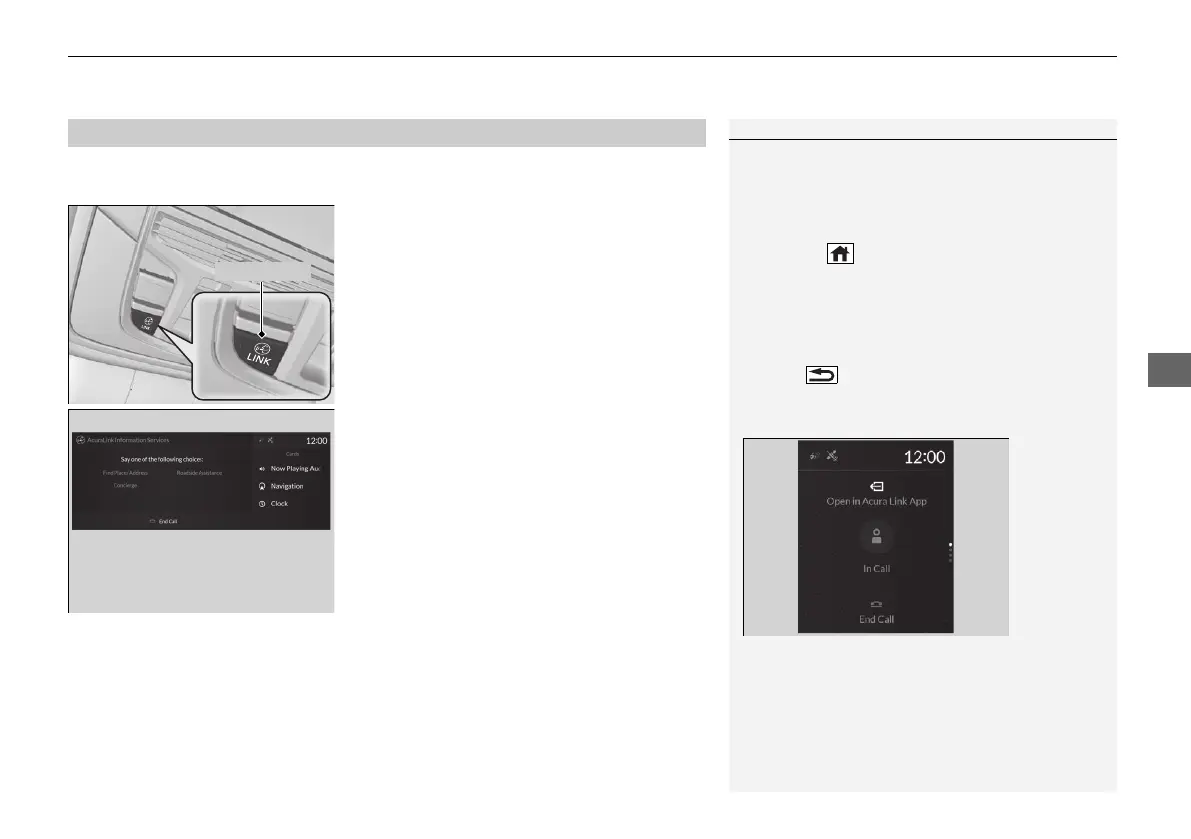
Connect to the AcuraLink operator when trying to find a destination or for roadside
assistance.
1. Press the LINK button.
u Connection to the operator begins.
2. Talk to the operator.
u To disconnect, select End Call on the
audio/information screen or move to left
the left selector wheel.
■
Operator Assistance
1Operator Assistance
Remain attentive to road conditions and driving
during operator assistance.
If you want to add or renew a subscription, call the
Operator Assistance.
1. Press the (home) button.
2. Select AcuraLink.
3. Select MENU.
4. Select AcuraLink Subscriptions.
5. Select Call AcuraLink Support.
Press the (back) button to return to the previous
screen, and then incall screen displayed on the
secondary information area.
Audio/Information screen when
connected to the AcuraLink
operator
21 ACURA RDX-31TJB6210.book 401 ページ 2020年6月16日 火曜日 午後12時39分



 To Next Page