Continued
263
uuAudio System Basic OperationuAudio/Information Screen
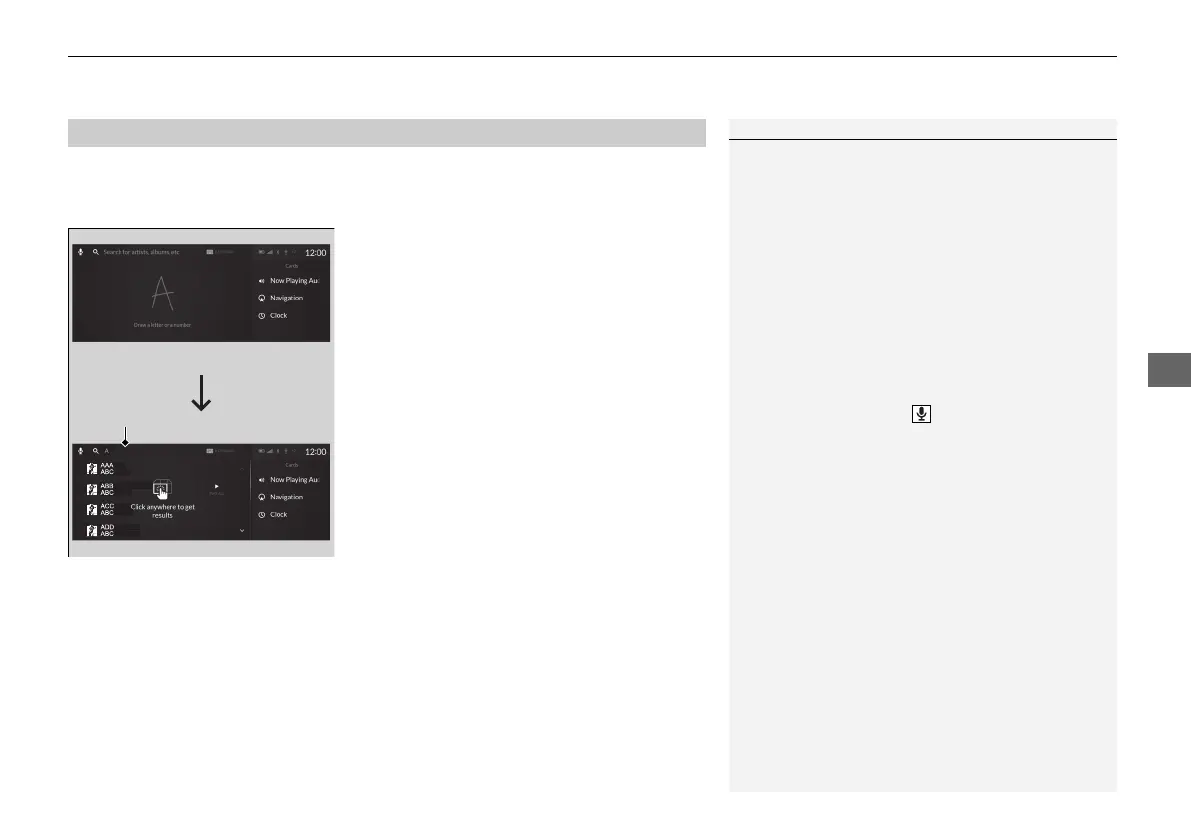
You can use the hand-writing input feature by using the true touchpad A when
searching for various items of the audio system (e.g., music, route of the navigation,
phonebook contact).
1. Write letters or numbers using the true
touchpad A.
u Search results appear on the screen.
2. Press the true touchpad A.
u If you re-enter letters or numbers, select
the input area on the upper side of the
screen.
3. Select a desired item, and then press the
true touchpad A.
■
Searching Screen
1Searching Screen
Delete a letter or number
Swipe left the true touchpad A to delete a letter or a
number.
Input a space
Swipe right the true touchpad A to input a space.
You can inputting letters or numbers by using on
screen keyboard. Select KEYBOARD on the upper
right of the screen.
When you return to hand-writing input screen, select
HANDWRITING.
You can inputting letters or numbers by using voice
control operation. Select icon on the upper left of
the screen.
21 ACURA RDX-31TJB6210.book 263 ページ 2020年6月16日 火曜日 午後12時39分



 To Next Page