Continued
261
uuAudio System Basic OperationuAudio/Information Screen
■
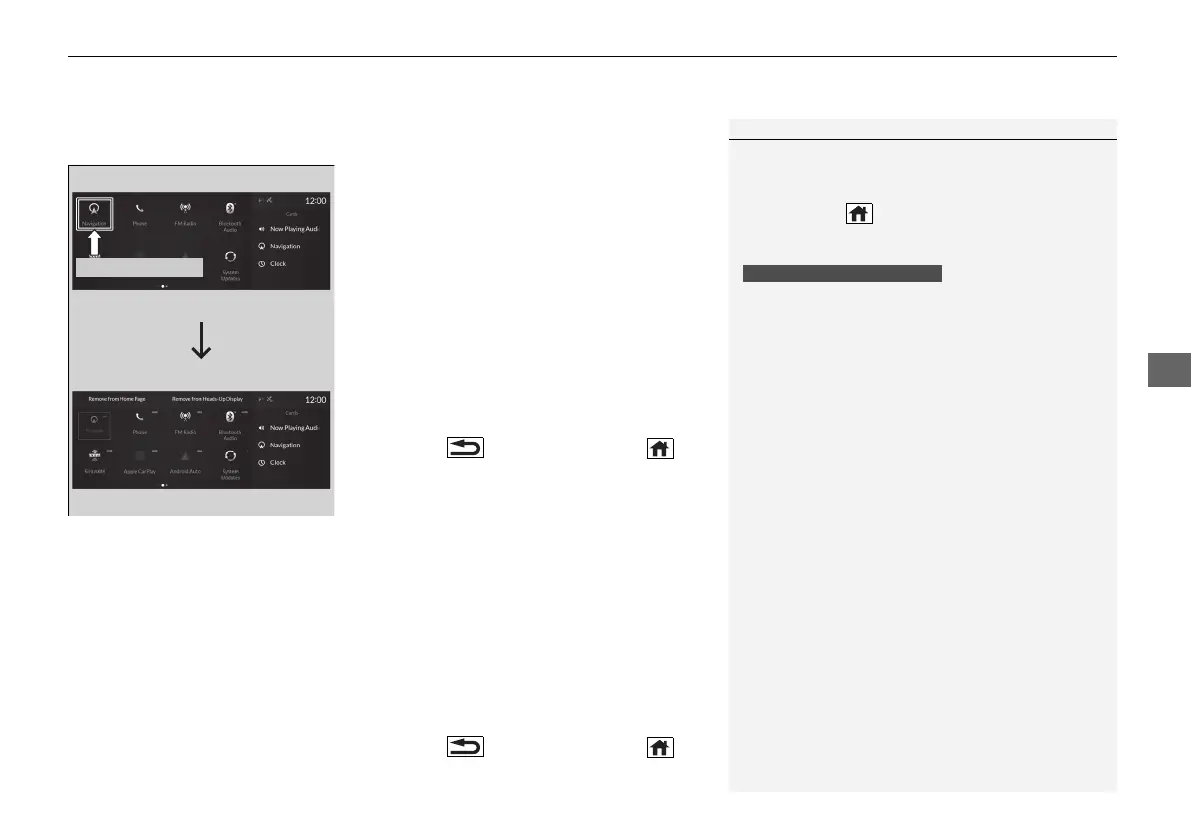
To remove icons from the home screen and the head-up display
*
You can remove icons from the home screen and the head-up display.
1. From the home screen, select the icon that
you want to remove, then press and hold
true touchpad A.
u The screen will switch to the
customization screen.
2. Go to Remove from Home Page or
Remove from Heads-Up Display
*
and
press the true touchpad A.
u The icon will be removed from the home
screen or the head-up display, and the
screen will remain in the customization
mode.
3. Press the (back) button or the
(home) button to confirm the change.
You can also remove an icon from the home
screen or head-up display directly from the All
Apps list.
1. Go to an item you want to remove, then
press and hold the true touchpad A.
2. Go to Remove from Home Page or
Remove from Heads-Up Display
*
and
press the true touchpad A.
u The icon will be removed from the home
screen or the head-up display.
3. Press the (back) button or the
(home) button to confirm the change.
1To remove icons from the home screen and the head-up display
*
Removing an icon from the home screen does not
result in the deletion of the corresponding app.
Press and hold (home) button to switch to the
customization screen.
If you remove a shortcut icon from the home screen,
the function of selected icon also remove from the
head-up display.
Models with head-up display
* Not available on all models
21 ACURA RDX-31TJB6210.book 261 ページ 2020年6月16日 火曜日 午後12時39分



 To Next Page