300
uuAudio System Basic OperationuPlaying Bluetooth® Audio
Playing Bluetooth® Audio
Your audio system allows you to listen to music from your Bluetooth-compatible
phone.
This function is available when the phone is paired and connected to the vehicle’s
Bluetooth® HandsFreeLink® (HFL) system.
2 Phone Setup P. 372
1Playing Bluetooth® Audio
Not all Bluetooth-enabled phones with streaming
audio capabilities are compatible with the system. For
a list of compatible phones:
• U.S.: Visit www.handsfreelink.com/Acura or call 1-
888-528-7876.
• Canada: For more information on smartphone
compatibility, call 1-855-490-7351.
It may be illegal to perform some data device
functions while driving.
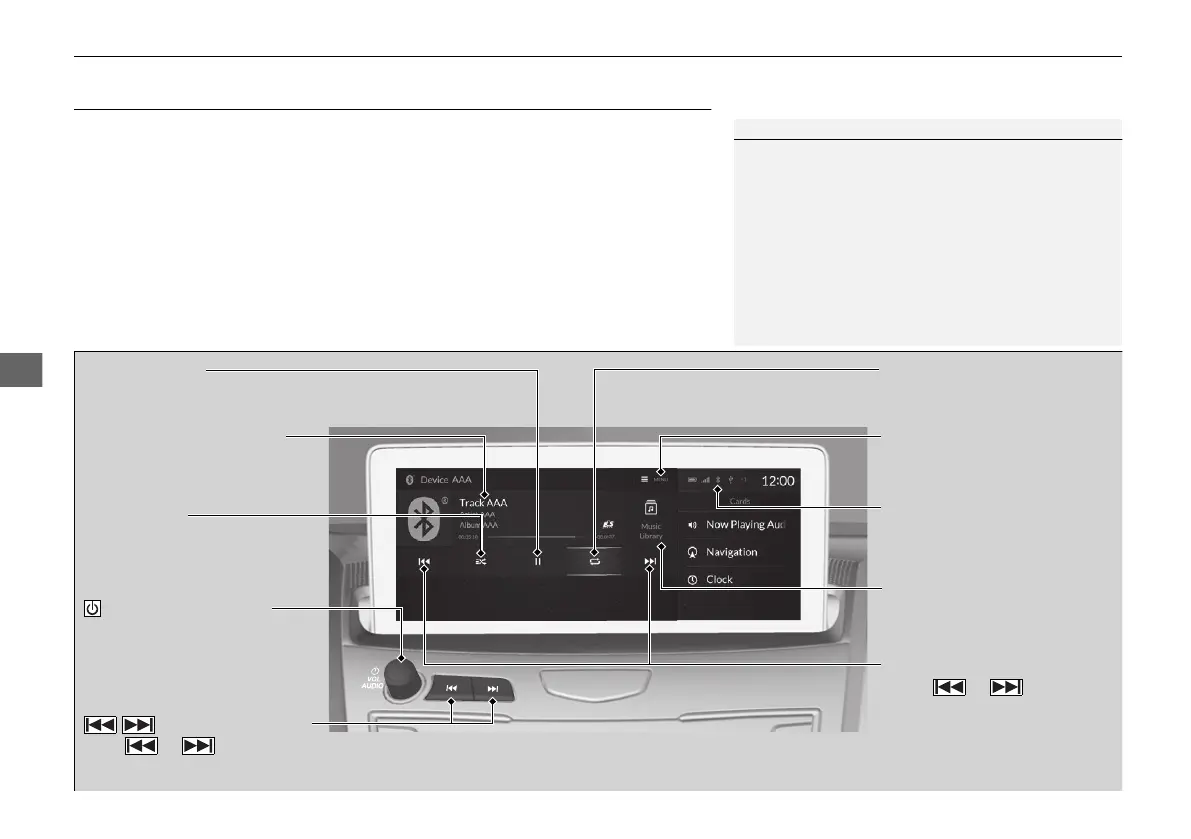
Repeat Icon
Select to repeat the current
file.
Music Library
Select to display the music
search screen.
Track Icons
Select or to
change tracks.
Select and hold to move
rapidly within a track.
Random Icon
Select to play all files in the
current folder in random
order.
VOL/AUDIO (Volume/
Power) Knob
Push to turn the audio system
on and off.
Turn to adjust the volume.
/ (Seek/Skip) Buttons
Press or to change tracks.
Press and hold to move rapidly within a track.
Play/Pause Icon
MENU
Select to display the menu
items.
Bluetooth® Indicator
Appears when your phone is
connected to HFL.
Current Track Information
Select to display the play list
screen.
21 ACURA RDX-31TJB6210.book 300 ページ 2020年6月16日 火曜日 午後12時39分



 To Next Page