uuAudio System Basic OperationuAudio/Information Screen
260
■
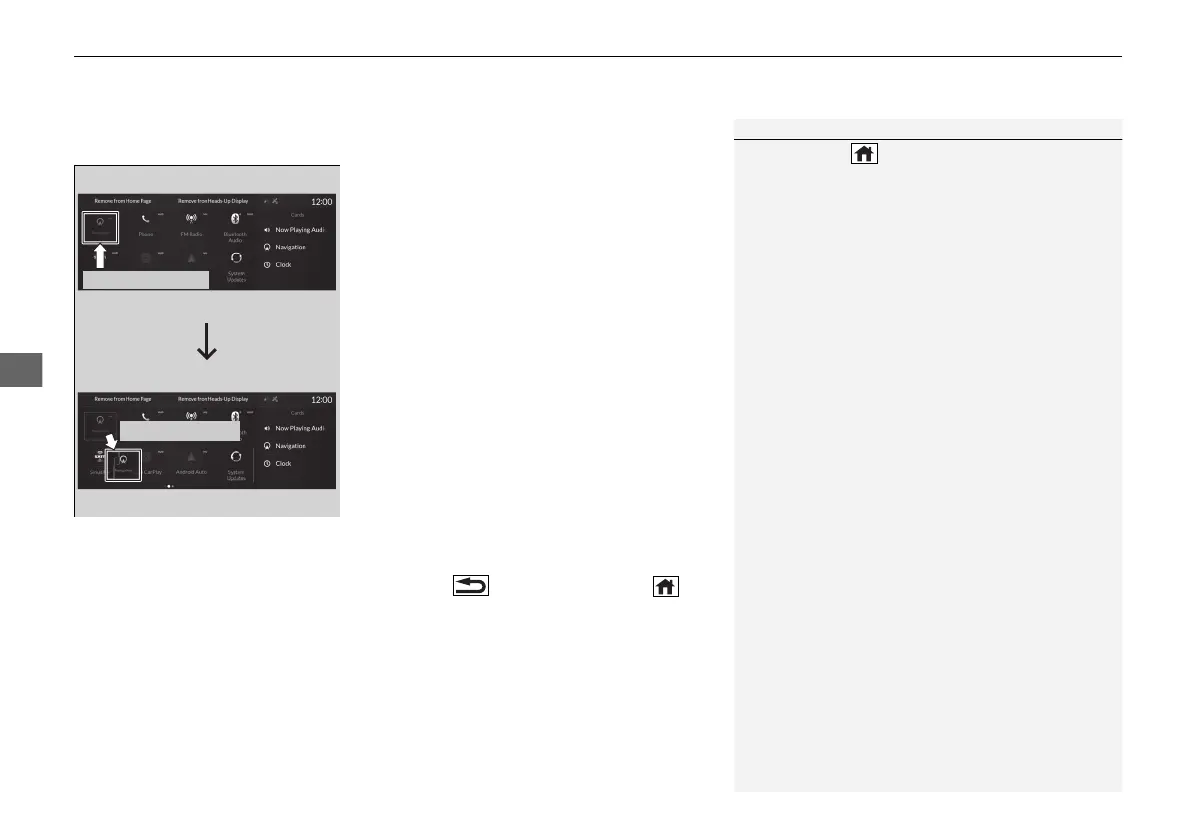
To move icons on the home screen
You can change the location of the icons on the home screen.
1. Select the icon you want to move, then
press and hold true touchpad A.
u The screen will change to the
customization screen.
2. Drag the icon to where you want it to be
and then press and hold the true touchpad
A.
u The icon will be repositioned and the
screen will remain in the customization
mode.
u After you drag the icon, keep your finger
on the true touchpad A and then press
down. If you release your finger before
pressing the true touchpad A, the icon
will remain in its original place.
u If you want to reposition the icon on
another page of the home screen, swipe
the true touchpad A.
3. Press the (back) button or the
(home) button to confirm the change.
1To move icons on the home screen
Press and hold (home) button to switch to the
customization screen.
Select and hold.
Drag and drop.
21 ACURA RDX-31TJB6210.book 260 ページ 2020年6月16日 火曜日 午後12時39分



 To Next Page