uuAudio System Basic OperationuWi-Fi Connection
304
Make sure your phone’s Wi-Fi setting is in access point (tethering) mode.
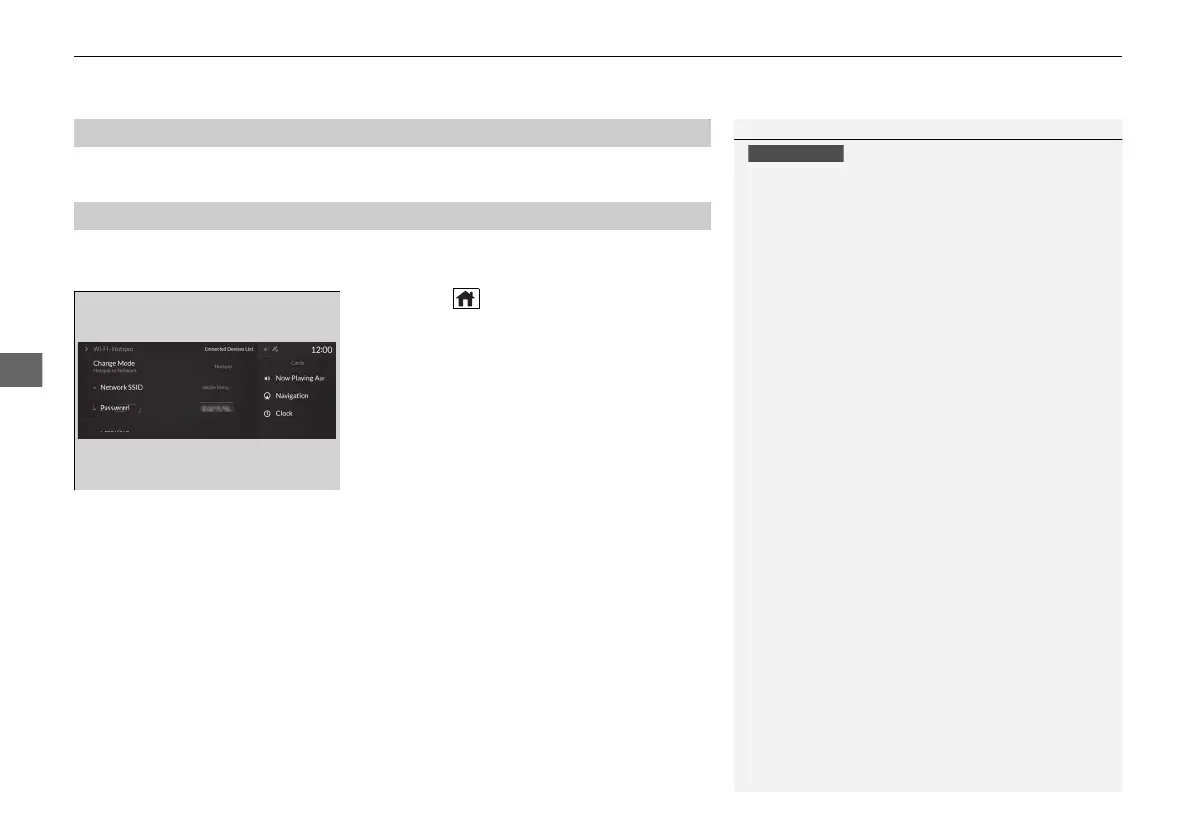
You can set the network as a Wi-Fi Hotspot of this audio system.
Use the following steps to setup.
1. Press the (home) button.
2. Select Settings.
3. Select Connections.
4. Select Wi-Fi.
5. Select Change Mode.
6. Select Hotspot.
u When you change the mode from
Network to Hotspot, a pop-up
appears, then select Confirm.
The following options are available for the setup.
• Network SSID: Set this network name.
• Password: Set password for require entering password when connecting Wi-Fi
device to this network.
• Connected Devices List: Display the connected device list. Up to seven devices
can be connected to this network.
■
Wi-Fi mode (after the initial setting has been made)
■
Setting the Audio System as a Wi-Fi Hotspot
1Wi-Fi mode (after the initial setting has been made)
You may need to go through an initial setup for Wi-Fi
connection again after you boot your phone.
21 ACURA RDX-31TJB6210.book 304 ページ 2020年6月16日 火曜日 午後12時39分



 To Next Page