253
uuAudio System Basic OperationuAudio/Information Screen
Continued
Audio/Information Screen
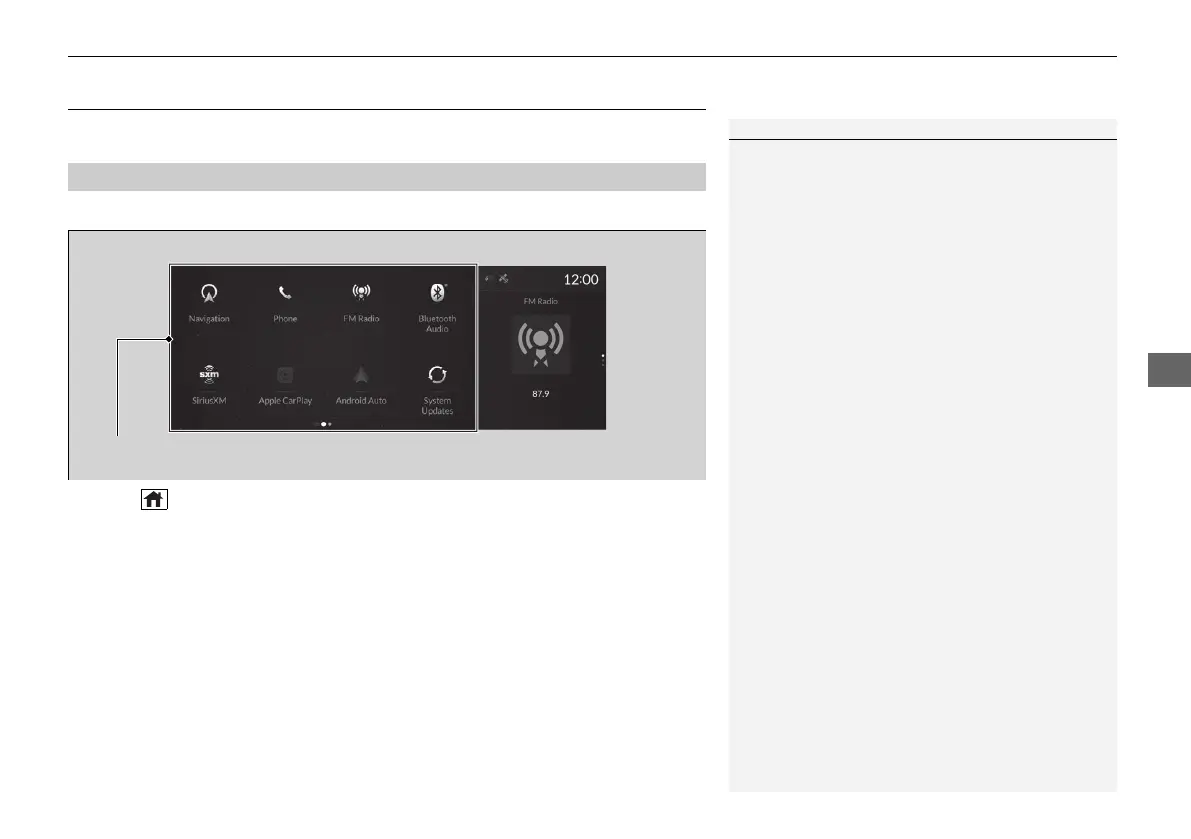
Displays each mode status. From this display, you can go to various setup options.
■
Switching the display
Press the (home) button to go to the home screen.
Select the following icons on the home screen or All Apps list.
■
Navigation
*
Displays the navigation screen.
2 Refer to the Navigation System Manual
■
Phone
Displays the HFL information.
2 Bluetooth® HandsFreeLink® P. 366
■
FM Radio/AM Radio/SiriusXM/USB Audio/Bluetooth Audio/AUX Input
Displays the audio information for each.
■
Primary Information Area
1Audio/Information Screen
All Apps list
You can select any of the apps from the All Apps list.
To display the All Apps list, place your finger on the
true touchpad and swipe right.
2 Home Screen P. 257
You can add or remove any of the apps in the home
screen through the All Apps list.
2 To add app icons to the home screen and
the head-up display
*
P. 258
Home Screen
Primary Information Area
* Not available on all models
21 ACURA RDX-31TJB6210.book 253 ページ 2020年6月16日 火曜日 午後12時39分



 To Next Page