Version 15.0 AF-5000 Series Pilot Guide 44
Options Menu
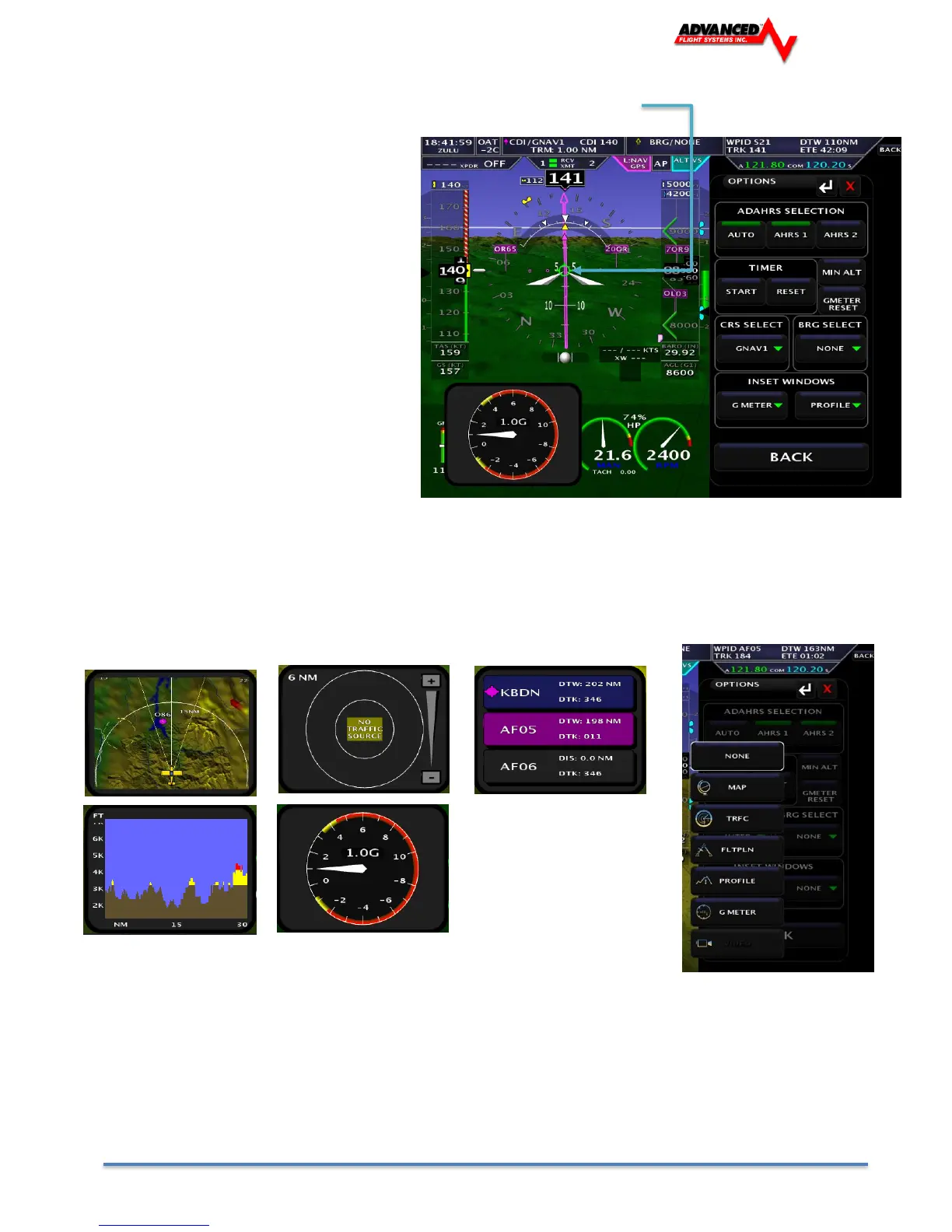
You select the EFIS OPTIONS menu by touching the center of the PFD page.
The Options menu provides a quick way to
get to frequently used items.
ADAHRS Selection
Selects the current ADAHRS to use. In AUTO
mode the system will switch ADAHRS units if
one fails.
TIMER
Reset, start and stop the EFIS timer displayed
in the upper left hand corner.
MIN ALT
Sets the Minimums altitude bug
GMETER RESET
Resets the G-Meter Maximum + and –
pointers to 1 G
CRS SELECT
Selects the current CDI needle source
BRG SELECT
Selects the current BRG needle source.
Inset Windows
Let’s you display a small inset window on the left and right of the EFIS screen. The available inset windows
are:
MAP TRFC FLTPLN
PROFILE G METER
You can display an inset window on the full page map screen by first selecting the inset window on a PFD
screen and then switching to a full screen map.
The inset windows will be displayed over part of the Engine Monitor window. You can remove the inset
window by selecting NONE or using the touch screen to swipe them off of the window (Left or Right)



 To Next Page